EasyManua.ls Logo

Canon MV430 - Taking Still Pictures to a Cassette.51

Canon MV430
152 pages
Print Icon
To Next Page IconTo Next Page
To Previous Page IconTo Previous Page
Loading...
Taking
Still
Pictures
to
a
Cassette
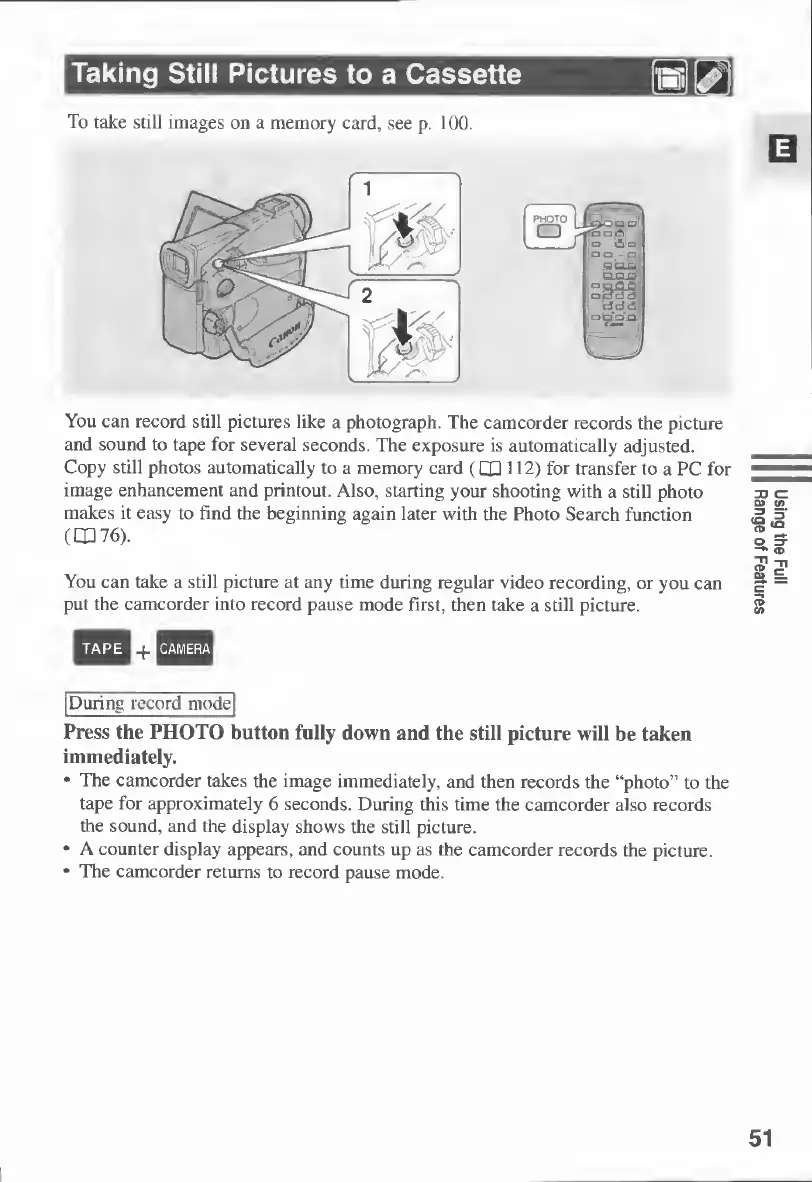
You
can
record
still
pictures
like
a
photograph.
The
camcorder
records
the
picture
and
sound
to
tape
for
several
seconds.
The
exposure
is
automatically
adjusted.
Copy
still
photos
automatically
to
a
memory
card
(1X1112)
for
transfer
to
a
PC
for
image
enhancement
and
printout.
Also,
starting
your
shooting
with
a
still
photo
makes
it
easy
to
find
the
beginning
again
later
with
the
Photo
Search
function
(OP
76).
You
can
take
a
still
picture
at
any
time
during
regular
video
recording,
or
you
can
put
the
camcorder
into
record
pause
mode
first,
then
take
a
still
picture.
TAPE
^CAMERA
During
record
mode
Press
the
PHOTO
button
fully
down
and
the
still
picture
will
be
taken
immediately.
The
camcorder
takes
the
image
immediately,
and
then
records
the
“photo”
to
the
tape
for
approximately
6
seconds.
During
this
time
the
camcorder
also
records
the
sound,
and
the
display
shows
the
still
picture.
A
counter
display
appears,
and
counts
up
as
the
camcorder
records
the
picture.
The
camcorder
returns
to
record
pause
mode.
51
Using
the
Full
Range
of
Features

Table of Contents

Other manuals for Canon MV430

Related product manuals