EasyManua.ls Logo

Canon MV430 - Recording from Another DV Device as a Still Image.103

Canon MV430
152 pages
Print Icon
To Next Page IconTo Next Page
To Previous Page IconTo Previous Page
Loading...
Recording
from
Another
DV
Device
as
a
Still
Image
-MV430i
only-
Record
images
input
through
the
DY
in
terminal
onto
the
memory
card
as
still
images.
The
still
image’s
data
code
will
reflect
the
date
and
time
it
is
recorded
to
the
memory
card.
Preparations
1.
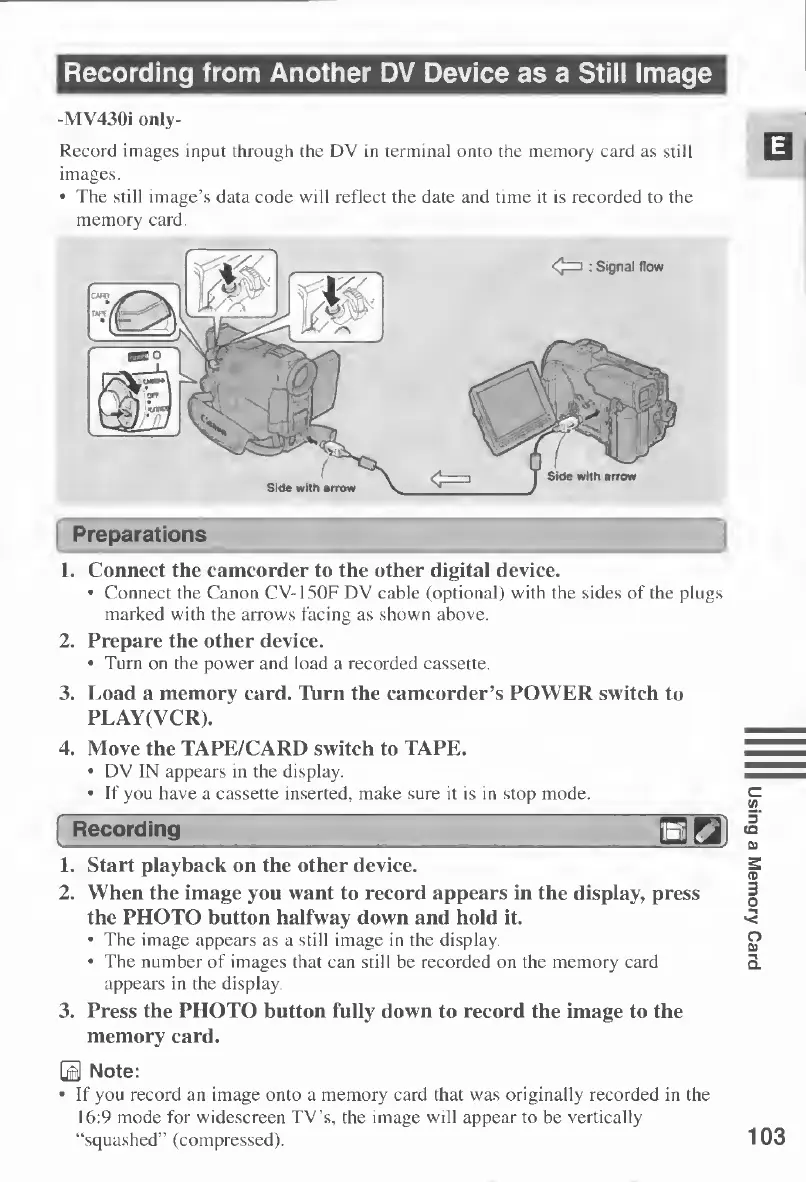
Connect
the
camcorder
to
the
other
digital
device.
Connect
the
Canon
CV-150F
DV
cable
(optional)
with
the
sides
of
the
plugs
marked
with
the
arrows
facing
as
shown
above.
2.
Prepare
the
other
device.
Turn
on
the
power
and
load
a
recorded
cassette.
3.
Load
a
memory
card.
Turn
the
camcorder’s
POWER
switch
to
PLAY(YCR).
4.
Move
the
TAPE/CARD
switch
to
TAPE.
DV
IN
appears
in
the
display.
If
you
have
a
cassette
inserted,
make
sure
it
is
in
stop
mode.
1.
Start
playback
on
the
other
device.
2.
W
r
hen
the
image
you
want
to
record
appears
in
the
display,
press
the
PHOTO
button
halfway
down
and
hold
it.
The
image
appears
as
a
still
image
in
the
display.
The
number
of
images
that
can
still
be
recorded
on
the
memory
card
appears
in
the
display.
3.
Press
the
PHOTO
button
fully
down
to
record
the
image
to
the
memory
card.
E
Note:
If
you
record
an
image
onto
a
memory
card
that
was
originally
recorded
in
the
16:9
mode
for
widescreen
TV’s,
the
image
will
appear
to
be
vertically
“squashed”
(compressed).
103
Using
a
Memory
Card

Table of Contents

Other manuals for Canon MV430

Related product manuals