EasyManua.ls Logo

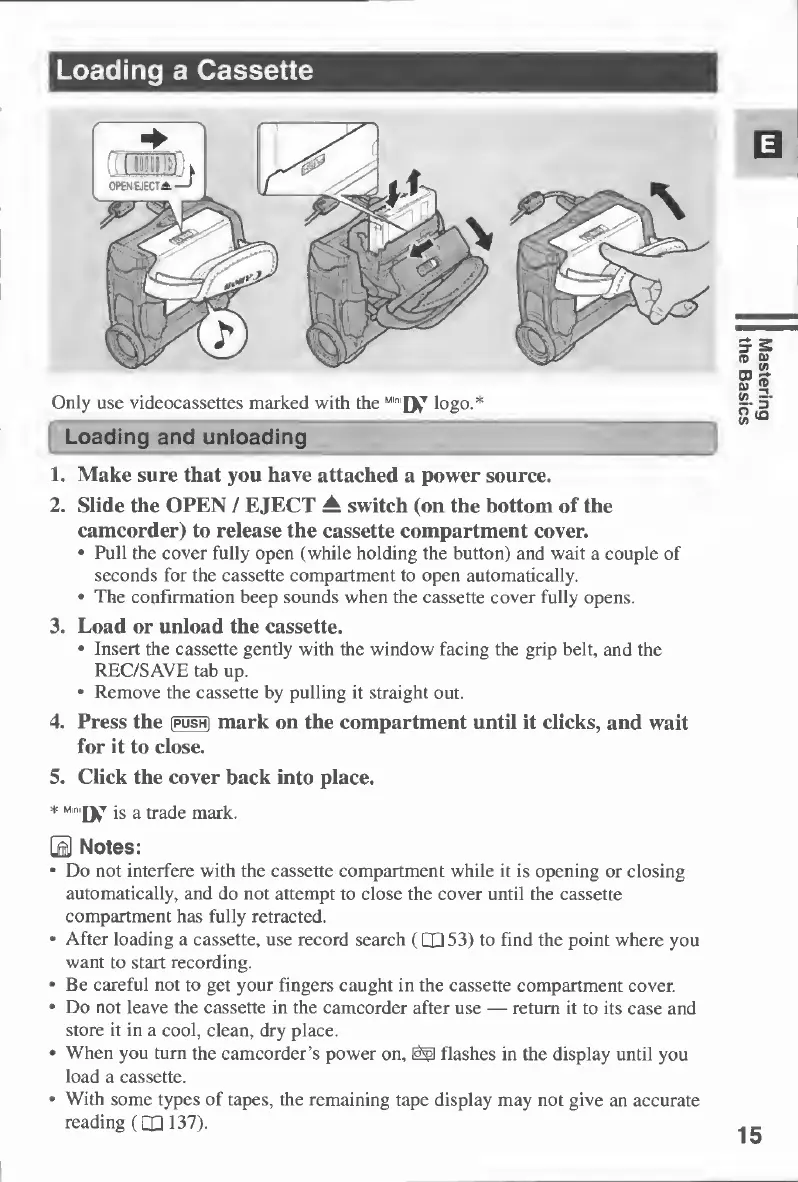
Canon MV430 - Loading a Cassette

Canon MV430
152 pages
Print Icon
To Next Page IconTo Next Page
To Previous Page IconTo Previous Page
Loading...
Loading
a
Cassette
Only
use
videocassettes
marked
with
the
M,n
'Dv
T
logo.*
Loading
and
unloading
1.
Make
sure
that
you
have
attached
a
power
source.
2.
Slide
the
OPEN
/
EJECT
±
switch
(on
the
bottom
of
the
camcorder)
to
release
the
cassette
compartment
cover.
Pull
the
cover
fully
open
(while
holding
the
button)
and
wait
a
couple
of
seconds
for
the
cassette
compartment
to
open
automatically.
The
confirmation
beep
sounds
when
the
cassette
cover
fully
opens.
3.
Load
or
unload
the
cassette.
Insert
the
cassette
gently
with
the
window
facing
the
grip
belt,
and
the
REC/SAVE
tab
up.
Remove
the
cassette
by
pulling
it
straight
out.
4.
Press
the
(push]
mark
on
the
compartment
until
it
clicks,
and
wait
for
it
to
close.
5.
Click
the
cover
back
into
place.
j
s
a
m
ark.
\M
Notes:
Do
not
interfere
with
the
cassette
compartment
while
it
is
opening
or
closing
automatically,
and
do
not
attempt
to
close
the
cover
until
the
cassette
compartment
has
fully
retracted.
After
loading
a
cassette,
use
record
search
(QQ
53)
to
find
the
point
where
you
want
to
start
recording.
Be
careful
not
to
get
your
fingers
caught
in
the
cassette
compartment
cover.
Do
not
leave
the
cassette
in
the
camcorder
after
use
return
it
to
its
case
and
store
it
in
a
cool,
clean,
dry
place.
When
you
turn
the
camcorder’s
power
on,
flashes
in
the
display
until
you
load
a
cassette.
With
some
types
of
tapes,
the
remaining
tape
display
may
not
give
an
accurate
reading
(QJ
137).
15
Mastering
the
Basics

Table of Contents

Other manuals for Canon MV430

Related product manuals