EasyManua.ls Logo

Canon MV430 - Page 16

Canon MV430
152 pages
Print Icon
To Next Page IconTo Next Page
To Previous Page IconTo Previous Page
Loading...
Mastering
the
Basics
Protecting
tapes
from
accidental
erasure
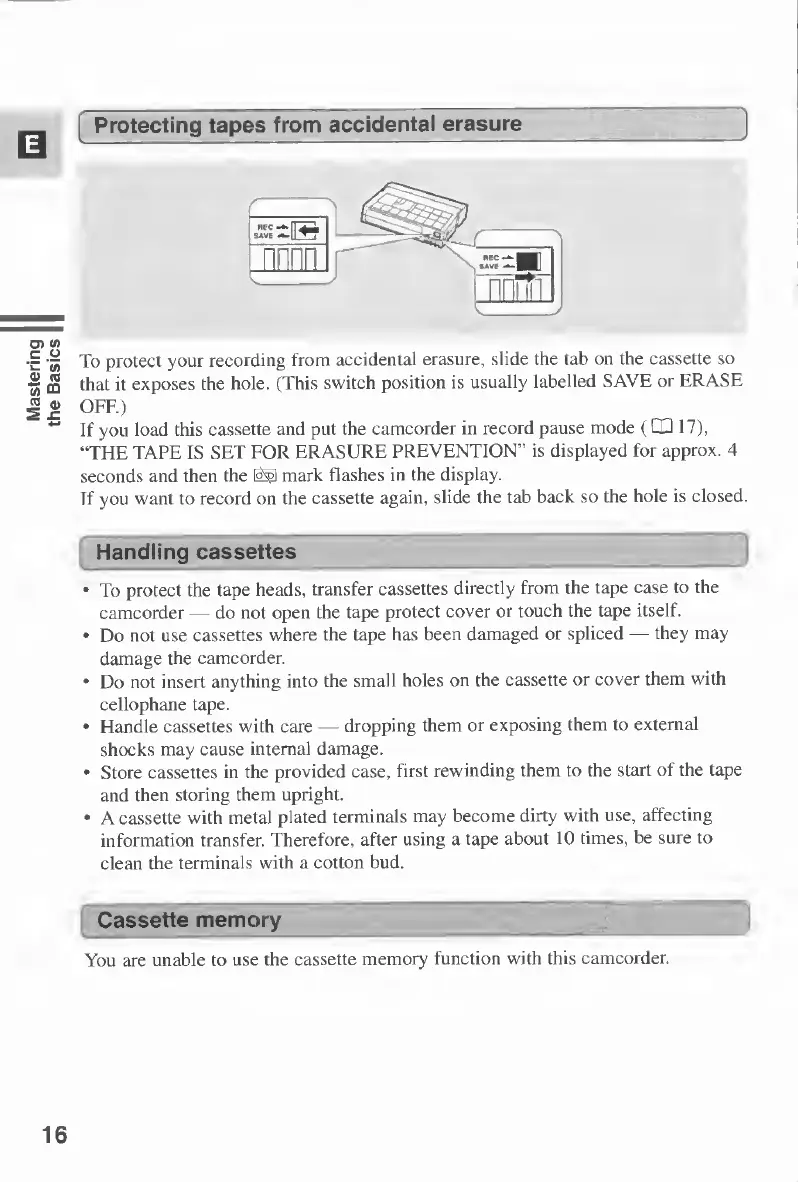
To
protect
your
recording
from
accidental
erasure,
slide
the
lab
on
the
cassette
so
that
it
exposes
the
hole.
(This
switch
position
is
usually
labelled
SAVE
or
ERASE
OFF.)
If
you
load
this
cassette
and
put
the
camcorder
in
record
pause
mode
(03
17),
“THE
TAPE
IS
SET
FOR
ERASURE
PREVENTION”
is
displayed
for
approx.
4
seconds
and
then
the
mark
flashes
in
the
display.
If
you
want
to
record
on
the
cassette
again,
slide
the
tab
back
so
the
hole
is
closed.
Handling
cassettes
To
protect
the
tape
heads,
transfer
cassettes
directly
from
the
tape
case
to
the
camcorder
do
not
open
the
tape
protect
cover
or
touch
the
tape
itself.
Do
not
use
cassettes
where
the
tape
has
been
damaged
or
spliced
they
may
damage
the
camcorder.
Do
not
insert
anything
into
the
small
holes
on
the
cassette
or
cover
them
with
cellophane
tape.
Handle
cassettes
with
care
dropping
them
or
exposing
them
to
external
shocks
may
cause
internal
damage.
Store
cassettes
in
the
provided
case,
first
rewinding
them
to
the
start
of
the
tape
and
then
storing
them
upright.
A
cassette
with
metal
plated
terminals
may
become
dirty
with
use,
affecting
information
transfer.
Therefore,
after
using
a
tape
about
10
times,
be
sure
to
clean
the
terminals
with
a
cotton
bud.
Cassette
memory
You
are
unable
to
use
the
cassette
memory
function
with
this
camcorder.
16

Table of Contents

Other manuals for Canon MV430

Related product manuals