EasyManua.ls Logo

Canon MV430 - Recording over Existing Scenes-AV Insert Editing (Mv430 I Only).85

Canon MV430
152 pages
Print Icon
To Next Page IconTo Next Page
To Previous Page IconTo Previous Page
Loading...
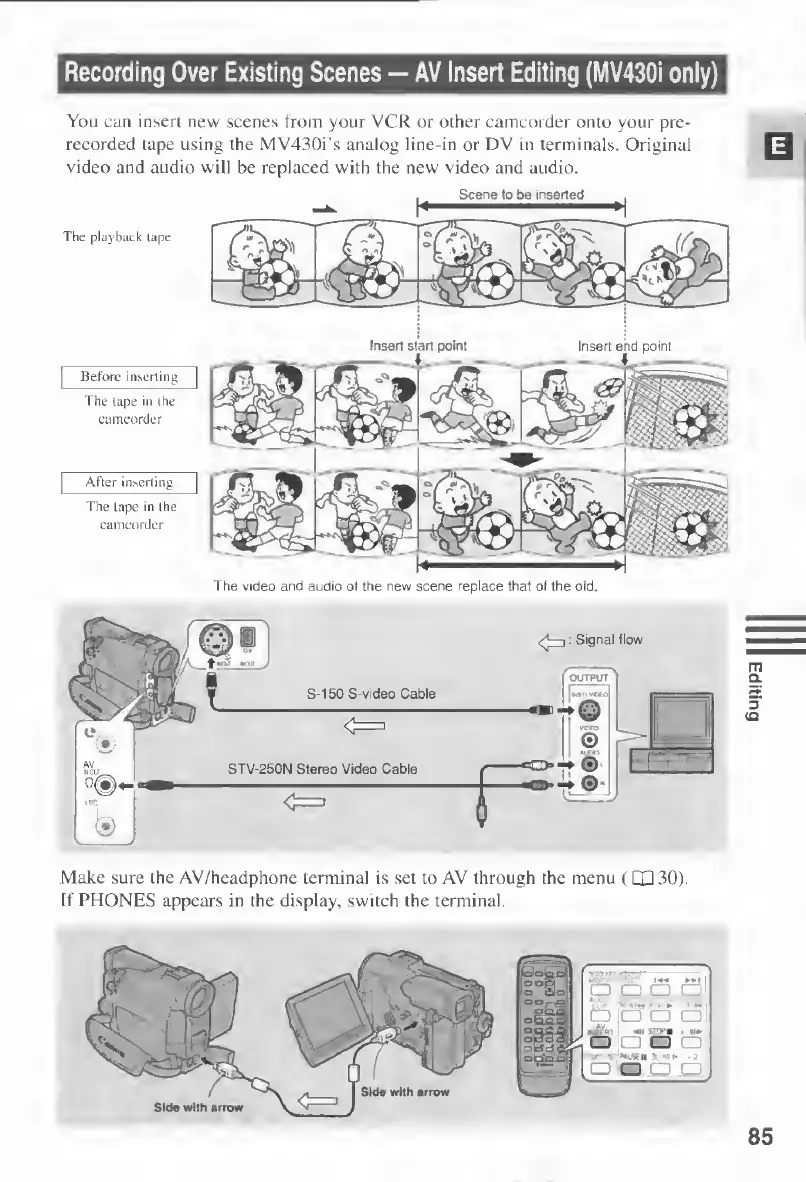
Recording
Over
Existing
Scenes
AV
Insert
Editing
(MV430i
only)
You
can
insert
new
scenes
from
your
VCR
or
other
camcorder
onto
your
pre¬
recorded
tape
using
the
MV430i’s
analog
line-in
or
DV
in
terminals.
Original
video
and
audio
will
be
replaced
with
the
new
video
and
audio.
Scene
to
be
inserted
Insert
end
point
Before
inserting
The
tape
in
the
camcorder
After
inserting
The
lape
in
the
camcorder
The
video
and
audio
of
the
new
scene
replace
that
of
the
old
OUTPUT
S-150
S-video
Cable
STV-250N
Stereo
Video
Cable
Make
sure
the
AV/headphone
terminal
is
set
to
AV
through
the
menu
(QD
30)
If
PHONES
appears
in
the
display,
switch
the
terminal.

Table of Contents

Other manuals for Canon MV430

Related product manuals