EasyManua.ls Logo

Canon MV430 - Playing Back a Cassette.26

Canon MV430
152 pages
Print Icon
To Next Page IconTo Next Page
To Previous Page IconTo Previous Page
Loading...
Mastering
the
Basics
Playing
Back
a
Cassette
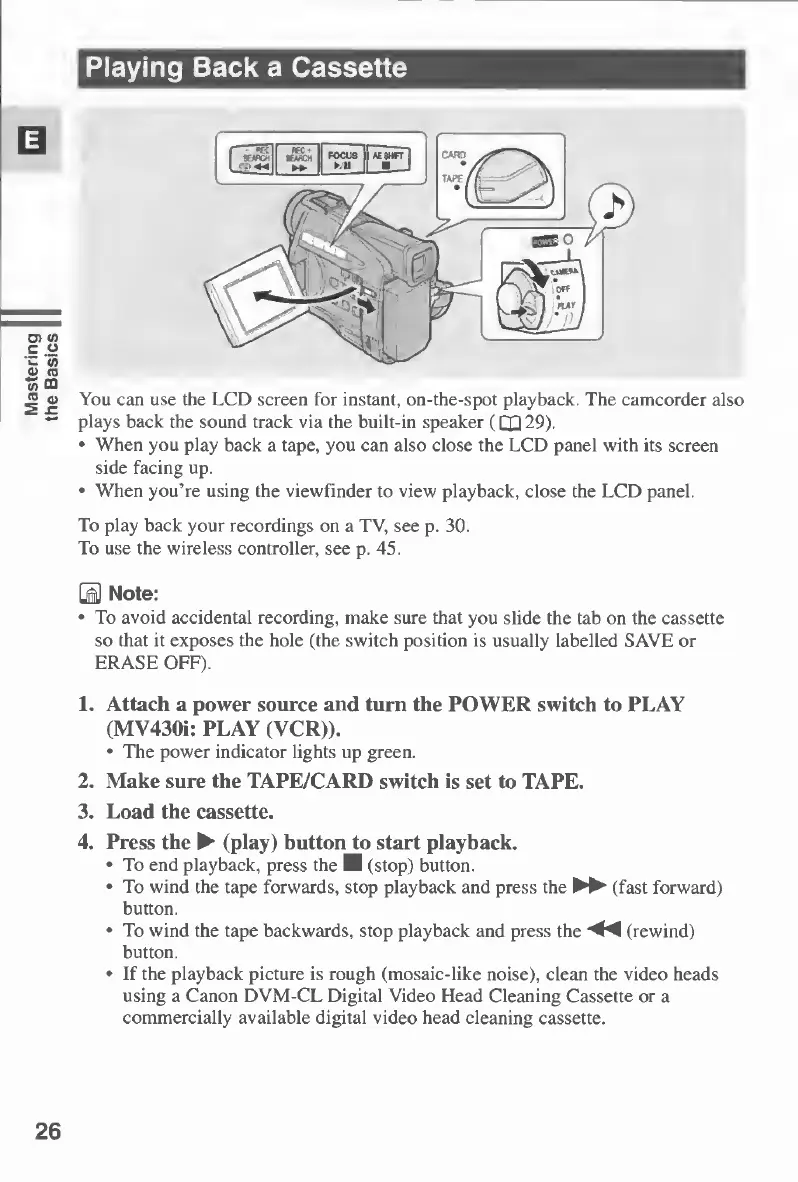
You
can
use
the
LCD
screen
for
instant,
on-the-spot
playback.
The
camcorder
also
plays
back
the
sound
track
via
the
built-in
speaker
(QQ29).
When
you
play
back
a
tape,
you
can
also
close
the
LCD
panel
with
its
screen
side
facing
up.
When
you’re
using
the
viewfinder
to
view
playback,
close
the
LCD
panel.
To
play
back
your
recordings
on
a
TV,
see
p.
30.
To
use
the
wireless
controller,
see
p.
45.
\M
Note:
To
avoid
accidental
recording,
make
sure
that
you
slide
the
tab
on
the
cassette
so
that
it
exposes
the
hole
(the
switch
position
is
usually
labelled
SAVE
or
ERASE
OFF).
1.
Attach
a
power
source
and
turn
the
POWER
switch
to
PLAY
(MV430i:
PLAY
(VCR)).
The
power
indicator
lights
up
green.
2.
Make
sure
the
TAPE/CARD
switch
is
set
to
TAPE.
3.
Load
the
cassette.
4.
Press
the
(play)
button
to
start
playback.
To
end
playback,
press
the
I
(stop)
button.
To
wind
the
tape
forwards,
stop
playback
and
press
the
►►
(fast
forward)
button.
To
wind
the
tape
backwards,
stop
playback
and
press
the
(rewind)
button.
If
the
playback
picture
is
rough
(mosaic-like
noise),
clean
the
video
heads
using
a
Canon
DVM-CL
Digital
Video
Head
Cleaning
Cassette
or
a
commercially
available
digital
video
head
cleaning
cassette.
26

Table of Contents

Other manuals for Canon MV430

Related product manuals