EasyManua.ls Logo

Canon MV430 - Page 25

Canon MV430
152 pages
Print Icon
To Next Page IconTo Next Page
To Previous Page IconTo Previous Page
Loading...
Allowing
the
subject
to
monitor
recording
0O
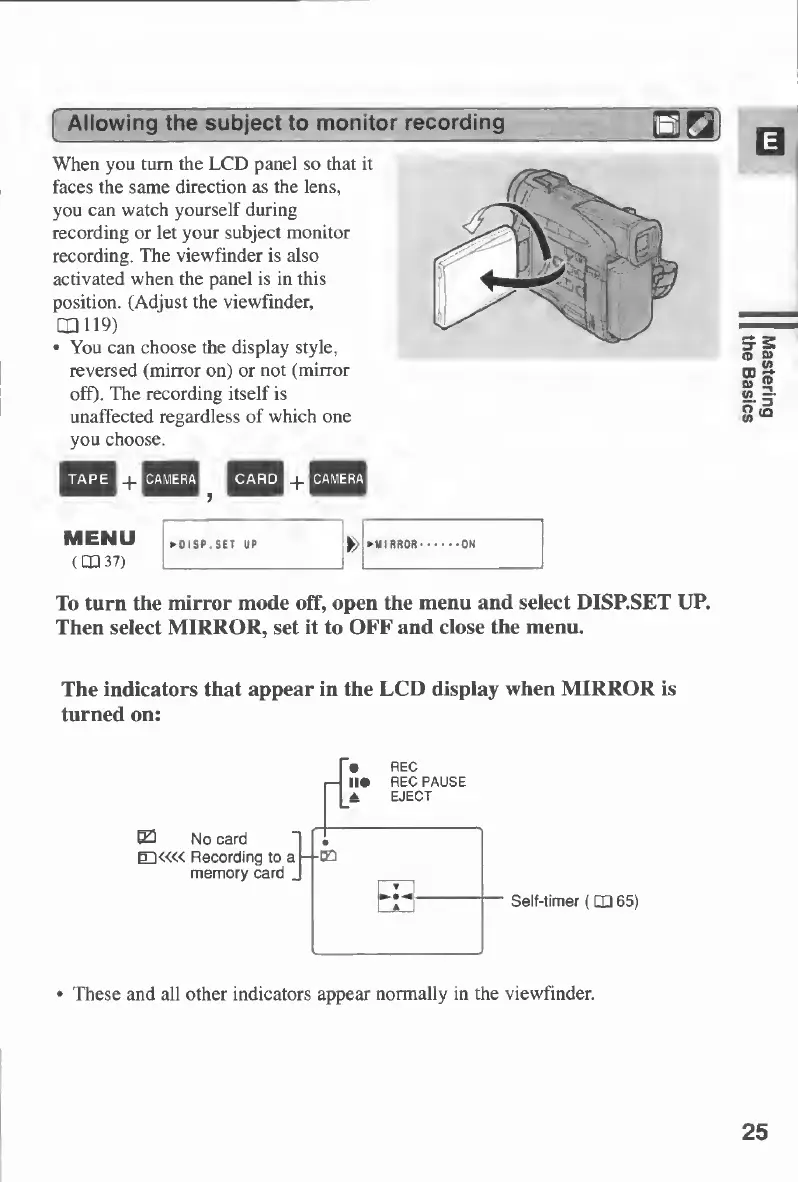
When
you
turn
the
LCD
panel
so
that
it
faces
the
same
direction
as
the
lens,
you
can
watch
yourself
during
recording
or
let
your
subject
monitor
recording.
The
viewfinder
is
also
activated
when
the
panel
is
in
this
position.
(Adjust
the
viewfinder,
1X1119)
You
can
choose
the
display
style,
reversed
(mirror
on)
or
not
(mirror
off).
The
recording
itself
is
unaffected
regardless
of
which
one
you
choose.
MENU
*01SP
SET
UP
MIRROR.ON
(CXI
37)
L__
_
To
turn
the
mirror
mode
off,
open
the
menu
and
select
DISP.SET
UP.
Then
select
MIRROR,
set
it
to
OFF
and
close
the
menu.
The
indicators
that
appear
in
the
LCD
display
when
MIRROR
is
turned
on:
These
and
all
other
indicators
appear
normally
in
the
viewfinder.
25
Mastering
the
Basics

Table of Contents

Other manuals for Canon MV430

Related product manuals