EasyManua.ls Logo

Canon MV430 - Basic Recording

Canon MV430
152 pages
Print Icon
To Next Page IconTo Next Page
To Previous Page IconTo Previous Page
Loading...
Basic
Recording
Before
you
start
recording
Have
you
completed
the
following
steps?
Attached
a
power
source
(OP
10),
Removed
the
lens
cap
(CP
119)
and
fastened
the
shoulder
strap
(CP
120).
Chosen
the
display:
viewfinder
(CP
119)
or
LCD
screen
(CP
23).
Notes:
When
you’re
using
the
viewfinder,
fully
close
the
LCD
or
rotate
the
LCD
so
that
it
faces
the
same
direction
as
the
lens
(OH
23).
When
using
the
viewfinder
with
the
BP-522
or
BP-535
Battery
Pack
(both
optional)
attached,
extend
the
viewfinder
and
rotate
it
to
a
comfortable
angle.
You
may
also
want
to
install
the
backup
battery
(CP
123)
in
order
to
set
the
date
and
time
display
(CP
48).
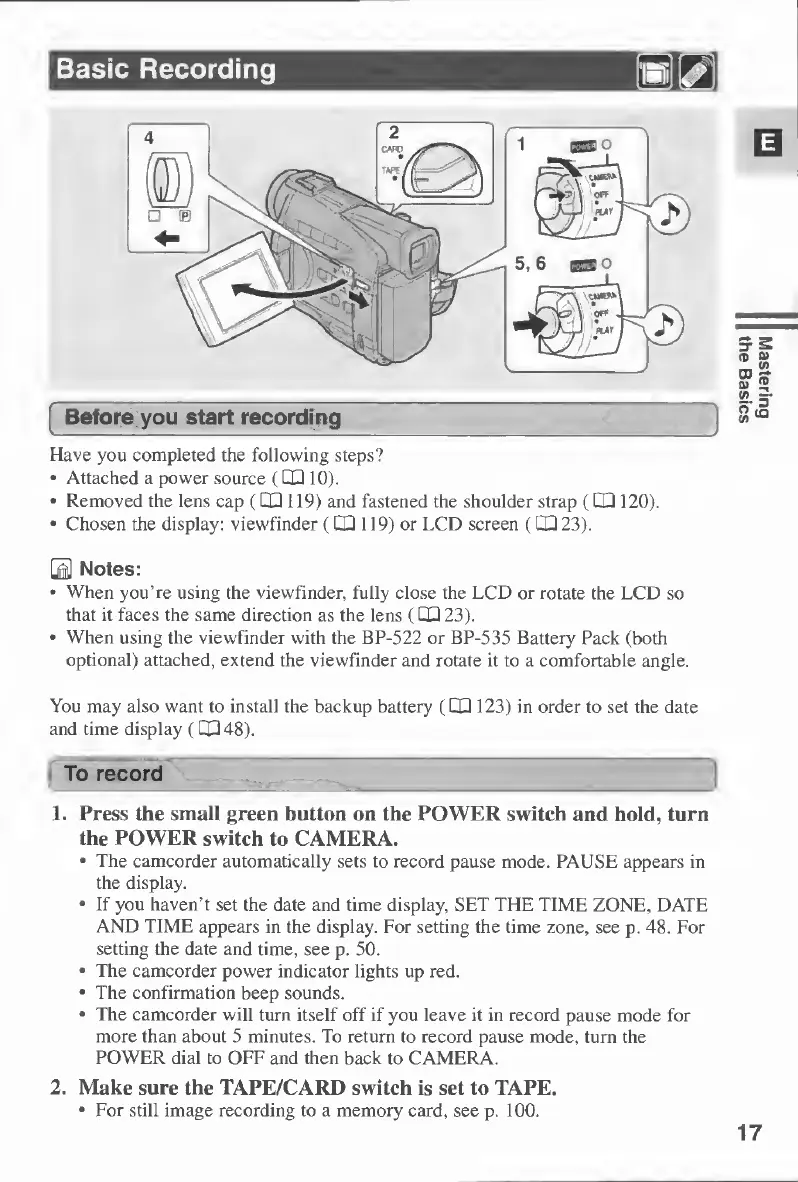
1.
Press
the
small
green
button
on
the
POWER
switch
and
hold,
turn
the
POWER
switch
to
CAMERA.
The
camcorder
automatically
sets
to
record
pause
mode.
PAUSE
appears
in
the
display.
If
you
haven’t
set
the
date
and
time
display,
SET
THE
TIME
ZONE,
DATE
AND
TIME
appears
in
the
display.
For
setting
the
time
zone,
see
p.
48.
For
setting
the
date
and
time,
see
p.
50.
The
camcorder
power
indicator
lights
up
red.
The
confirmation
beep
sounds.
The
camcorder
will
turn
itself
off
if
you
leave
it
in
record
pause
mode
for
more
than
about
5
minutes.
To
return
to
record
pause
mode,
turn
the
POWER
dial
to
OFF
and
then
back
to
CAMERA.
2.
Make
sure
the
TAPE/CARD
switch
is
set
to
TAPE,
For
still
image
recording
to
a
memory
card,
see
p.
100.
17
Mastering
the
Basics

Table of Contents

Other manuals for Canon MV430

Related product manuals