EasyManua.ls Logo

Canon MV430 - Page 9

Canon MV430
152 pages
Print Icon
To Next Page IconTo Next Page
To Previous Page IconTo Previous Page
Loading...
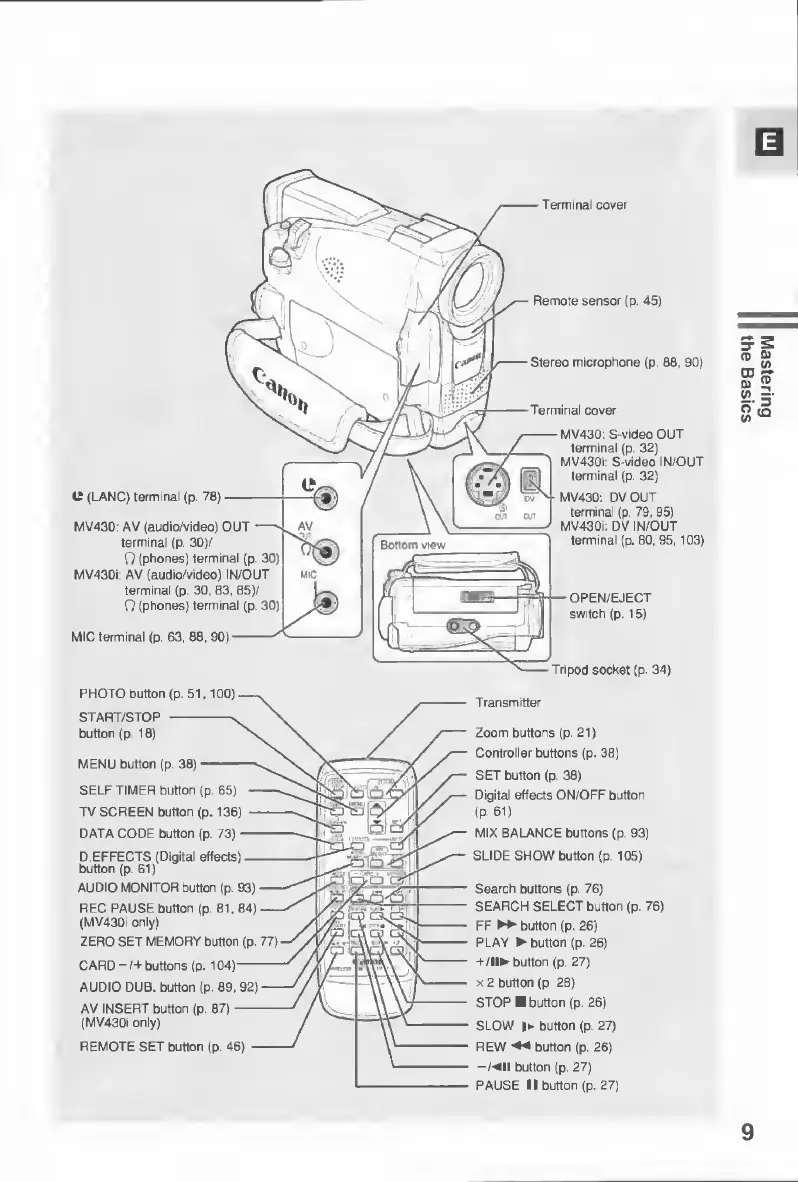
Terminal
cover
Remote
sensor
(p.
45)
Stereo
microphone
(p.
80,
90)
Terminal
cover
MV43Q:
S-video
OUT
terminal
(p.
32)
MV430i:
S-video
IN/OUT
terminal
(p.
32)
MV430:
DVOUT
terminal
(p.
79,
95)
MV430i:
DV
IN/OUT
terminal
(p.
80,
95,
103)
IT
(LANC)
terminal
{p.
70)
MV430:
AV
(audio/video)
OUT
—s
terminal
(p.
30)/
Q
(phones)
terminal
(p.
30)
MV430i:
AV
(audio/video)
IN/OUT
terminal
(p.
30,
83,
85)/
O
(phones)
terminal
(p.
30)
Bottom
view
OPEN/EJECT
switch
(p.
15)
MIC
terminal
(p.
63,
08,
90)
Tripod
socket
(p.
34)
PHOTO
button
(p.
51,100)
START/STOP
-v
button
(p.
10)
MENU
button
(p.
38)-^
SELF
TIMER
button
(p.
65)
-
TV
SCREEN
button
(p.
136)
-
DATA
CODE
button
(p.
73)-
D.EFFECTS
(Digital
effects)-
button
(p.
61)
AUDIO
MONITOR
button
(p.
93)
REC
PAUSE
button
(p.
81,04)
(MV430i
only)
ZERO
SET
MEMORY
button
(p.
77)
CARD-/+buttons
(p.
104)-
AUDIO
DUB.
button
(p.
89,
92)
AV
INSERT
button
(p.
87)-
(MV430i
only)
REMOTE
SET
button
(p.
46)
-
Transmitter
Zoom
buttons
(p.
21)
Controller
buttons
(p.
38)
SET
button
(p.
38)
Digital
effects
ON/OFF
button
(P-61)
MIX
BALANCE
buttons
(p.
93)
SLIDE
SHOW
button
(p.
105)
Search
buttons
(p.
76)
SEARCH
SELECT
button
(p.
76)
FF
►►
button
(p,
26)
PLAY
button
(p.
26)
+/!!
button
(p.
27)
x
2
button
(p
28)
STOP
button
(p.
26)
SLOW
!
button
(p.
27)
REW
◄◄
button
(p.
26)
-/
II
button
(p.
27)
PAUSE
II
button
(p.
27)
9
Mastering
the
Basics

Table of Contents

Other manuals for Canon MV430

Related product manuals