EasyManua.ls Logo

Canon MV430 - Page 11

Canon MV430
152 pages
Print Icon
To Next Page IconTo Next Page
To Previous Page IconTo Previous Page
Loading...
Your
battery
pack
was
partially
charged
before
it
left
the
factory.
It
should
have
enough
power
for
you
to
check
that
your
camcorder
is
working
properly.
However,
you
must
charge
the
battery
pack
fully
if
you
want
it
to
power
the
camcorder
for
more
than
a
few
minutes.
Always
turn
the
camcorder
off
and
raise
the
viewfinder
before
connecting/
removing
the
battery.
1.
Set
the
POWER
switch
to
OFE
2.
Attach
the
battery
to
the
camcorder.
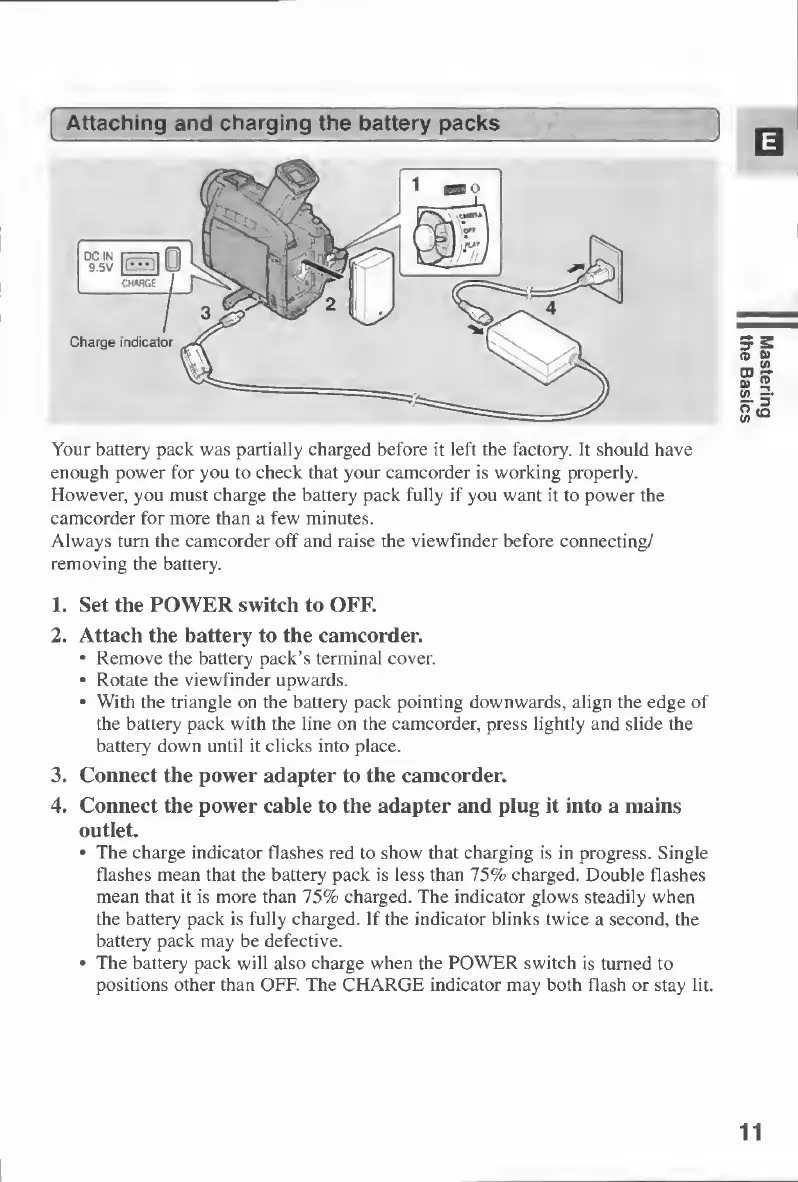
Remove
the
battery
pack’s
terminal
cover.
Rotate
the
viewfinder
upwards.
With
the
triangle
on
the
battery
pack
pointing
downwards,
align
the
edge
of
the
battery
pack
with
the
line
on
the
camcorder,
press
lightly
and
slide
the
battery
down
until
it
clicks
into
place.
3.
Connect
the
power
adapter
to
the
camcorder.
4.
Connect
the
power
cable
to
the
adapter
and
plug
it
into
a
mains
outlet.
The
charge
indicator
flashes
red
to
show
that
charging
is
in
progress.
Single
flashes
mean
that
the
battery
pack
is
less
than
75%
charged.
Double
flashes
mean
that
it
is
more
than
75%
charged.
The
indicator
glows
steadily
when
the
battery
pack
is
fully
charged.
If
the
indicator
blinks
twice
a
second,
the
battery
pack
may
be
defective.
The
battery
pack
will
also
charge
when
the
POWER
switch
is
turned
to
positions
other
than
OFF.
The
CHARGE
indicator
may
both
flash
or
stay
lit.
Mastering
the
Basics

Table of Contents

Other manuals for Canon MV430

Related product manuals