EasyManua.ls Logo

Canon MV430 - Page 122

Canon MV430
152 pages
Print Icon
To Next Page IconTo Next Page
To Previous Page IconTo Previous Page
Loading...
Additional
Information
How
much
power
is
left?
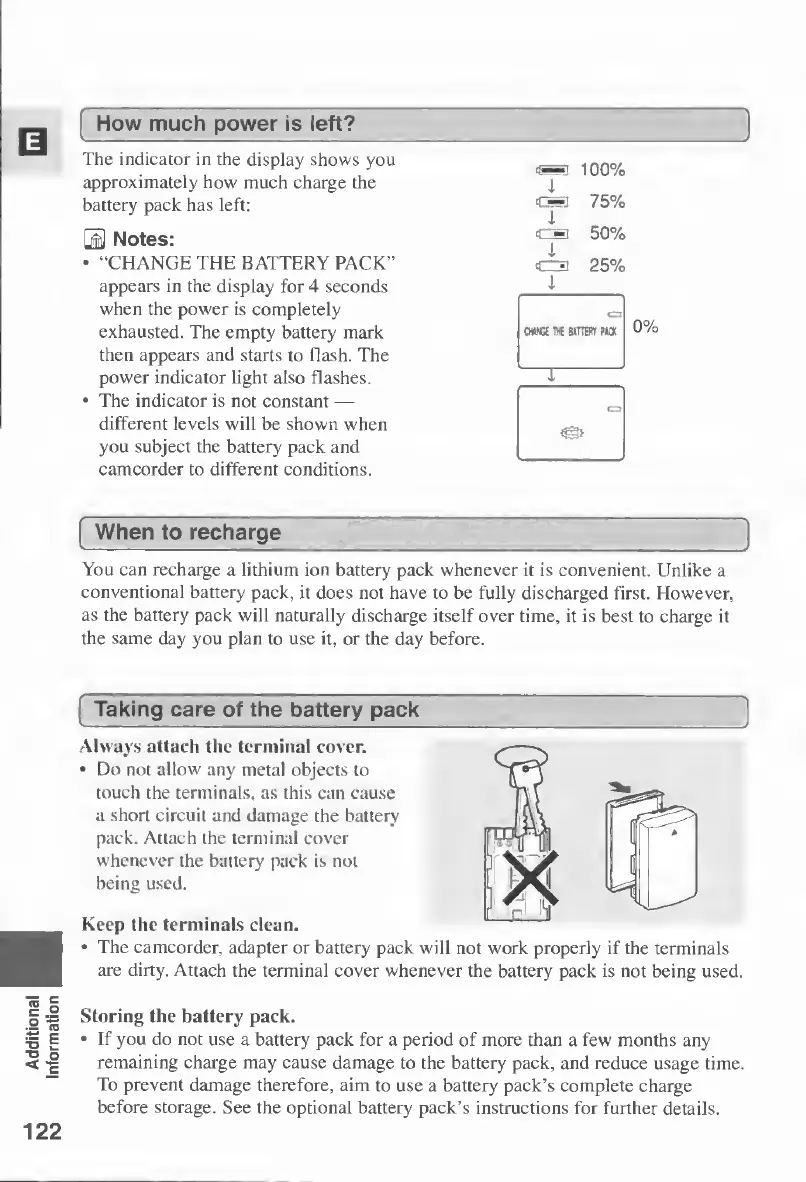
The
indicator
in
the
display
shows
you
[
_
[
100%
approximately
how
much
charge
the
i
battery
pack
has
left:
1
75%
0
Notes:
I
50%
“CHANGE
THE
BATTERY
PACK”
<C=3
25%
appears
in
the
display
for
4
seconds
when
the
power
is
completely
exhausted.
The
empty
battery
mark
then
appears
and
starts
to
flash.
The
power
indicator
light
also
flashes.
The
indicator
is
not
constant
different
levels
will
be
shown
when
you
subject
the
battery
pack
and
camcorder
to
different
conditions.
When
to
recharge
You
can
recharge
a
lithium
ion
battery
pack
whenever
it
is
convenient.
Unlike
a
conventional
battery
pack,
it
does
not
have
to
be
fully
discharged
first.
However,
as
the
battery
pack
will
naturally
discharge
itself
over
time,
it
is
best
to
charge
it
the
same
day
you
plan
to
use
it,
or
the
day
before.
Taking
care
of
the
battery
pack
_
_
__
Always
attach
the
terminal
cover.
Do
not
allow
any
metal
objects
to
touch
the
terminals,
as
this
can
cause
a
short
circuit
and
damage
the
battery
pack.
Attach
the
terminal
cover
whenever
the
battery
pack
is
not
being
used.
Keep
the
terminals
clean.
The
camcorder,
adapter
or
battery
pack
will
not
work
properly
if
the
terminals
are
dirty.
Attach
the
terminal
cover
whenever
the
battery
pack
is
not
being
used.
Storing
the
battery
pack.
If
you
do
not
use
a
battery
pack
for
a
period
of
more
than
a
few
months
any
remaining
charge
may
cause
damage
to
the
battery
pack,
and
reduce
usage
time.
To
prevent
damage
therefore,
aim
to
use
a
battery
pack’s
complete
charge
before
storage.
See
the
optional
battery
pack’s
instructions
for
further
details.
122

Table of Contents

Other manuals for Canon MV430

Related product manuals