EasyManua.ls Logo

Canon MV430 - Page 125

Canon MV430
152 pages
Print Icon
To Next Page IconTo Next Page
To Previous Page IconTo Previous Page
Loading...
------
Storage
_J
If
you
do
not
intend
to
use
the
camcorder
for
some
time,
store
it
in
an
area
which
is
free
of
dust
and
moisture,
and
where
the
temperature
is
no
higher
than
30°C
(86°F).
After
storage,
check
each
part
and
function
of
your
camcorder
to
make
sure
everything
is
still
working
properly.
B
Note:
•
These
cautions
also
apply
to
accessories
such
as
battery
packs
and
cassettes.
Maintenance
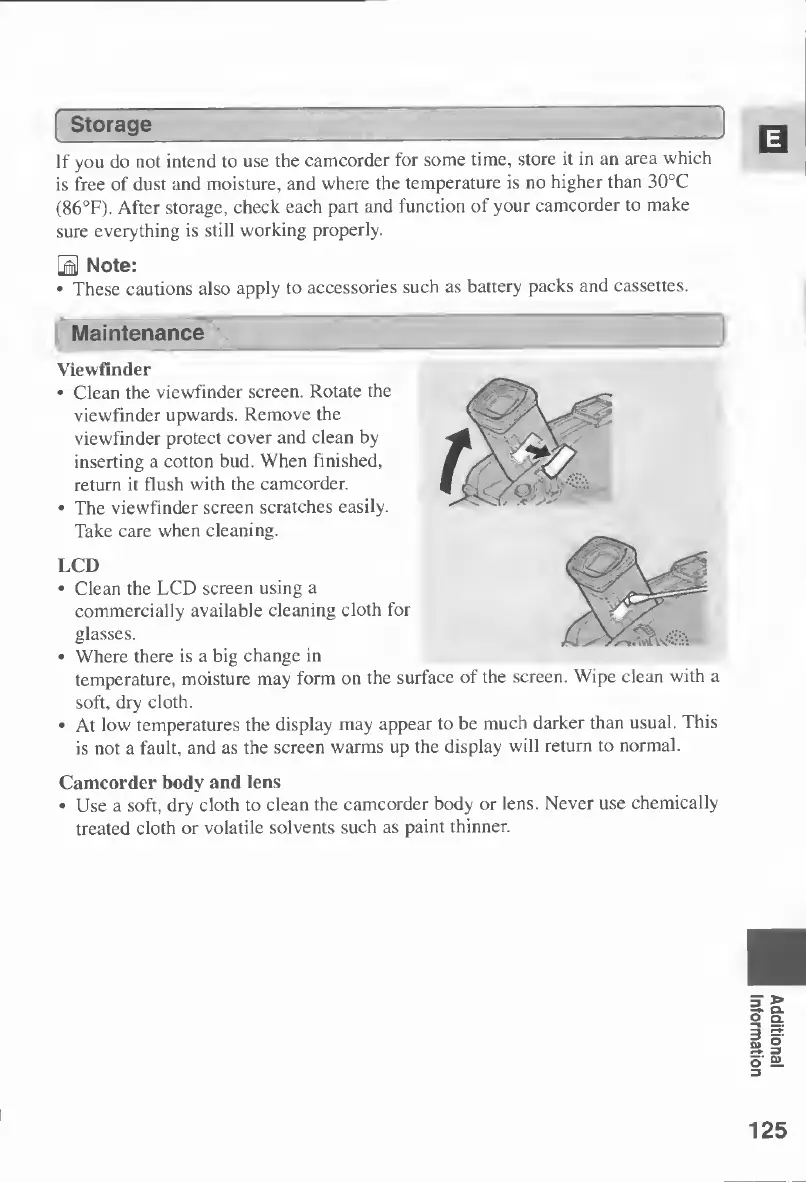
Viewfinder
•
Clean
the
viewfinder
screen.
Rotate
the
viewfinder
upwards.
Remove
the
viewfinder
protect
cover
and
clean
by
inserting
a
cotton
bud.
When
finished,
return
it
flush
with
the
camcorder.
•
The
viewfinder
screen
scratches
easily.
Take
care
when
cleaning.
LCD
•
Clean
the
LCD
screen
using
a
commercially
available
cleaning
cloth
for
glasses.
•
Where
there
is
a
big
change
in
temperature,
moisture
may
form
on
the
surface
of
the
screen.
Wipe
clean
with
a
soft,
dry
cloth.
•
At
low
temperatures
the
display
may
appear
to
be
much
darker
than
usual.
This
is
not
a
fault,
and
as
the
screen
warms
up
the
display
will
return
to
normal.
Camcorder
body
and
lens
•
Use
a
soft,
dry
cloth
to
clean
the
camcorder
body
or
lens.
Never
use
chemically
treated
cloth
or
volatile
solvents
such
as
paint
thinner.
125
Additional
Information

Table of Contents