EasyManua.ls Logo

Canon MV430 - Page 139

Canon MV430
152 pages
Print Icon
To Next Page IconTo Next Page
To Previous Page IconTo Previous Page
Loading...
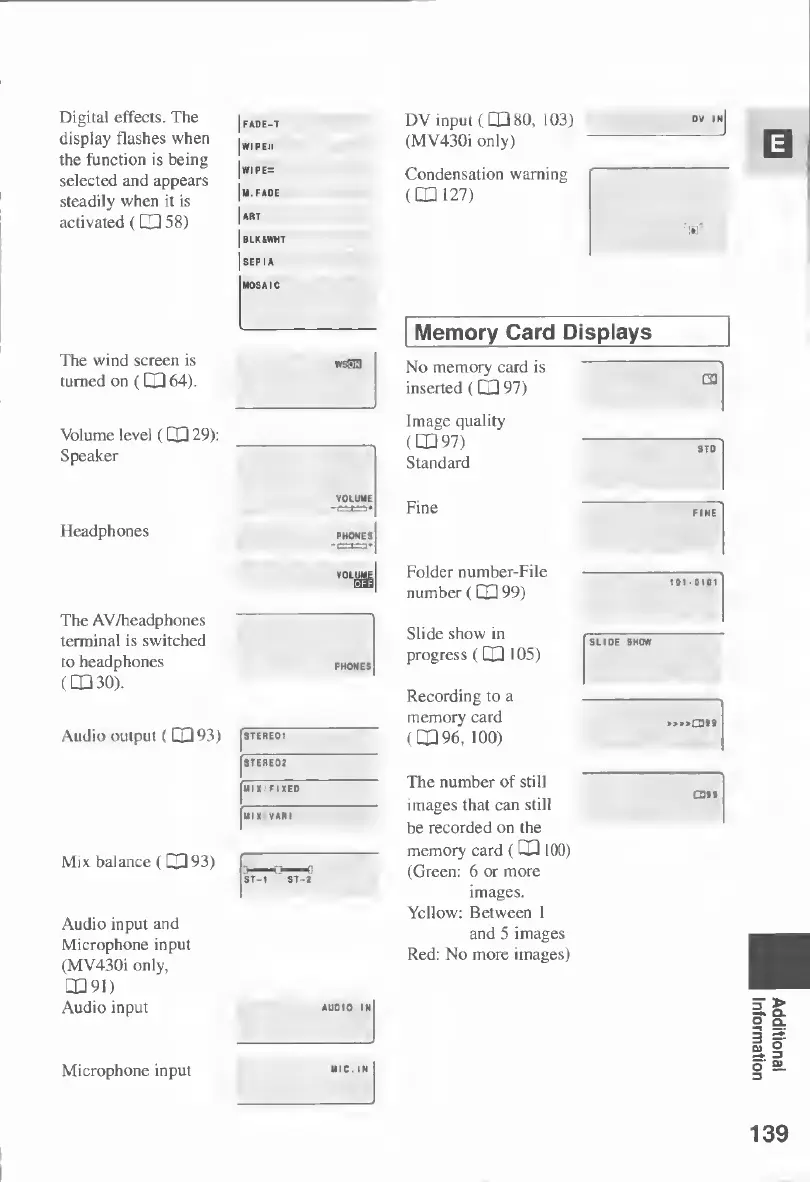
Digital
effects.
The
display
flashes
when
the
function
is
being
selected
and
appears
steadily
when
it
is
activated
(CXH
58)
The
wind
screen
is
turned
on
(
CD
64).
Volume
level
(
C
O
29):
Speaker
Headphones
The
AV/headphones
terminal
is
switched
to
headphones
(DO
30).
Audio
output
(
CO
93)
Mix
balance
(
CO
93)
Audio
input
and
Microphone
input
(MV430i
only,
□
091)
Audio
input
Microphone
input
|fade-t
DV
input
(CDSO,
103)
|
wr
i
p
eh
(MV430i
only)
|wiPE=
Condensation
warning
Im.fade
(CD
127)
|art
Jblkawht
I
SEPIA
1
MOSAIC
STEREOI
STERE02
IIIX'FIXED
ST-1
ST-2
wsPEl
VOLUME
AUDIO
IN
Memory
Card
Displays
No
memory
card
is
inserted
(CO
97)
Image
quality
(
□
097)
Standard
Fine
vol
ume
Folder
number-File
'
number
(
CD
99)
Slide
show
in
progress
(CD
105)
Recording
to
a
memory
card
(CD
96,
100)
The
number
of
still
images
that
can
still
be
recorded
on
the
memory
card
(
C
D
100)
(Green:
6
or
more
images.
Yellow:
Between
1
and
5
images
Red:
No
more
images)
G3
STO
SLIDE
SHOW
.Q3»9
£311
MIC.
IN
139
Additional
Information

Table of Contents