EasyManua.ls Logo

Canon MV430 - Page 46

Canon MV430
152 pages
Print Icon
To Next Page IconTo Next Page
To Previous Page IconTo Previous Page
Loading...
Using
the
Full
Range
of
Features
When
Operating
2
Canon
DV
Camcorders
(Remote
Sensor
Mode)
0
Q
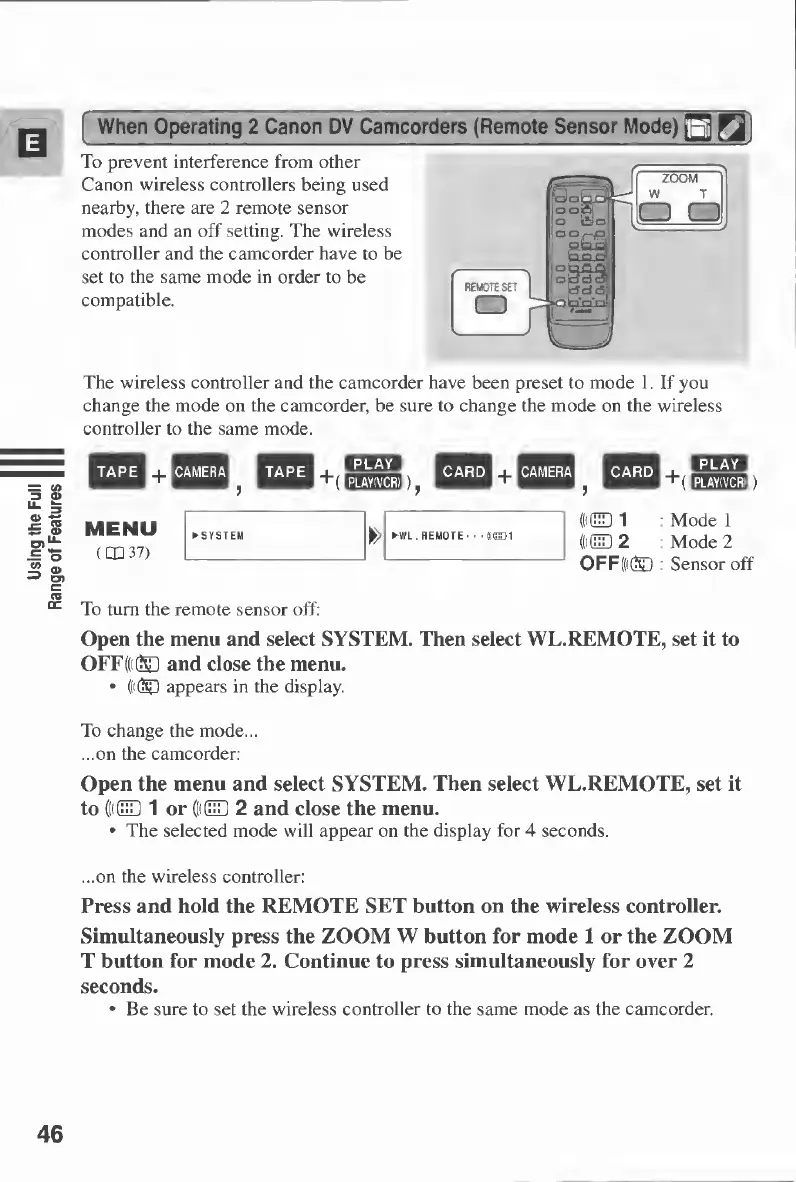
To
prevent
interference
from
other
Canon
wireless
controllers
being
used
nearby,
there
are
2
remote
sensor
modes
and
an
off
setting.
The
wireless
controller
and
the
camcorder
have
to
be
set
to
the
same
mode
in
order
to
be
compatible.
The
wireless
controller
and
the
camcorder
have
been
preset
to
mode
1.
If
you
change
the
mode
on
the
camcorder,
be
sure
to
change
the
mode
on
the
wireless
controller
to
the
same
mode.
CHI
"
“(
EEJE02))
Mode
1
Mode
2
Sensor
off
To
turn
the
remote
sensor
off:
Open
the
menu
and
select
SYSTEM.
Then
select
WL.REMOTE,
set
it
to
OFF((i®
and
close
the
menu.
(((®
appears
in
the
display.
To
change
the
mode...
...on
the
camcorder:
Open
the
menu
and
select
SYSTEM.
Then
select
WL.REMOTE,
set
it
to
((((HD
1
or
((((HD
2
and
close
the
menu.
The
selected
mode
will
appear
on
the
display
for
4
seconds.
...on
the
wireless
controller:
Press
and
hold
the
REMOTE
SET
button
on
the
wireless
controller.
Simultaneously
press
the
ZOOM
W
button
for
mode
1
or
the
ZOOM
T
button
for
mode
2.
Continue
to
press
simultaneously
for
over
2
seconds.
Be
sure
to
set
the
wireless
controller
to
the
same
mode
as
the
camcorder.
46

Table of Contents

Other manuals for Canon MV430

Related product manuals