EasyManua.ls Logo

Canon MV430 - Page 59

Canon MV430
152 pages
Print Icon
To Next Page IconTo Next Page
To Previous Page IconTo Previous Page
Loading...
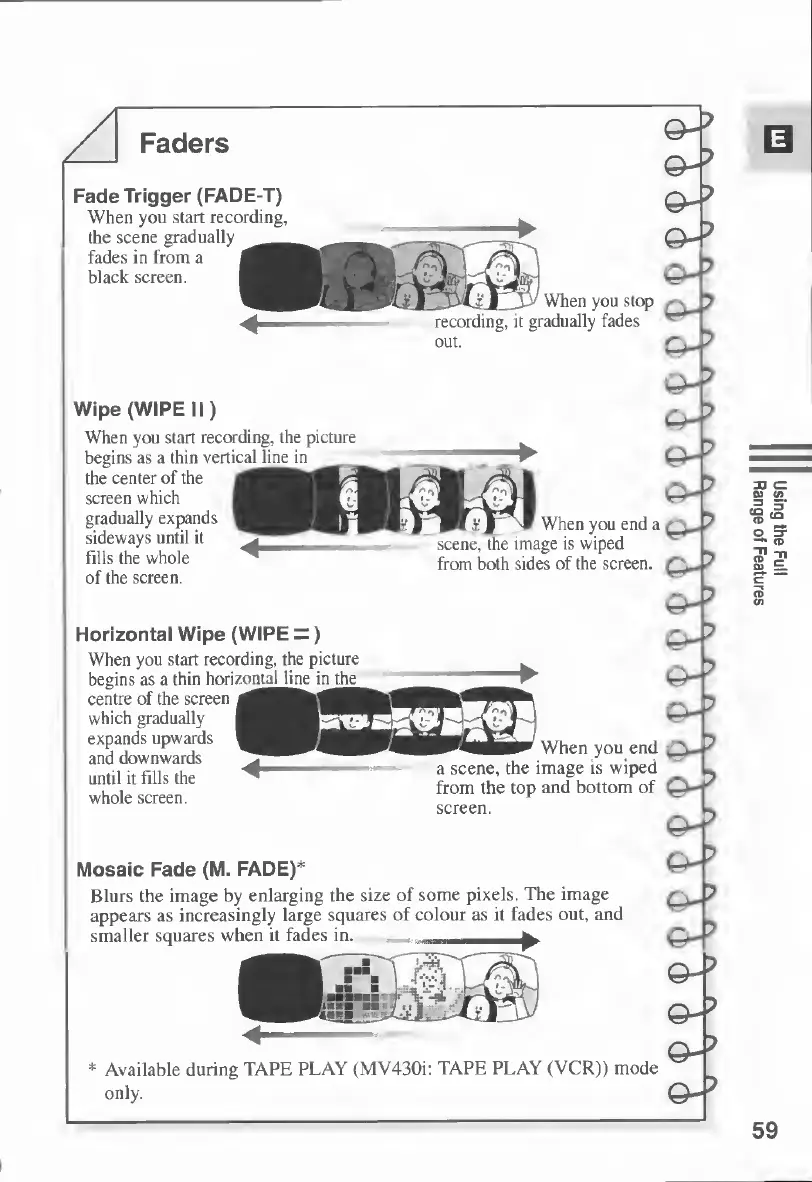
Faders
Fade
Trigger
(FADE-T)
When
you
start
recording,
the
scene
gradually
fades
in
from
a
^2
black
screen.
Hh
When
you
stop
recording,
it
gradually
fades
Wipe
(WIPE
II)
When
you
start
recording,
the
picture
begins
as
a
thin
vertic
al
line
in
the
center
of
the
screen
which
gradually
expands
H
sideways
until
it
fills
the
whole
of
the
screen.
pt
.
1
*
When
you
end
a
scene,
the
image
is
wiped
from
both
sides
of
the
screen.
Horizontal
Wipe
(WIPE
=)
When
you
start
recording,
the
picture
begins
as
a
thin
horiz
ontal
line
i
n
the
centre
of
the
screen
which
gradually
H
expands
upwards
V
and
downwards
until
it
fills
the
whole
screen.
When
you
end
a
scene,
the
image
is
wiped
from
the
top
and
bottom
of
screen.
Mosaic
Fade
(M.
FADE)*
Blurs
the
image
by
enlarging
the
size
of
some
pixels.
The
image
appears
as
increasingly
large
squares
of
colour
as
it
fades
out,
and
smaller
squares
when
it
fades
in.
*
Available
during
TAPE
PLAY
(MV430i:
TAPE
PLAY
(VCR))
mode
only.
59
Using
the
Full
Range
of
Features

Table of Contents

Other manuals for Canon MV430

Related product manuals