EasyManua.ls Logo

Canon MV430 - Page 97

Canon MV430
152 pages
Print Icon
To Next Page IconTo Next Page
To Previous Page IconTo Previous Page
Loading...
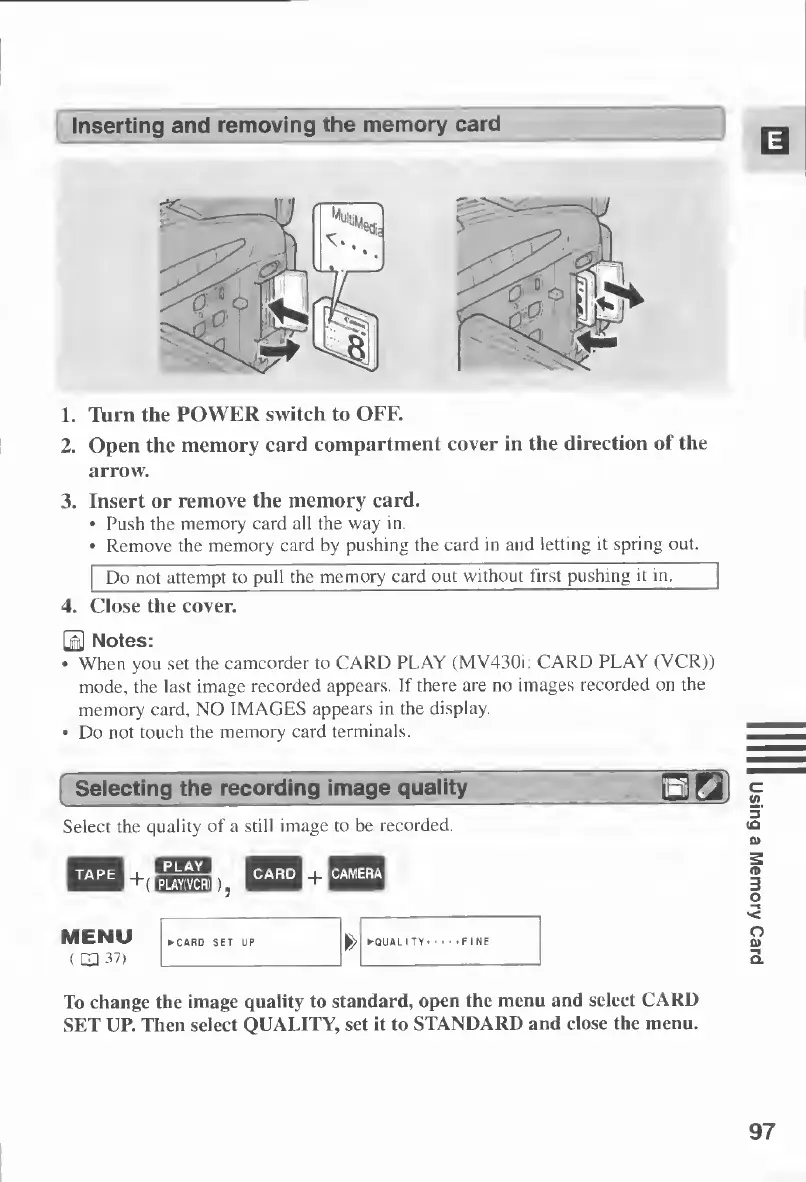
Inserting
and
removing
the
memory
card
1.
Turn
the
POWER
switch
to
OFF.
2.
Open
the
memory
card
compartment
cover
in
the
direction
of
the
arrow.
3.
Insert
or
remove
the
memory
card.
Push
the
memory
card
all
the
way
in.
Remove
the
memory
card
by
pushing
the
card
in
and
letting
it
spring
out.
Do
not
attempt
to
pul
l
the
memory
card
out
without
first
pushing
it
in.
4.
Close
the
cover.
0
Notes:
When
you
set
the
camcorder
to
CARD
PLAY
(MV430i:
CARD
PLAY
(VCR))
mode,
the
last
image
recorded
appears.
If
there
are
no
images
recorded
on
the
memory
card,
NO
IMAGES
appears
in
the
display.
Do
not
touch
the
memory
card
terminals.
Selecting
the
recording
image
quality
Select
the
quality
of
a
still
image
to
be
recorded.
MENU
(
LD
37)
To
change
the
image
quality
to
standard,
open
the
menu
and
select
CARD
SET
UP.
Then
select
QUALITY,
set
it
to
STANDARD
and
close
the
menu.
97
Using
a
Memory
Card

Table of Contents

Other manuals for Canon MV430

Related product manuals