EasyManua.ls Logo

Canon MV430 - Page 99

Canon MV430
152 pages
Print Icon
To Next Page IconTo Next Page
To Previous Page IconTo Previous Page
Loading...
File
numbers
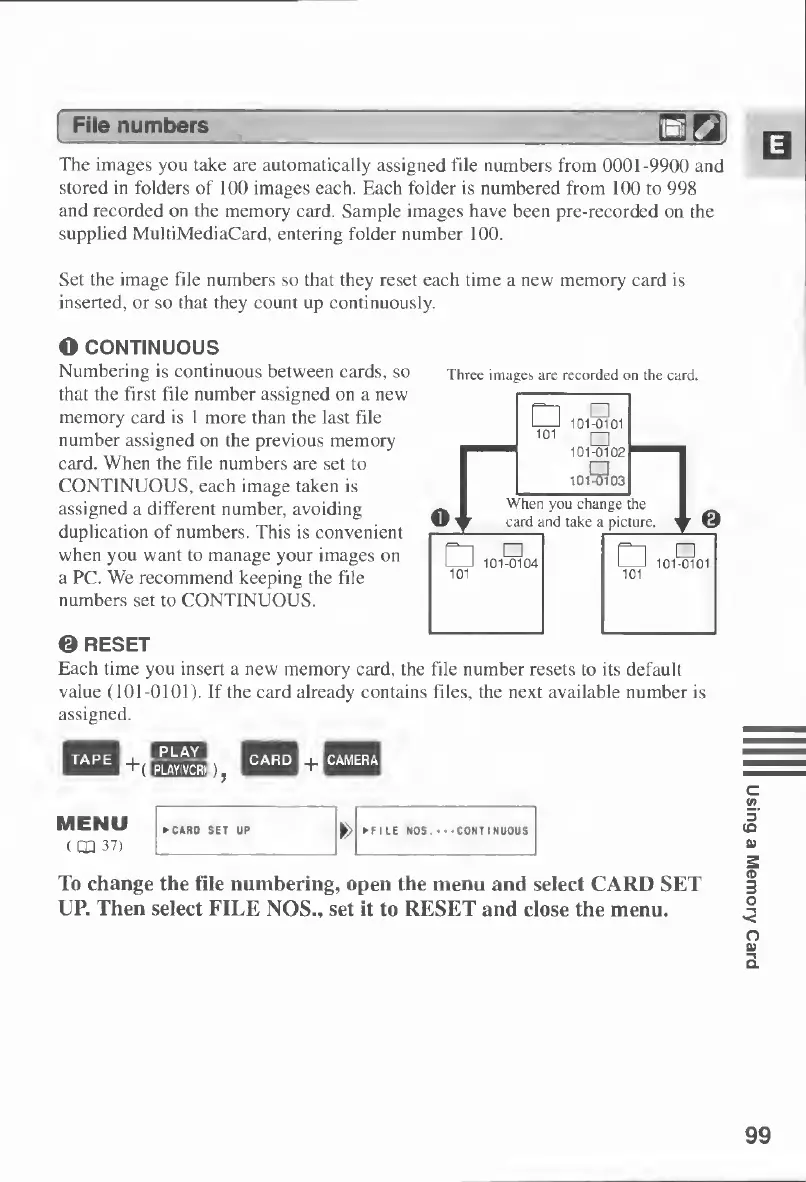
The
images
you
take
are
automatically
assigned
file
numbers
from
0001-9900
and
stored
in
folders
of
100
images
each.
Each
folder
is
numbered
from
100
to
998
and
recorded
on
the
memory
card.
Sample
images
have
been
pre-recorded
on
the
supplied
MultiMediaCard,
entering
folder
number
100.
Set
the
image
file
numbers
so
that
they
reset
each
time
a
new
memory
card
is
inserted,
or
so
that
they
count
up
continuously.
O
CONTINUOUS
Numbering
is
continuous
between
cards,
so
that
the
first
file
number
assigned
on
a
new
memory
card
is
1
more
than
the
last
file
number
assigned
on
the
previous
memory
card.
When
the
file
numbers
are
set
to
CONTINUOUS,
each
image
taken
is
assigned
a
different
number,
avoiding
duplication
of
numbers.
This
is
convenient
when
you
want
to
manage
your
images
on
a
PC.
We
recommend
keeping
the
file
numbers
set
to
CONTINUOUS.
©
RESET
Each
time
you
insert
a
new
memory
card,
the
file
number
resets
to
its
default
value
(101-0101).
If
the
card
already
contains
files,
the
next
available
number
is
assigned.
CRMS
j
wxm
MM
HPfil
Hill
+(
p
gra
)
j
lijlii
+
Milil
MENU
(
CD
37)
To
change
the
file
numbering,
open
the
menu
and
select
CARD
SET
UP.
Then
select
FILE
NOS.,
set
it
to
RESET
and
close
the
menu.
Three
images
are
recorded
on
the
card.
99
Using
a
Memory
Card

Table of Contents

Other manuals for Canon MV430

Related product manuals