CHAPTER 1 GENERAL DESCRIPTION
COPYRIGHT © 1999 CANON INC. CANON PC800s/900s REV.0 AUG. 1999 PRINTED IN JAPAN (IMPRIME AU JAPON)
1-15
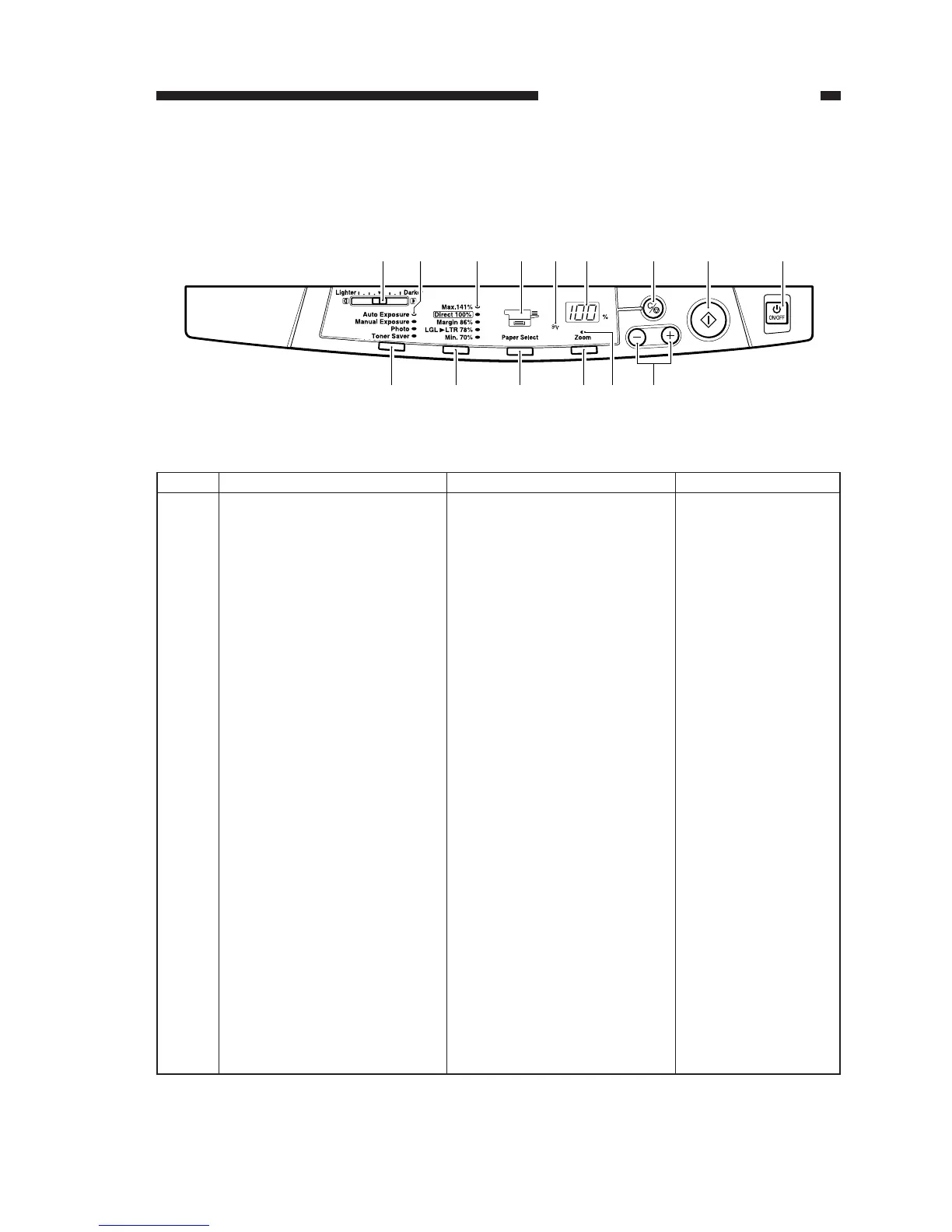
Description
Adjusts the density of copies
manually.
Indicates the selected copy den-
sity mode.
Indicates the selected default ra-
tio.
Indicates the selected cassette/
manual feed tray.If there is no
paper loaded, it flashes.
Flashes in response to a jam.
• Indicates the number of copies
or reproduction ratio.
• The symbol “%” turns on
when indicating a ratio.
Stops copying or returns copy-
ing mode to standard mode.
Starts copying.
Turns on and off the power.
No.
1
2
3
4
5
6
7
8
9
Remarks
100 (max.; continuous
copying)
Standard Mode
Ratio: 100%
Count: 1
Paper source: cassette
Copy density: auto
mode
Name
Copy density adjusting lever
Copy density mode indicator
Default ratio indicator
Paper selection indicator
*1
Jam indicator
Count/ratio indicator
Clear/stop key
Copy start key
Power switch
[8] [9][7][6][1]
[15] [14] [12] [10][11][13]
[5][4][3][2]
IV. USING THE MACHINE
A. Control Panel
Figure 1-401



 To Next Page