CHAPTER 11 TROUBLESHOOTING
COPYRIGHT
©
1999 CANON INC. CANON PC800s/900s REV.0 AUG. 1999 PRINTED IN JAPAN (IMPRIME AU JAPON)
11-88
Caution:
1. If the self-diagnosis has turned on, turn off the power switch to reset the machine.
In the case of ‘E000’, ‘E001’, ‘E002’, or ‘E003’, however, the machine must be reset as
follows: this consideration is to prevent feeding power to the fixing heater otherwise oc-
curring if the thermistor has an open circuit:
2. In the case of ‘E0’, ‘E000’, ‘E001’, ‘E002’, ‘E003’, or ‘E220’, the machine will turn off in
1.5 sec for ‘E0’ and ‘E000’ through ‘E003’ and in 2 sec for ‘E220’.
3. In the case of ‘E0’, ‘E000’, ‘E001’, ‘E002’, or ‘E003’, perform the following steps:
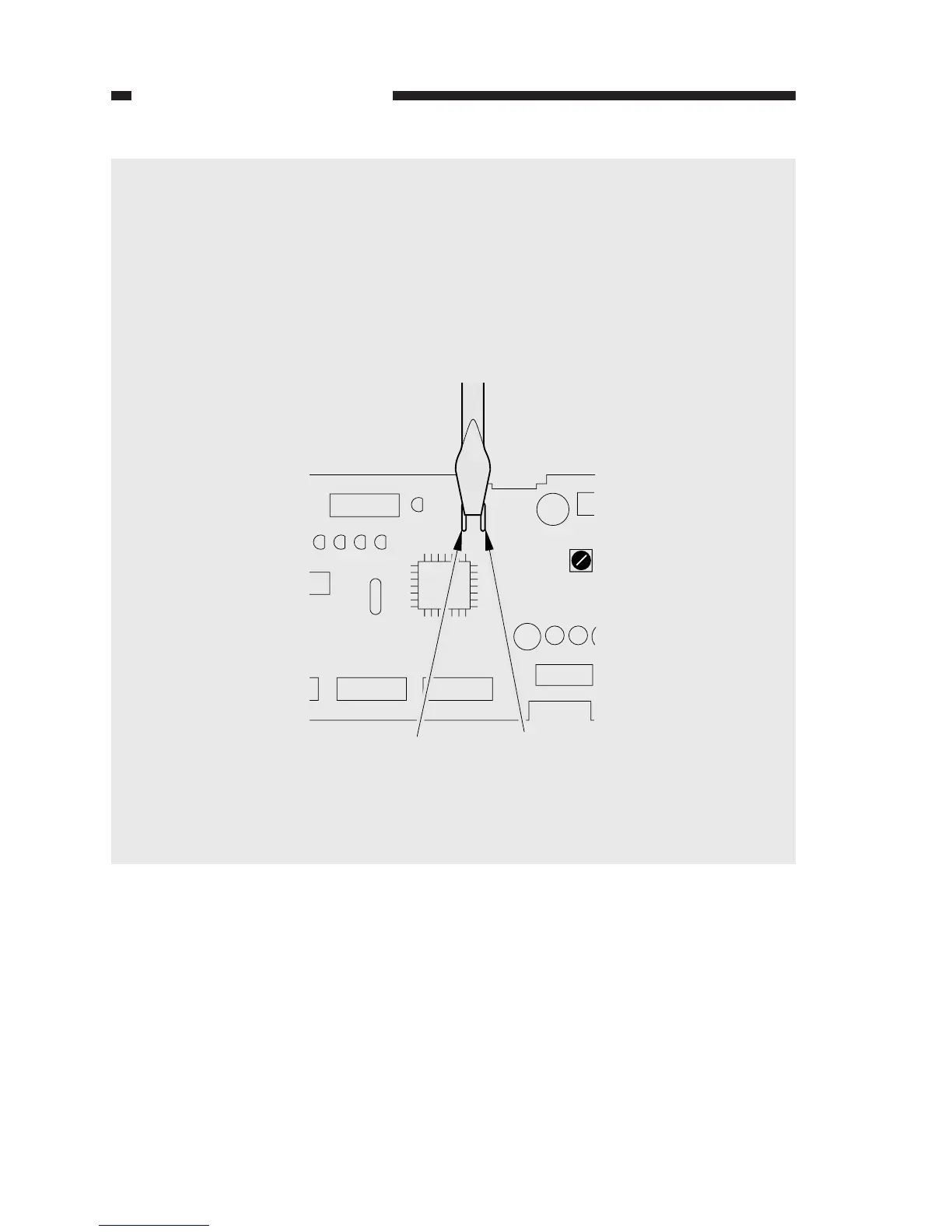
1) Turn off the power switch, and short circuit JP101 and JP102 on the DC controller PCB
with a screwdriver or the like.
Figure 11-701
2) While keeping the condition in step 1), turn on the power switch.
3) Stop short-circuiting JP101 and JP102.
JP102 JP101
JP101
JP102


 To Next Page