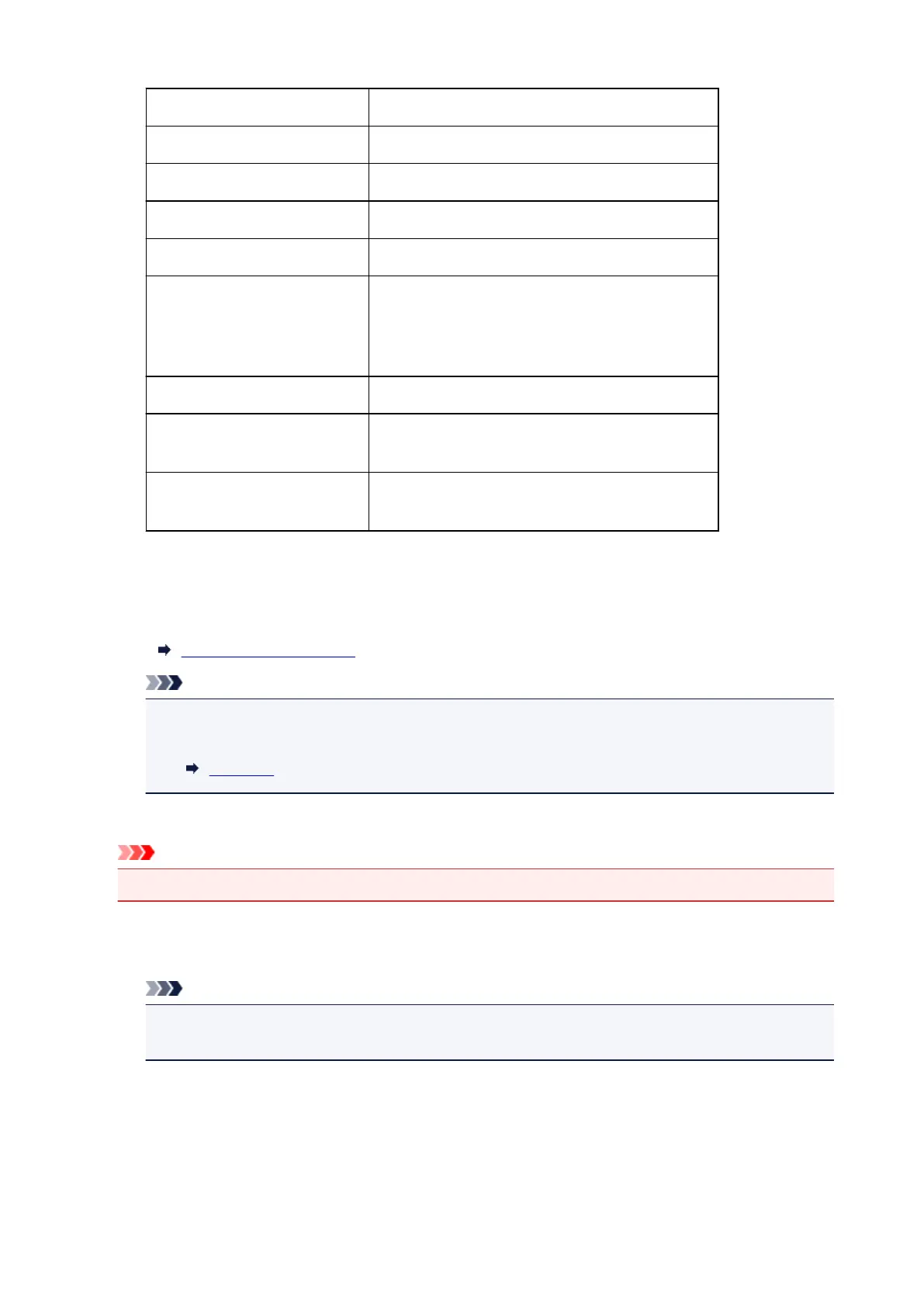
IPv6 link-local prefix length XXX (up to 3 digits)
MAC address XX:XX:XX:XX:XX:XX (12 characters)
IPsec settings Enable (ESP)/Enable (ESP & AH)/Enable (AH)/Disable
Pre-shared key XXXXXXXXXXXXXXXX (16 characters)
Printer name XXXXXXXXXXXXXXX (up to 15 characters)
Bonjour service name XXXXXXXXXXXXX
XXXXXXXXXXXXX
XXXXXXXXXXXXX
XXXXXXXXXXXXX (up to 52 characters)
Wireless Direct device name XXXXXX-XXXXXXseries
Root cert. thumbprint (SHA-1) XXXXXXXX XXXXXXXX XXXXXXXX
XXXXXXXX XXXXXXXX
Root cert. thumbprint (SHA-256) XXXXXXXX XXXXXXXX XXXXXXXX XXXXXXXX
XXXXXXXX XXXXXXXX XXXXXXXX XXXXXXXX
("XX" represents alphanumeric characters.)
◦
Print LAN details
Prints out the network setting information list.
Printing Network Settings
Note
•
You can also print out the network setting information list by selecting Print LAN details on
Test print.
Test print
•
Other settings
Important
•
You cannot select the items below when Disable LAN is selected for Change LAN.
◦
Set printer name
Specifies the printer name. You can use up to 15 characters for the name.
Note
•
You cannot use the same printer name as that already used for other LAN connected devices.
•
You cannot use a hyphen for the initial or last character of the printer name.
◦
TCP/IP settings
Performs IPv4 or IPv6 setting.
◦
WSD setting
203


 To Next Page