ECG100+ - ECG200+ - ECG100S - ECG200S
8. MENU AND DEVICE SETTINGS
8.3. ECG archive
The electrocardiograph can save up to 100 ECG's (1000 if the extended memory option is enabled).
To access the ECG archive, press the F2 key (ECG Archive) on the Main menu.
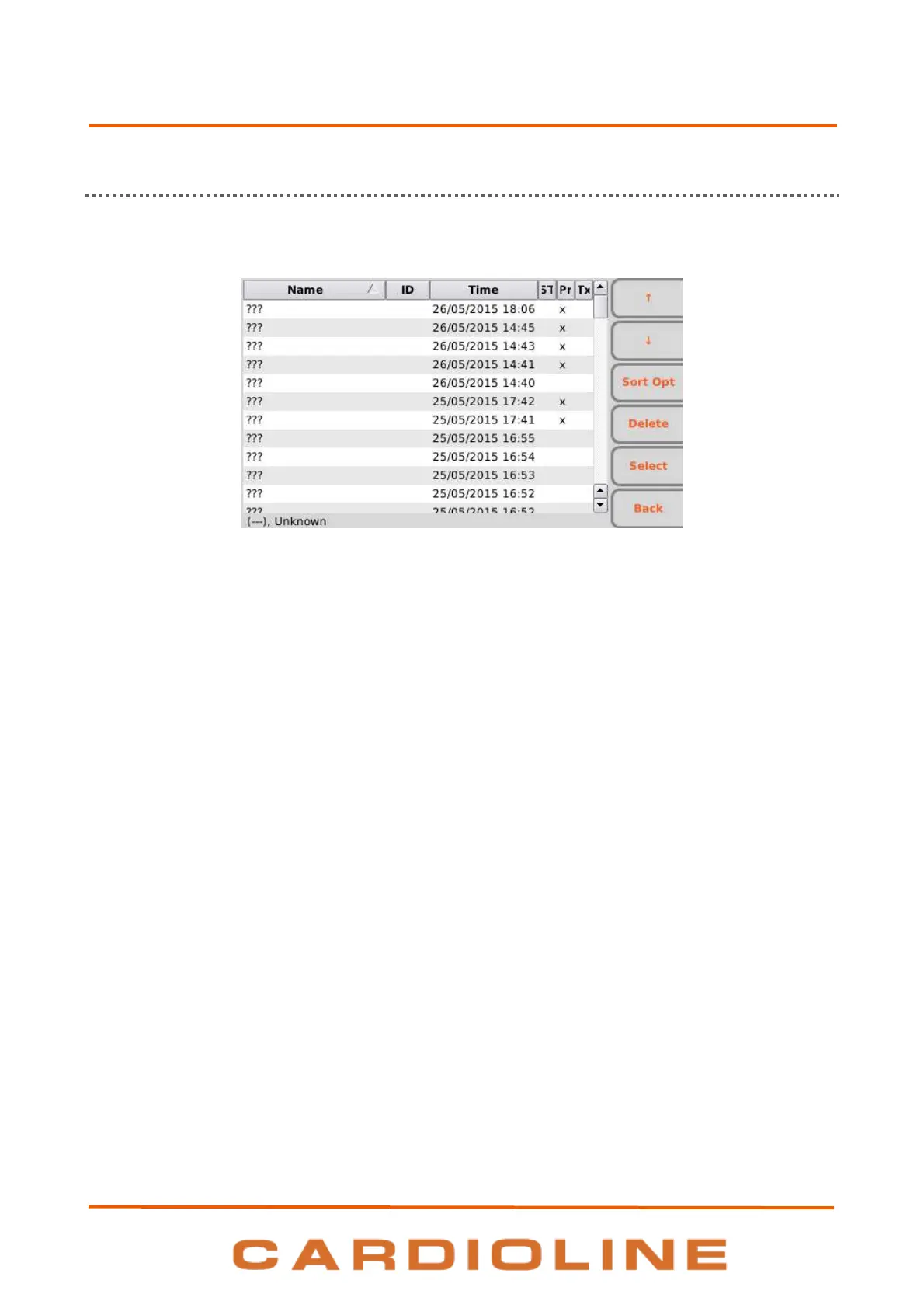
ECG archive screen
Display and function keys
The stored examinations are viewed as a list, each including:
Patient name
Patient ID
Date of birth or age
Date and time of acquisition
Status: transmitted, printed, urgent
It is possible to move within the list, to select an ECG and to order the list using the function keys:
F1 () to move to the previous examination,
F2 () to move to the following examination,
F3 (SortOpt) to order the list, cycling over the sorting criteria: Patient name ascending, Patient name
descending, Patient ID ascending, ID descending, acquisition time ascending, acquisition time
descending
F4 (Delete) to delete the selected ECG; a confirmation pop-up window appears,
F5 (Select) to open and view the selected ECG. Once an ECG has been opened it is possible to print
it, to modify the format of the tracings, to mark it as "urgent", to transmit it, etc. as described in Par.
7.5.1.
F6 (Back) to go back to the Main menu.
Hot keys












 To Next Page