3-SETUP
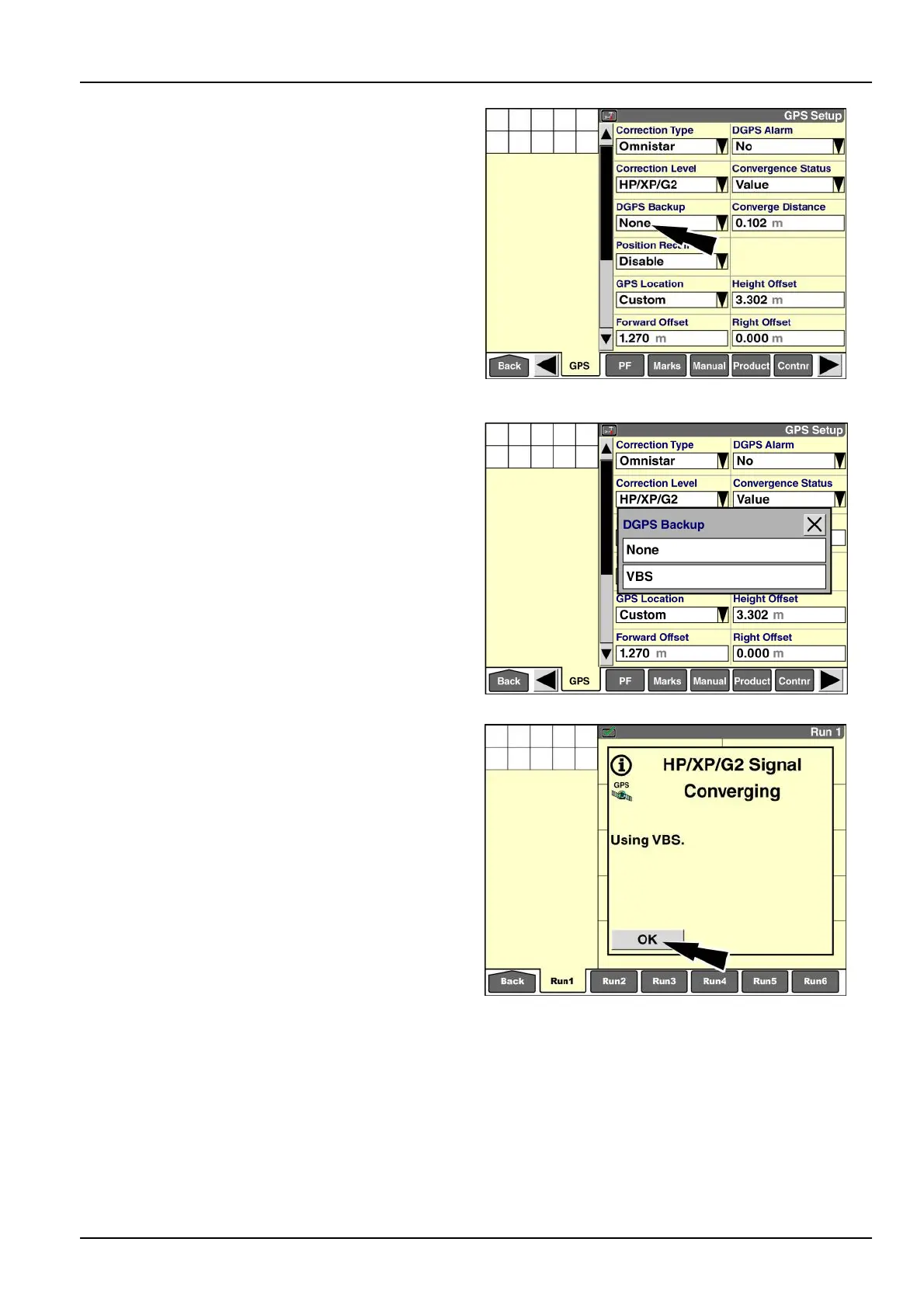
“DGPSBackup”(automaticbackupwith
VBSsignal)
Toovercomethelongconvergencetimeorsometimes
degradedsignalassociatedwithOmniSTAR®HP/XP/G2
correction,precisionfarmingsystemsofferOmniSTAR®
VBScorrectionasbackuptoOmniSTAR®HP/XP/G2
enabledreceivers.
•
WhileOmniSTAR®HP/XP/G2isconverging,thesys-
temusesOmniSTAR®VBScorrectiontoenableeld
operationwithDGPSinthemeantime.
•
IftheOmniSTAR®HP/XP/G2signaldegrades,thesys-
temusesOmniSTAR®VBScorrectionasabackup.
Pressthe“DGPSBackup”windowtoaccessthepop-up
optionswindow.
RAIL14DSP1513BA9
Press“VBS”toenablebackup.
Press“None”toturnbackupOFF.
Whenyouusethe“PrecisionFarming”applicationwith-
outthe“Autoguidance”application,thetransitionbetween
OmniSTAR®VBSandOmniSTAR®HP/XP/G2isseam-
lesswithnonoticationwhenthechangeoccurs.The
“GPSStatus”windowreportswhichtechnologyiscur-
rentlyinuse.
RAIL14DSP1580BA10
Ifthe“Autoguidance”applicationispresent,messages
informyouwhenthecorrectiontypechangesfromOm-
niSTAR®VBStoOmniSTAR®HP/XP/G2orvice-versa.
The“GPSStatus”windowalsoreportswhichtechnology
iscurrentlyinuse.
Whenyouengageautomaticsteeringforthersttime
sincethedisplaywaspoweredON,iftheOmniSTAR®
HP/XP/G2signalisnotconverged,amessagedisplays:
“UsingVBS.”Themessagedisplaysjustonce–whenthe
systemengages.
RAIL14DSP1581BA11
3-71



 To Next Page