4-OPERATION
Farm
Select“Farm”todeleteallinformationrelatedtothese-
lectedfarmorfarms.Thisincludeselds,tasks,obsta-
cles,boundaries,calibrations,autoguidanceswaths,and
GPSrecordsforanyoperation–planting,spraying,har-
vesting,etc.–associatedwiththefarm.
SinceeachfarmhasauniqueIDandisusedacrossop-
erationsandvehicles,onlydeleteafarmifyouaresure
thatyouhavenofutureuseforthefarmoranyofitsas-
sociatedeldsanddata.Re-creatingthesamefarmata
latertimeresultsinanewfarmwithadifferentID,requir-
ingmoremanagementeffortwiththedesktopsoftware.
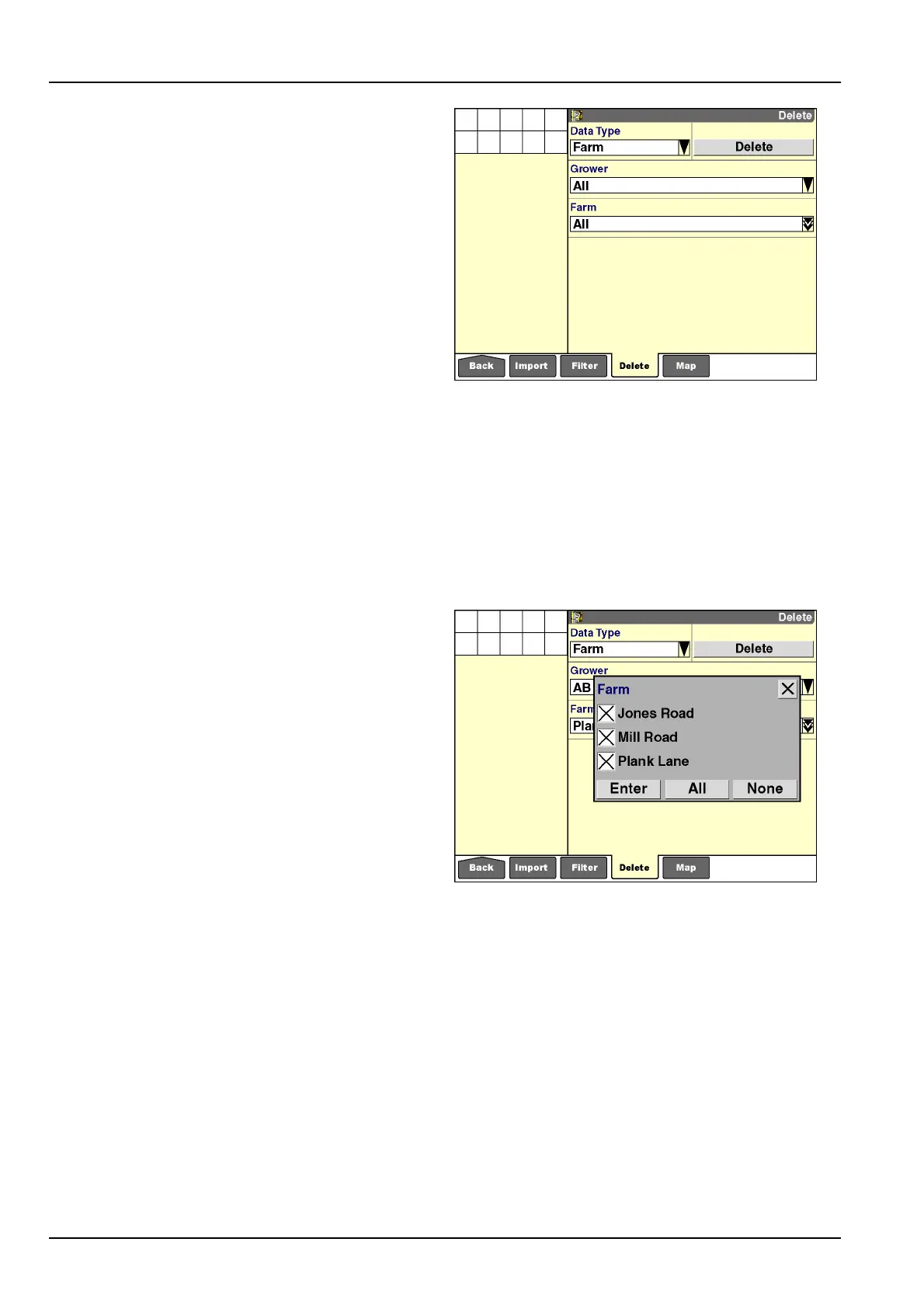
Farmsaredeletedinthesamefashionasgrowers.To
deleteallfarmsfromdisplaymemoryandthememory
stick:
1.Select“Farm”inthe“DataType”window.
2.Pressthe“Grower”windowtoselect“All”forallgrow-
ersonthememorystick.
3.The“Farm”windowdefaultsto“All,”when“All”isse-
lectedinthe“Grower”window.Pressthe“Delete”but-
tontodeleteallfarmsonthememorystick.
4.Pressthe“Yes”or“No”buttonattheconrmationmes-
sage.
RCIL11DSP316BBG10
Toselectivelydeletefarmsfromdisplaymemoryandthe
memorystick:
1.Select“Farm”inthe“DataType”window.
2.Pressthe“Grower”windowtolimittheselectiontoa
specicgrower.
3.Pressthe“Farm”windowtoaccessthepop-upoptions
window.
4.Selectthefarmstobedeleted.
NOTE:Ifonlyonefarmispresentonthememorystick,the
farm’snameautomaticallypopulatesthe“Farm”window.
5.Pressthe“Enter”buttontoconrmtheselection.
6.Pressthe“Delete”buttontodeletetheselectedfarms.
7.Pressthe“Yes”orNo”buttonattheconrmationmes-
sage.
RCIL11DSP317BBG11
4-12



 To Next Page