4-OPERATION
Field
Select“Field”todeleteallinformationrelatedtothese-
lectedeldorelds.Thisincludestasks,boundary,obsta-
cles,calibrations,autoguidanceswaths,andGPSrecords
foranyoperation–planting,spraying,harvesting,etc.–
associatedwiththeeld.
SinceeacheldhasauniqueIDandisusedacrossoper-
ationsandvehicles,onlydeleteaeldifyouaresurethat
youhavenofutureusefortheeldoranyofitsassociated
data.Re-creatingthesameeldatalatertimeresultsina
neweldwithadifferentID,requiringmoremanagement
effortwiththedesktopsoftware.
Fielddeletionrequiresanadditionalwindowtomakethe
correctselection.T odeletealleldsonthememorystick:
1.Select“Farm”inthe“DataType”window.
2.Pressthe“Grower”windowtoselect“All”forallgrow-
ersonthememorystick.
3.The“Farm”and“Field”windowsdefaultto“All,”when
“All”isselectedinthe“Grower”window.Pressthe
“Delete”buttontodeletealleldsforallfarmsforall
growersonthememorystick.
4.Pressthe“Yes”or“No”buttonattheconrmationmes-
sage.
RCIL11DSP318BBG12
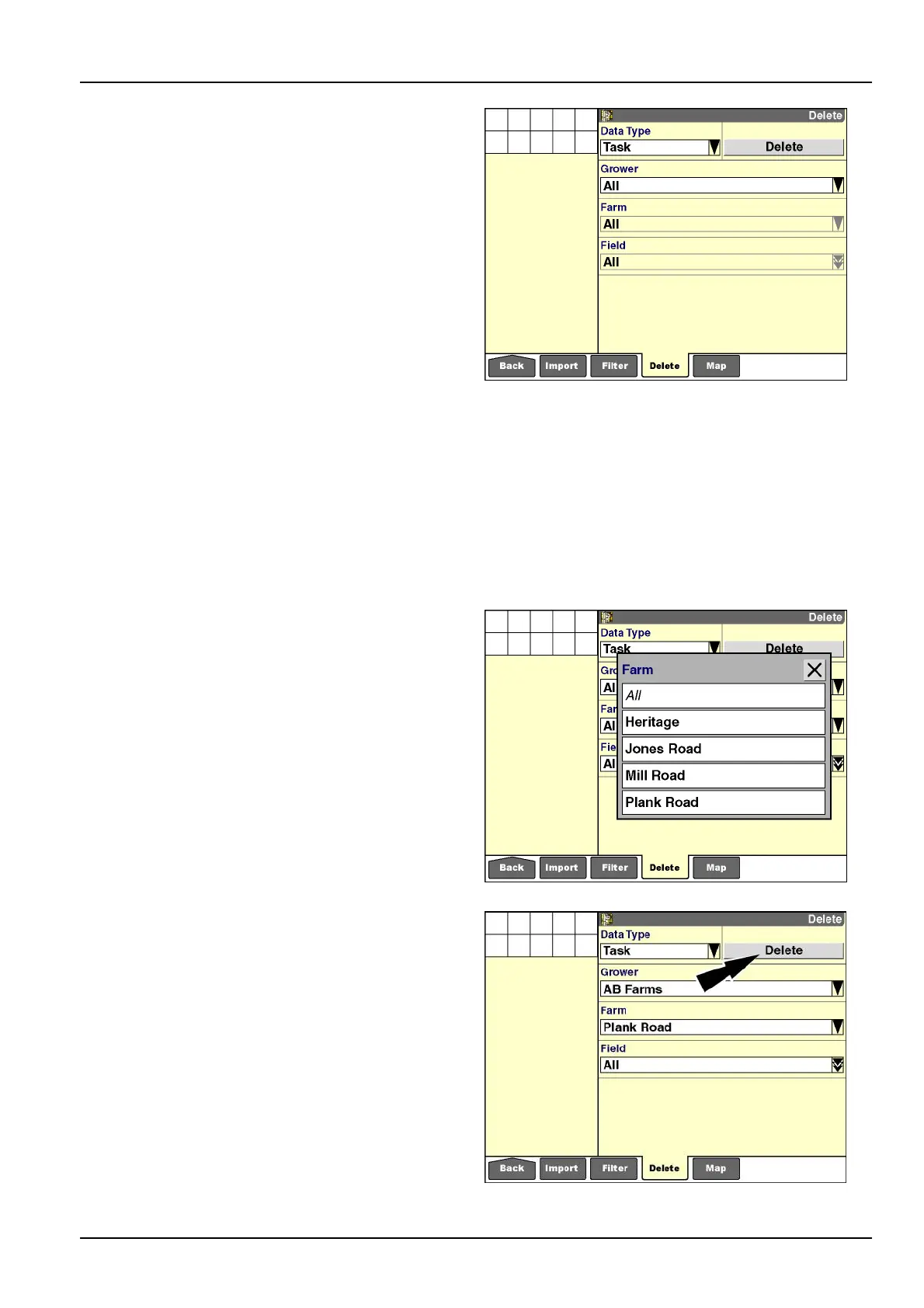
Todeletetheeldsforaspecicfarm:
1.Pressthe“Grower”windowtodisplaythepop-upop-
tionswindowandselectthegrowerofthefarmwhich
containstheeld.
2.Pressthe“Farm”windowtoselectthefarmwhichcon-
tainstheeld.Apop-upoptionswindowdisplays.
3.Pressafarmintheoptionswindowtoselectit.
RCIL11DSP319BBG13
Thescreenupdateswithyourselectioninthe“Farm”win-
dowandwiththe“Field”windowsetto“All.”
Pressthe“Delete”buttontodeletealleldsforthese-
lectedfarm.Theconrmationmessagedisplays.
RCIL11DSP320BBG14
4-13



 To Next Page