9-ACCESSORIES
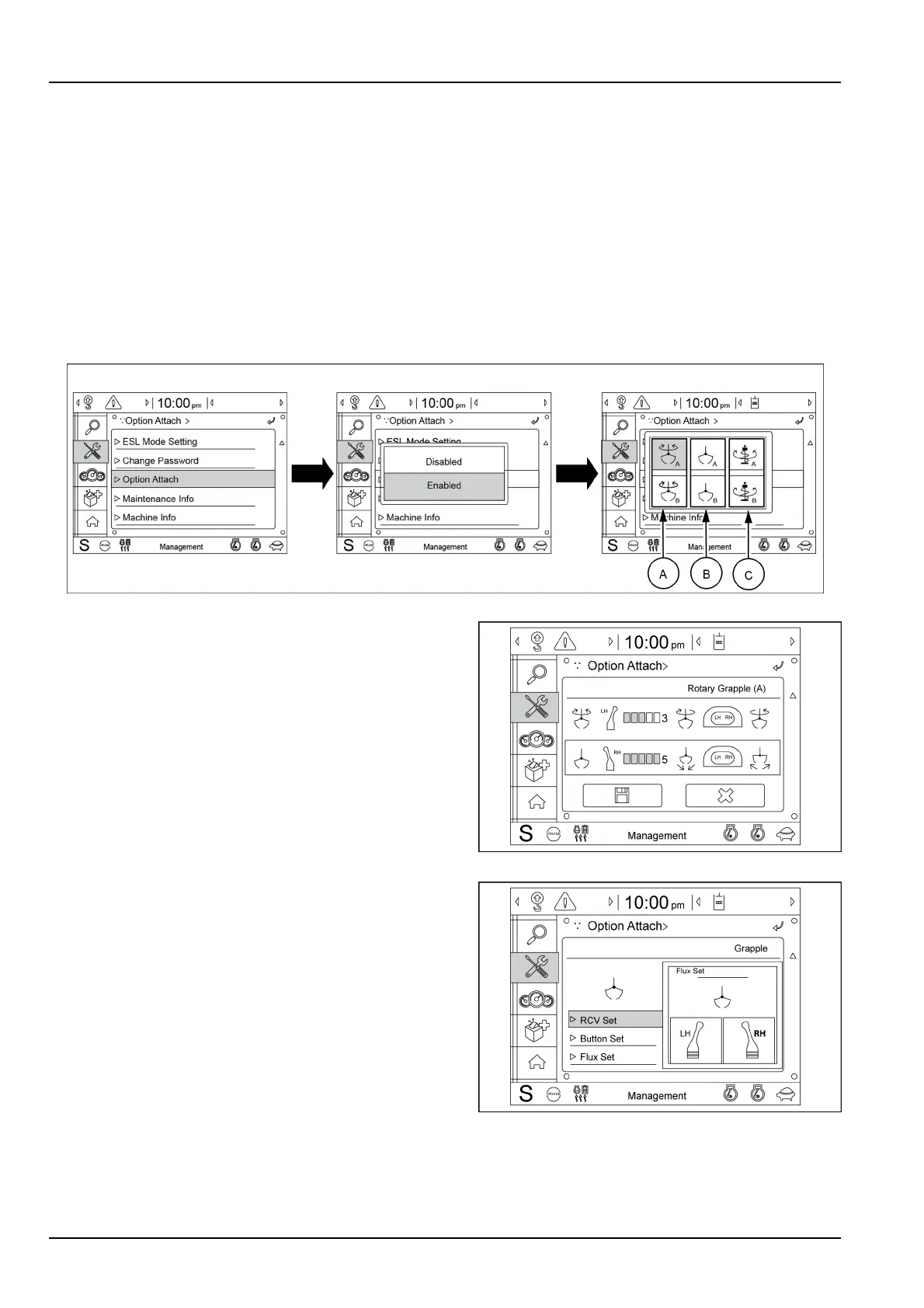
Toactivateandsettingthesecondauxiliaryhydrauliccir-
cuit,followtheprocedurefromthemainmenuscreento
the“Optionattach”inthesubmenu“Management”asre-
portedin3-27.
Threekindsofattachmentoptionscanbeselectedby
thismenu:
A.Rotarygrapple(4-way)
B.Grapple(2-way)
C.Auger(2-way).
NOTE:forthesecondauxiliaryhydrauliccircuitsettings
canbeselectedtherotary/grappleoperation.
SMIL18MEX0092EA15
Selectrotary.
•
Remotecontrolvalve,buttonanduxcanbesetbythis
menu.
SMIL17MEX2977AA16
SelectRCVset:
•
Setleft-handorright-handremotecontrolvalveforro-
taryoperation.
NOTE:inthisscreentheoperatorcanchoosetocus-
tomizethesettingoftheleft-handandtheright-handre-
motecontrolvalvestoperformtherotaryandgrappleop-
erations.
•
Iftheoperatorsetsright-handremotecontrolvalvefor
grappleoperation,left-handremotecontrolvalvewillbe
setforrotaryautomatically.
SMIL17MEX2978AA17
9-18



 To Next Page