22
GB
INSTALLATION
RX DC X-RAY UNIT
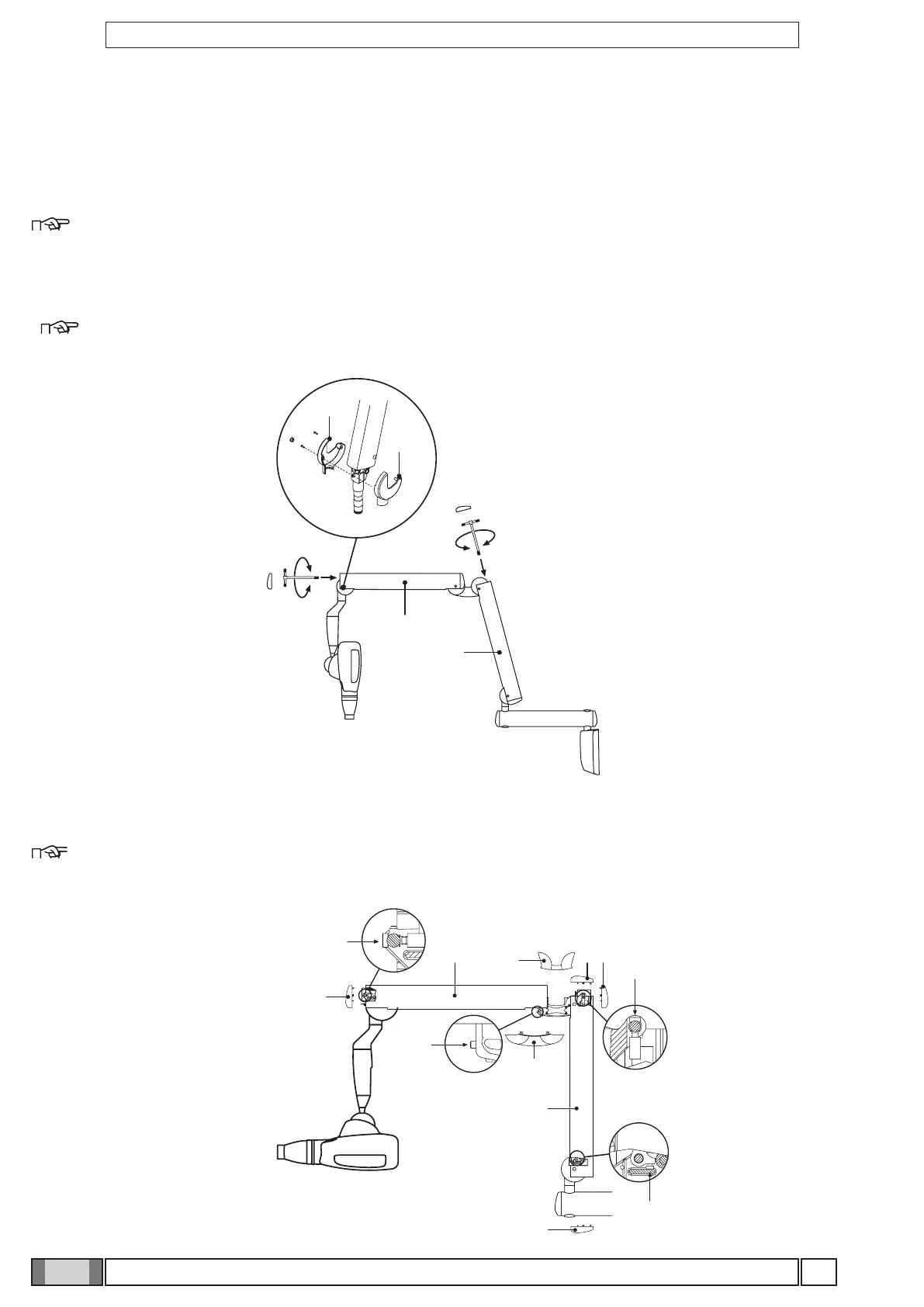
4.10 Adjusting the double pantograph arm end-stops
Figure R
If the end-stops of the double pantograph arm need to be adjusted, work on the screws (i - l - m - n) shown in the diagram.
NOTE:
To adjust the screw (n) on the articulated joint of the extension side place the relevant arm (a) in a horizontal position.
4.9 Balancing the double pantograph arm
Figure Q
If the double pantograph arm does not stay in a stable position, adjust the spring tension by using an 8mm Allen wrench
about 20cm long, provided with the device.
• To adjust the arm (a) connected to the extension: position it as shown in the gure and place the wrench at point A.
NOTE:
TIGHTEN (clockwise) if the arm tends to move down.
LOOSEN (anti-clockwise) if the arm tends to move up.
• To adjust the arm (b) connected to the generator: put the 2 covers (c) and (d) on the front pivot point, move the arm
(b) into a horizontal position and insert the key in point B.
NOTE:
TIGHTEN (clockwise) if the arm tends to move down.
LOOSEN (anti-clockwise) if the arm tends to move up.
Figure Q
Figure R



 To Next Page