13Software Overview
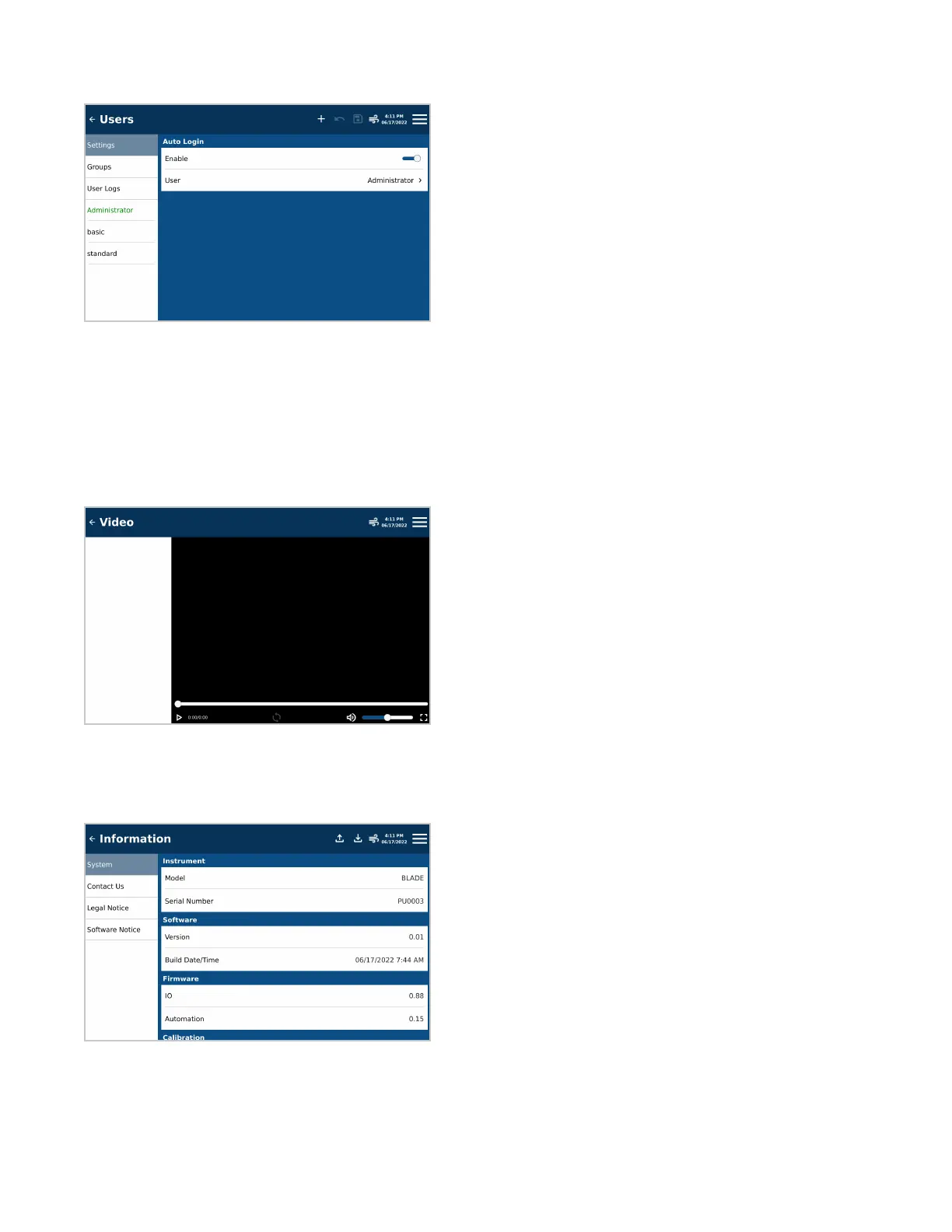
Users
Location for creating and deleting different user accounts, as well as reviewing user logs if necessary
• Settings: Turning ON/OFF auto-login requirements for users
• Groups: Determines visible system functionality depending on the selected user group
• User Logs: Audit trail for tracking user movement within software
• Current User: List of users are located beneath logs. Green indicates the user who is currently logged in.
Video
The videos provides instructions on system use, diagnostic tests, and helpful tips on preparing samples.
Information
Displays system information including serial number, software version and contact information.
• System: Reference for serial number, software and rmware versions, and calibration dates
• Contact Us: Contact information for CEM Headquarters and Subsidiaries
• Legal Notice: Legal information concerning the use and distribution of the instrument and other CEM products
• Software Notice: System notication pertaining to the software currently loaded on the system


 To Next Page