18
INTRODUCTION PRE-INSTALL NETWORKINSTALL ACCESS CONTROL
Gate Access (Wired)
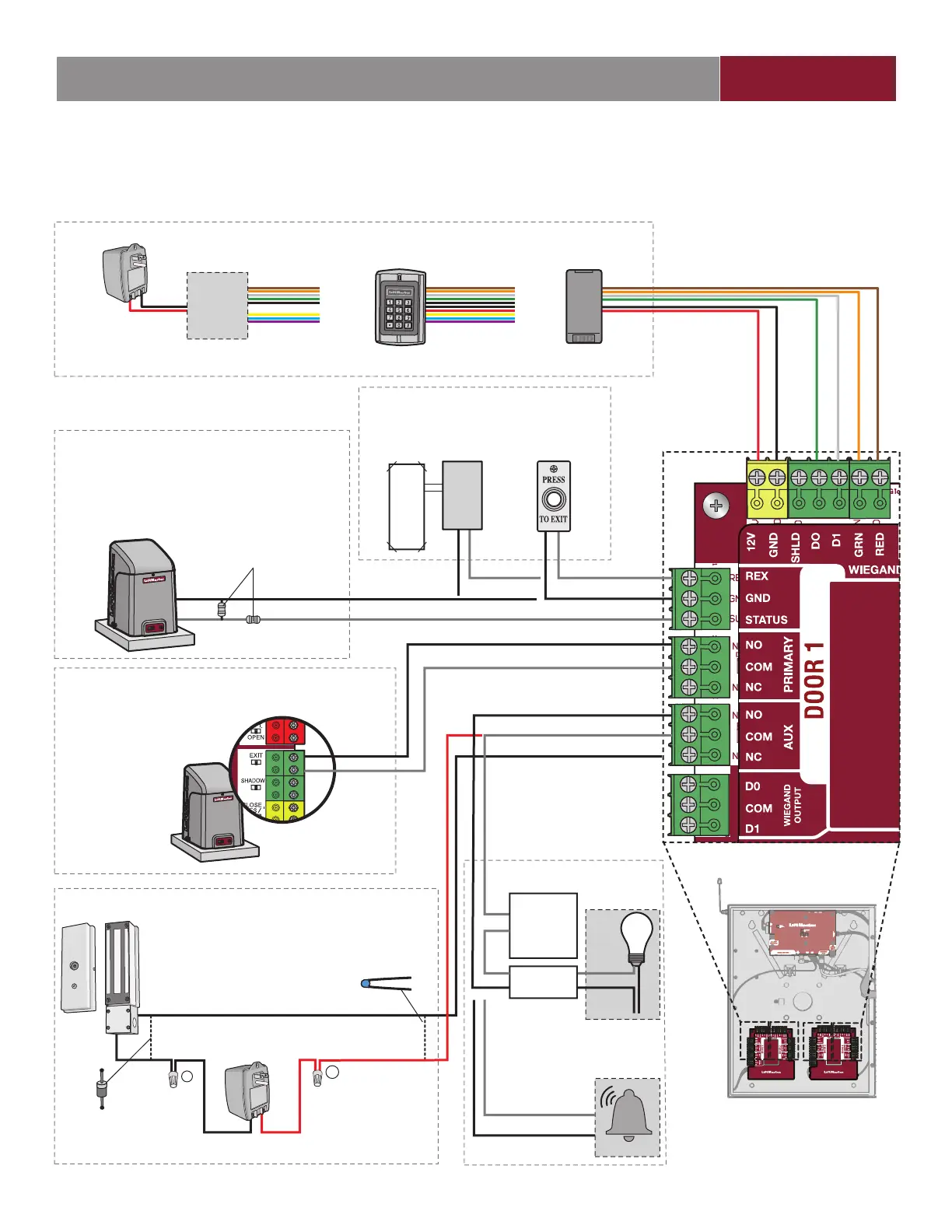
Disconnect power BEFORE making electrical connections. Below is an example of a wiring setup for gate access. Gate access can
be wired to Door 1, 2, 3, or 4 on the Door Boards. LiftMaster
®
Security+ 2.0
®
gate operators can also be programmed to communicate
wirelessly instead of using a wired connection (refer to the following page).
+
–
NOTE: The length of the unshielded
wires should be kept to a minimum to
avoid electrical noise.
PUSH
BUTTON
GATE OPERATOR
(connect to Aux Closed Limit switch -
refer to gate operator manual)
MAGLOCK
RED LED - brown
GREEN LED - orange
DATA 1 - white
DATA 0 - green
GROUND - black
12Vdc - red
READER
OR
KEYPAD
OR
EOL (End of Line)
Resistor (1k ohm)
EXTERNAL FREE EXIT
LOOP DETECTOR
For DC Power:
Install a 1N4005
diode or equivalent
Use 18-22 AWG
Power for Maglock
(Not Provided)
DO NOT use the power
supply for the controller
For AC Power:
Install a Siemens S10K30MOV
(Metal Oxide Varistor) (provided)
or equivalent
REQUEST TO EXIT
GROUND
STATUS
NORMALLY OPEN
COMMON
COMMON
NORMALLY CLOSED
NORMALLY CLOSED
COMMON
OR
DOOR 1, 2, 3, or 4
REQUEST TO EXIT
WIEGAND
STATUS
PRIMARY RELAY
*AUXILIARY RELAY
GATE OPERATOR
COMMON
EXIT
NORMALLY OPEN
ALARM BYPASS
LIGHT
NORMALLY OPEN
COMMUN
LOAD
LINE
AUXILIARY RELAY
OR
NEUTRAL
LiftMaster
®
Security+ 2.0
®
gate
operators can be programmed
to communicate wirelessly
instead of using a wired
connection. Refer to the
following page.
* NOTE: MAGLOCK and ALARM
BYPASS not evaluated by UL.
(Not applicable for wireless gate operator connections.)
RFID ANTENNA
with Wiegand output
Power for RFID ANTENNA
(Not Provided)
DO NOT use the power
supply for the controller
NOTE: DO NOT
run high voltage
power within
the CAPXL
enclosure.
Isolation
Relay
Low
Voltage
Power
Supply
NOTE: For KPR2000
keypad, wire the pink and
black (ground) wires together.


 To Next Page