25
INTRODUCTION PRE-INSTALL NETWORKINSTALL ACCESS CONTROL
Auto-Call Feature
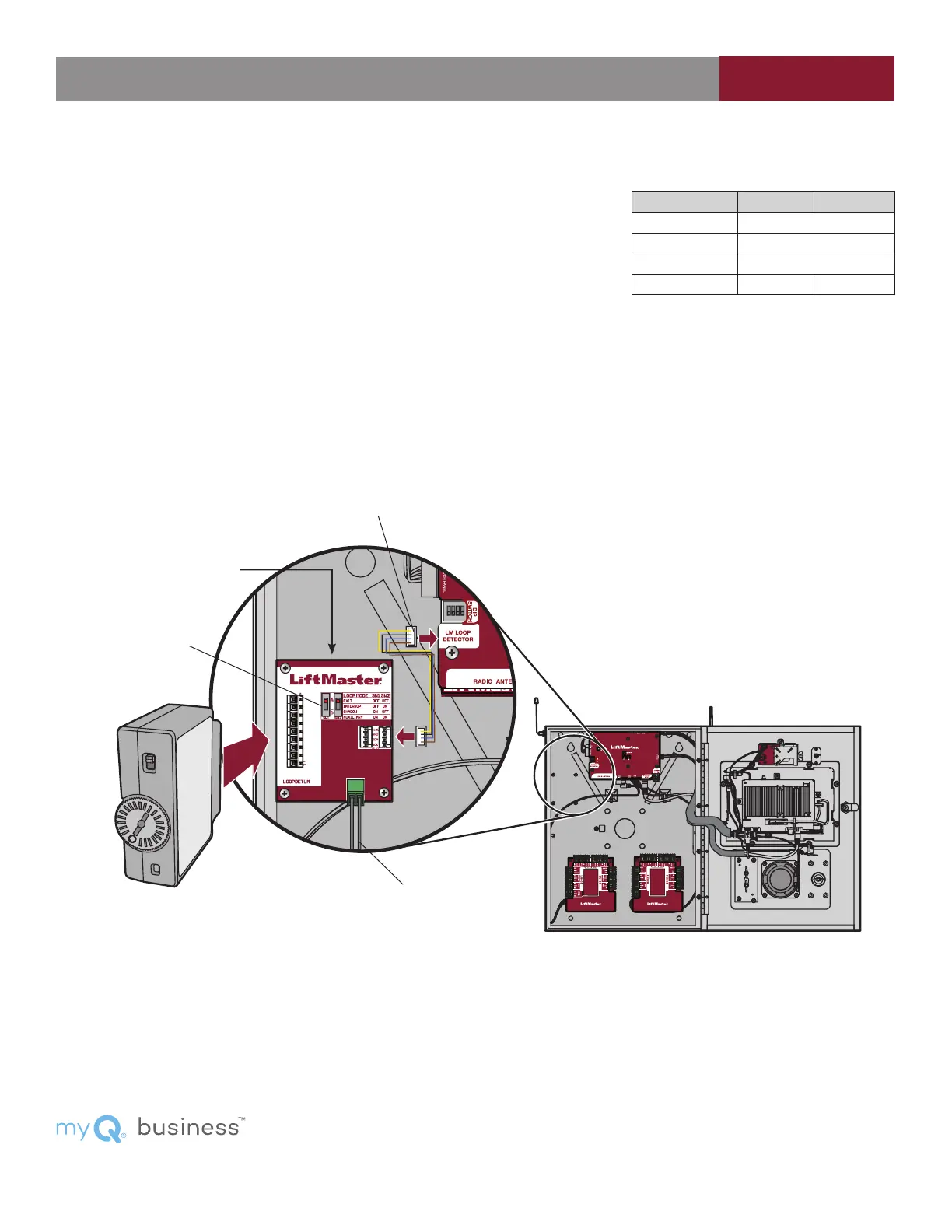
Disconnect power BEFORE making electrical connections. The Loop Detector Board
(model LPEXP, not provided) combined with the LOOPDETLM, provides Auto Call
functionality that is available through the auxiliary switch setting. The LPEXP and
LOOPDETLM can be purchased together as a kit (LPEXPKIT). When the loop detects
a vehicle the number programmed into the “Quick call” fi eld in myQ
®
Business™ is
automatically dialed.
1. Secure the Loop Detector Board (model LPEXP) to the standoffs in the CAPXL /
CAPXLV with the provided screws.
2. Connect the wire harness from the Loop Detector Board to the Power/Internet Board.
3. Connect the loop wires to the input on the Loop Detector Board.
4. Plug in the loop detector (model LOOPDETLM).
5. Set both switches on the Loop Detector Board to ON (auxiliary setting).
6. Activate the loop input in the CAPXL / CAPXLV main Admin screen (Toggle dip
switch #1)
NOTE: Loop Detector Board not evaluated by UL.
ON
Plug-in Loop Detector
Model LOOPDETLM
Wire Harness
Loop Wiring
LOOP MODE SW1 SW2
EXIT Not supported
INTERRUPT Not supported
SHADOW Not supported
AUXILIARY ON ON
Switches
LOOP DETECTOR BOARD
For myQ
®
Business™ programming please visit www.myqbusiness.com.


 To Next Page