23
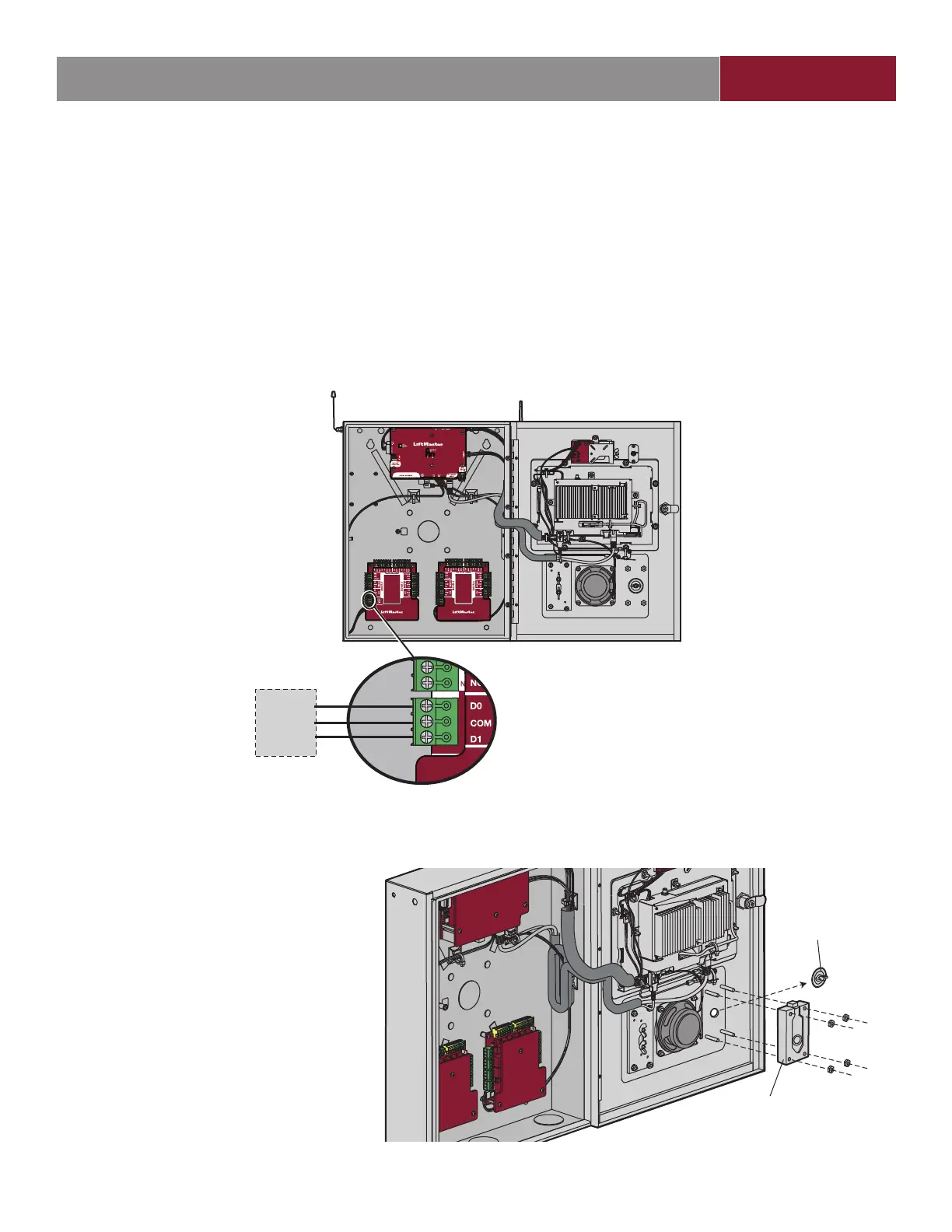
Wiegand Output
ON
DOOR BOARD1
Third Party Access System
Wiegand Input
(This Device/Reader Must
Li
t
t
L 2
4.
Data-0
Ground
Data-1
Disconnect power BEFORE making electrical connections. The CAPXL / CAPXLV offers a Wiegand output capable of 26 bit
transmission of the following data:
• Success Call with access granted by the resident. The CAPXL / CAPXLV will provide a myQ
®
Business™ specifi ed facility code
followed by the Directory Code of the resident that granted access.
And/Or
• Successful access through Entry Code. The CAPXL / CAPXLV will provide a myQ
®
Business™ specifi ed facility code followed by the
successful Entry Code.
And/Or
• Successful access with a Wiegand credential. The CAPXL / CAPXLV will pass along the successful credential Facility Code and ID.
INTRODUCTION PRE-INSTALL NETWORKINSTALL ACCESS CONTROL
Postal Lock
1. Remove the wing nut and plug. Discard the
wing nut and plug.
2. Remove 4 mounting nuts from studs.
3. Install postal lock using 4 nuts from step 3.
4. Cut the factory installed wire tie from the
postal lock switch.
5. The postal lock switch is wired from the
factory.
Postal Lock
Wing Nut and Plug


 To Next Page