3
PRE-INSTALL NETWORKINSTALL ACCESS CONTROLINTRODUCTION
INTRODUCTION
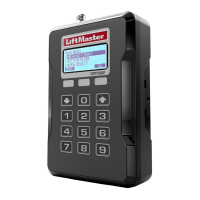
CAPXL / CAPXLV Overview ........................................... 4
Power/Internet Board Overview ..................................... 5
Door Board Overview .................................................... 6
Carton Inventory ........................................................... 7
Tools Needed ................................................................ 7
Dimensions ................................................................... 8
System Specifi cations ................................................... 8
Wire Specifi cations ....................................................... 9
Internet Requirements................................................. 10
PRE-INSTALL
1
Internet Service ........................................................... 11
Phone Provider ........................................................... 11
Setup a myQ
®
Business™ Account ............................. 11
INSTALL
2
Remove Knockouts ..................................................... 12
Mount the CAPXL / CAPXLV........................................ 13
Install Antennas........................................................... 14
Install the Ground........................................................ 15
Connect Power ............................................................ 16
NETWORK
3
Connect Internet .......................................................... 17
Validate Setup ............................................................. 17
ACCESS CONTROL
4
Gate Access (Wired).................................................... 18
Gate Access (Wireless) ............................................... 19
Door Access ................................................................ 20
Card Reader ................................................................ 21
Wiegand Output .......................................................... 22
Postal Lock ................................................................. 23
Video Camera Feature ................................................. 24
Auto-Call Feature ......................................................... 25
Wiring Diagram ........................................................... 26
Repair Parts ................................................................ 27
Accessories ................................................................. 27
Confi guration Sheet..................................................... 28
Legal Disclaimers ........................................................ 29
Warranty ..................................................................... 30
For myQ
®
Business™ programming, please visit www.myqbusiness.com


 To Next Page