Automatic Transformer Test System 3300/3302 User’s Manual
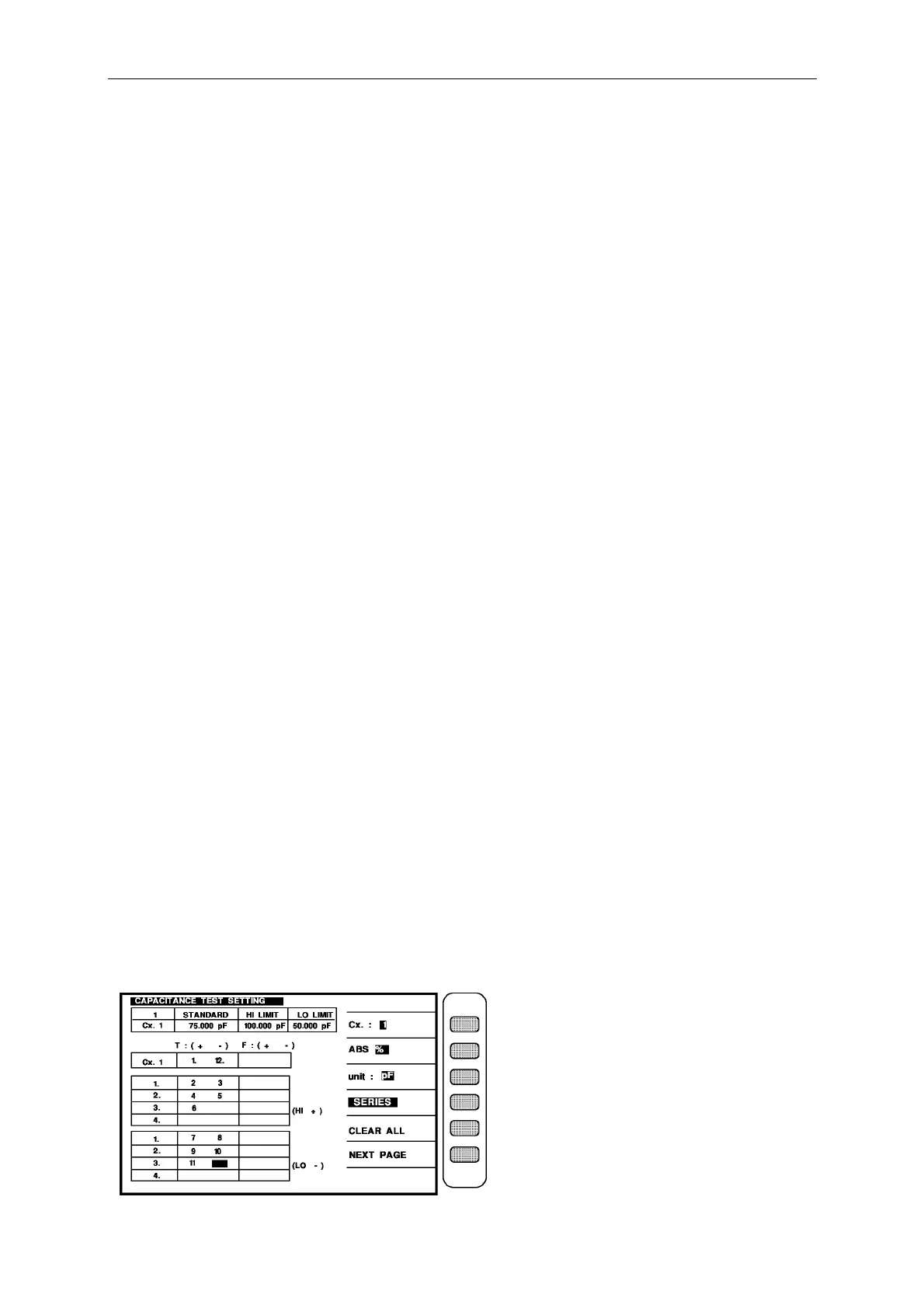
When into this screen is entrance to the judgment setting of transformer two items capacitance,
it is also guidable operation, just according the block area on the screen and number keys to
input the pin number, press [ENTER] then automatically change to next pin setting item, use
the same method till the last item of pin number on the same screen, press [ENTER] then
automatically change to next the setting screen of parameter.
Ex.: The spec. of the testing transformer capacitance are following:
Cx1 (PIN 1,2,3,4,5,6 – 7,8,9,10,11,12,) = 75 pF
HI LIMIT = 100pF, LO LIMIT = 50 pF.
Then the input is as below :
press the key [ABS%] beside the screen to make [ABS] change to back-light.
press the unit key [unit : pF] beside the screen to change the unit to The pF is back-light.
Cx.1 STANDARD : [7] [5] [Enter] [1] [0] [0] [Enter] [5] [0] [Enter]
Cx.1 TERMINAL : [1] [Enter] [1] [2] [Enter]
Use the forward key to move the block area to the pin input box of the Hi terminal
transformer (1.) and input : HI TERMINAL 1. : [2] [Enter] [3] [Enter]
Use the forward key to move the block area to the pin input box of the Hi terminal
transformer (2.) and input : HI TERMINAL 2. : [4] [Enter] [5] [Enter]
Use the forward key to move the block area to the pin input box of the Hi terminal
transformer (3.) and input : HI TERMINAL 3. : [6] [Enter]
Use the forward key to move the block area to the pin input box of the Lo terminal
transformer (1.) and input : LO TERMINAL 1. : [7] [Enter] [8] [Enter]
Use the forward key to move the block area to the pin input box of the Lo terminal
transformer (2.) and input : LO TERMINAL 2. : [9] [Enter] [1] [0] [Enter]
Use the forward key to move the block area to the pin input box of the Lo terminal
transformer (3.) and input : LO TERMINAL 3. : [1] [1] [Enter]
After finish the input all the parameter, the screen is as below:



 To Next Page