PLAY VIDEO GAMES
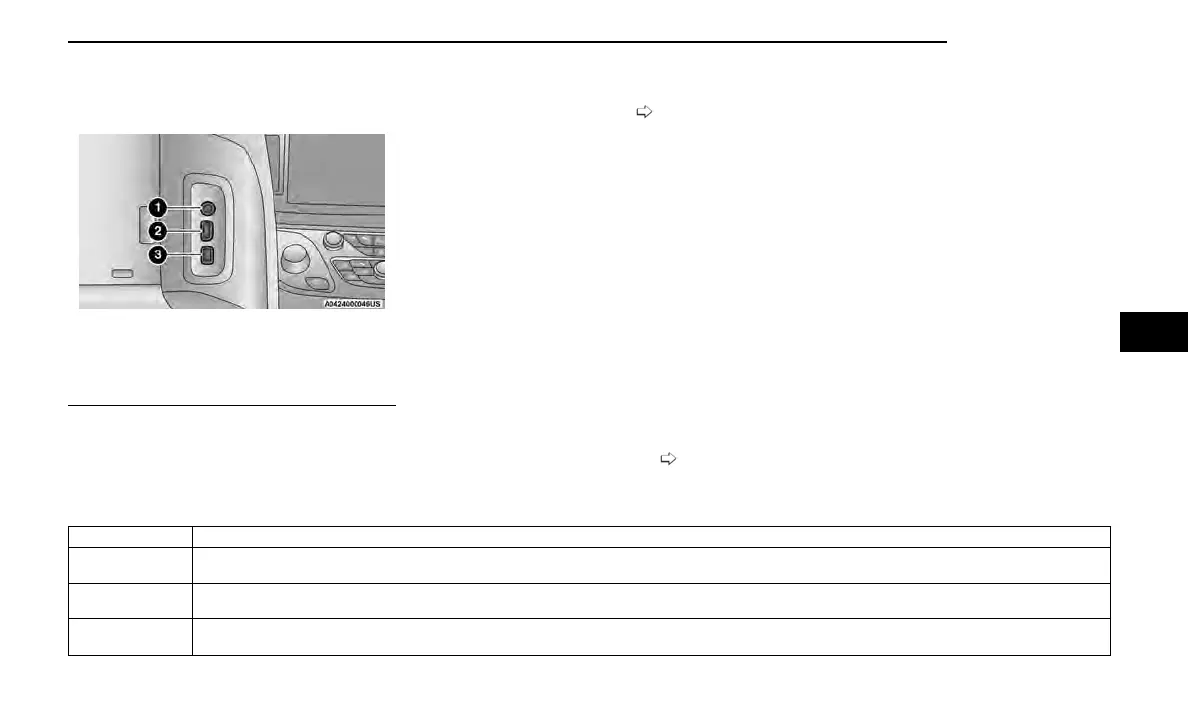
Connect the video game console to either of the HDMI
ports located behind either of the first row seats.
NOTE:
Certain high-end video games may exceed the power
limit of the vehicle's Power Inverter
page 83.
HEADPHONES OPERATION
Rear Seat Entertainment with Fire TV built-in does not
come equipped with headphones. Customers will need
to provide their own wireless headphones that can be
paired with the system using Bluetooth®. Customers
can also use their own wired headphones and plug
them into a Headphone Jack located under one of the
rear screens.
Wireless Headphones Pairing
To pair wireless headphones with Rear Seat Entertain-
ment with Fire TV built-in using the rear screens, follow
these steps:
1. Push the Gear/Settings button on the Voice Remote
with Alexa or tap the screen.
2. Select the Gear/Settings icon on the screen.
3. Select “Settings” on the screen.
4. While in Settings, select “Controllers & Bluetooth®
Devices”.
5. Select “Other Bluetooth® Devices” and follow the
on-screen steps for pairing.
While multiple headphones can be paired, only one will
output audio at a time.
REAR CLIMATE CONTROLS
The Rear Climate Controls can also be controlled using Rear Seat Entertainment with Fire TV built-in page 67.
Rear Climate Controls can be accessed by using the Vehicle menu. Tap on either rear screen and select the Vehicle icon or press the Vehicle button on the Voice Remote with
Alexa. Then select the Rear Climate Controls option.
Options within Rear Climate Controls include:
Icon Description
ON
Climate Control ON Button
Press and release this button to turn the Rear Climate Controls on.
OFF
Climate Control OFF Button
Press and release this button to turn the Rear Climate Controls off.
SYNC
SYNC Button
Pressing this button will sync both sides of the Rear Climate Controls.
AUX/HDMI/USB
1 — Headphone Jack (Headphone Output Only)
2 — HDMI Port
3 — USB Port (Charge Only)
MULTIMEDIA 191
5















 To Next Page