Number Of Indicator
Lights Illuminated
Percent Of Battery
Charge
1st light blinks 0 – 20%
1st light on, 2nd light
blinks
21 – 40%
1st and 2nd lights on,
3rd light blinks
41 – 60%
1st, 2nd, and 3rd lights
on, 4th light blinks
61 – 80%
1st, 2nd, 3rd, and 4th
lights on, 5th light blinks
81 – 99%
All 5 lights on 100%
Two outer lights are
blinking
Indicates an error in the
charging process
Lights turn on one at a
time from left to right
(when looking at the
front of the vehicle)
Indicates system is waiting
for scheduled time in
charge schedule to begin
charging
All lights turn on, then
immediately turn off
Indicates a successful
plug-in
NOTE:
For each segment of lights illuminated indicating the
percent of battery charge, two different blink rates are
used. A blink rate of 1 second on/1 second off indi-
cates that the first half is charging. The blink rate will
increase to 0.5 second on/0.5 second off to indicate
that the second half is charging. When the battery is
fully charged, the blinking stops and the lights remain
illuminated as charging continues.
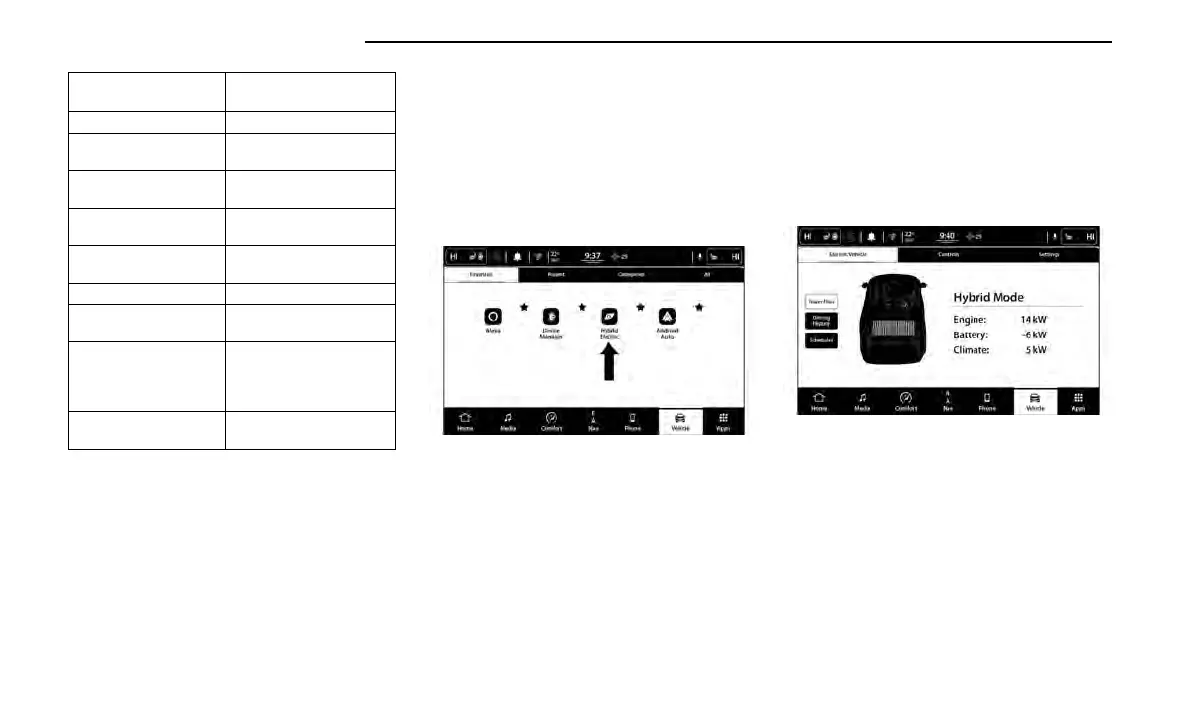
HYBRID ELECTRIC APP
Within the Uconnect system is the Hybrid Electric App
that allows you to see your vehicle’s power flow, under-
stand your driving history, and set a charging schedule
for your vehicle’s high voltage battery. To access this
App, press the Apps or Vehicle button on the main
menu bar of the radio’s touchscreen, and locate the
Hybrid Electric App. Accessing the app brings you to a
set of three pages: Power Flow, Driving History, and
Schedules.
Power Flow
The Power Flow screen shows the current power read-
ings for all of the following:
•
Engine - Shows the amount of power (in kW) the
engine is generating. Based on vehicle operating
conditions, this power is used to: propel the vehicle,
provide passenger compartment heating, power
vehicle electrical loads, and charge the high voltage
battery. Engine operation is controlled to maximize
fuel economy.
•
Battery - Shows the amount of power (in kW) the
high voltage battery is currently providing/
absorbing. A negative kW indicates the vehicle’s
high voltage battery is charging.
•
Climate - Shows the amount of power (in kW) the
Climate Control system is using to maintain the cur-
rent interior temperature.
Power Flow paths are indicated by the direction of the
arrows on the touchscreen.
Driving History
The Driving History screen shows the miles (km) driven
in both Full Electric and Hybrid (battery and engine pow-
ered) modes for both the previous week and the current
week. The data is displayed in a bar graph: Electric
mode in teal and Hybrid mode in blue.
On the bar graph, miles (km) driven on the same day in
Electric mode (battery only) are always shown below
miles (km) driven in Hybrid mode. When one day of the
week exceeds 100 miles (160 km) driven, the values
for miles (km) driven in Electric and Hybrid modes will
be listed above the bar graph in respective colors (teal
for Electric and blue for Hybrid).
Hybrid Electric App Location
Power Flow Screen
18 GETTING TO KNOW YOUR VEHICLE















 To Next Page