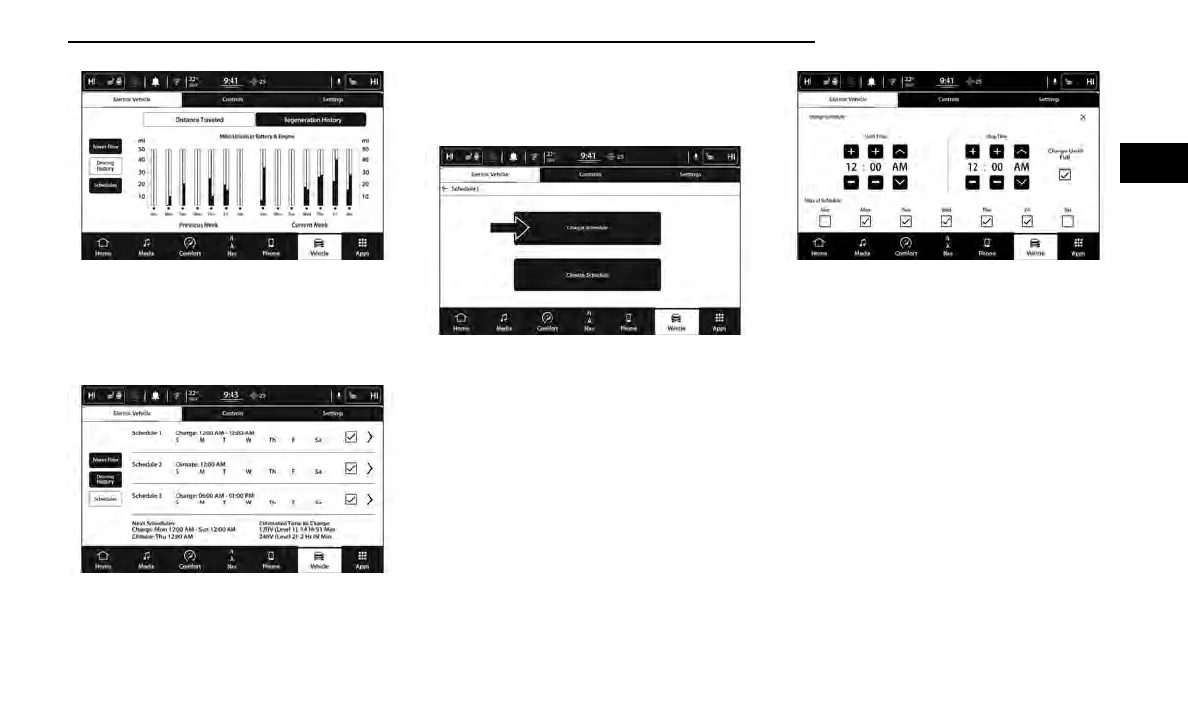
Charging Schedule
To set a charging schedule, select the Hybrid Electric
App in the touchscreen and follow these steps:
1. Select “Schedules”.
2. Select the schedule to be set (1, 2, or 3) by pressing
the appropriate arrow on the right side of the
screen.
3. Select “Charge Schedule”.
4. Select if Scheduled Charging should “Charge Until
Full”.
5. Set the Charge Start Time: Hours, Minutes, and
AM/PM.
NOTE:
This is to occur every week (as long as the vehicle is
connected to an EVSE).
6. When done, press the X in the upper right hand cor-
ner, then select “yes” to save the charge schedule.
The active schedule will be indicated by the check
mark to the right of the schedule event line. The
event action and time will be displayed.
7. To add another Scheduled Charging event, repeat
these steps.
NOTE:
A maximum of three independent Scheduled Charg-
ing events can be scheduled at a given time.
NOTE:
•
If the charging schedule is not enabled, the vehicle
will charge whenever plugged in. It is not necessary
to set up the charging schedule to charge the
vehicle.
•
If the vehicle is plugged in outside of the charging
schedule set in the Uconnect system (and Charge
Until Full is not selected), the vehicle’s battery will
not charge. Charging will only begin immediately if
the vehicle is plugged in within the time and day of
Driving History Screen
Schedules Screen
Select Charge Schedule
Set Charge Schedule
GETTING TO KNOW YOUR VEHICLE 19
2















 To Next Page