Chapter 5: Service
72 Troubleshooting guide
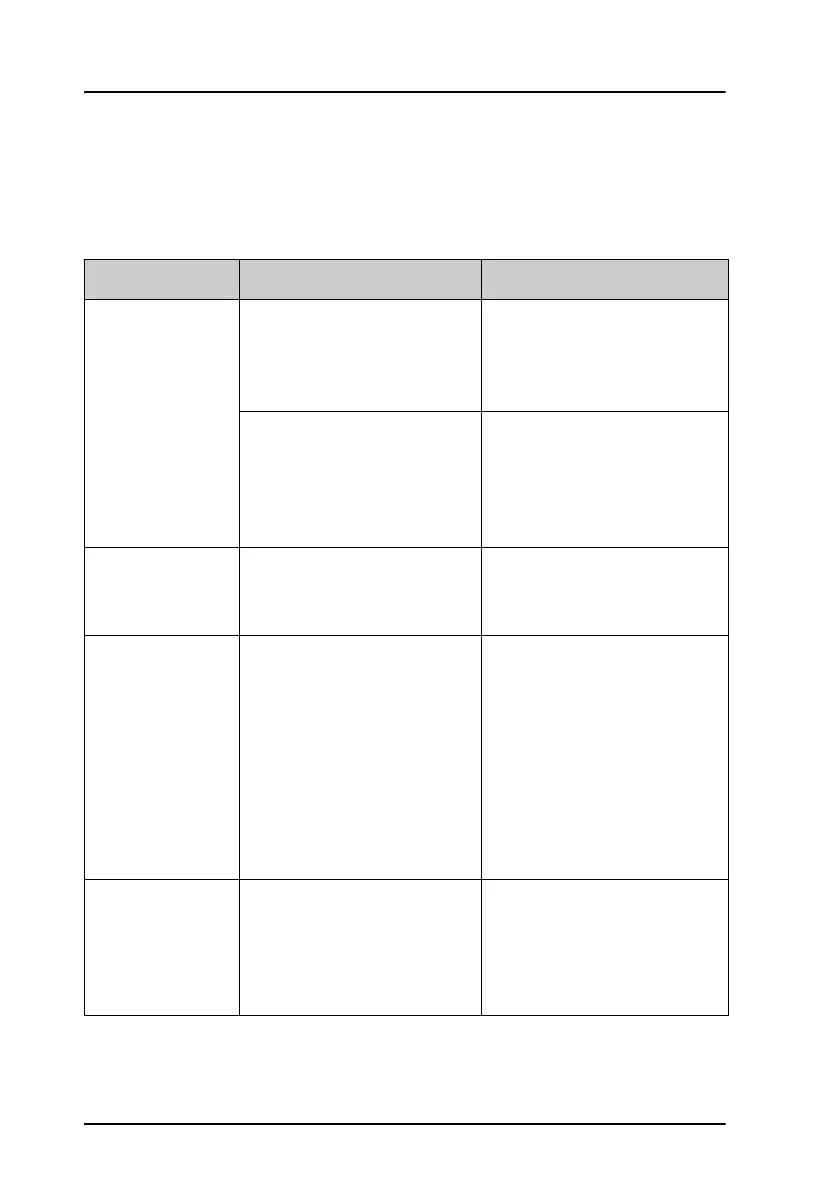
Troubleshooting guide
The below table provides information on some of the problems that might
occur, including possible causes and remedies to solve the problems.
Problem Possible cause Remedy
The system
cannot be
switched on
using the SAILOR
6018.
The SAILOR 6018 has a
remote on/off switch, so the
power button is disabled.
If the SAILOR 6018 is using a
remote on/off switch, use
that instead of the power
button.
There is no power on the
input to the SAILOR 6018.
Check that all power cables
between the ship power
source and the SAILOR 6018
are connected correctly, and
that the power source is on.
The SAILOR
6018 cannot
switch off.
Software error Push and hold the Power
button for 10 seconds, or
reboot via the power cable.
There is no signal
or weak signal
from the satellite.
The view to the satellite is
blocked, or there is a
hardware problem.
Make sure the SAILOR 3027
has a clear view in all
directions. See the
installation manual for
details.
If the view is not blocked,
check the error log. If the
problem persists, contact
your local distributor.
No connection
between SAILOR
6018 and SAILOR
3027
The CAN cables between
the SAILOR 3027 and the
SAILOR 6018 are damaged
or are not properly
connected.
Make sure the CAN cables
are properly connected and
that the cables and
connectors are not damaged.









 To Next Page