20
CONVAID USER’S GUIDE
1. Loosen the two back plate adjustment knobs. Fig. 22
2. Loosen the chair upholstery attached to the back as necessary.
3. Slide the back up or down carefully to desired position. Fig. 23
4. Tighten knobs and check for proper position of all items loosened in step 1.
Fig. 22 Fig. 23
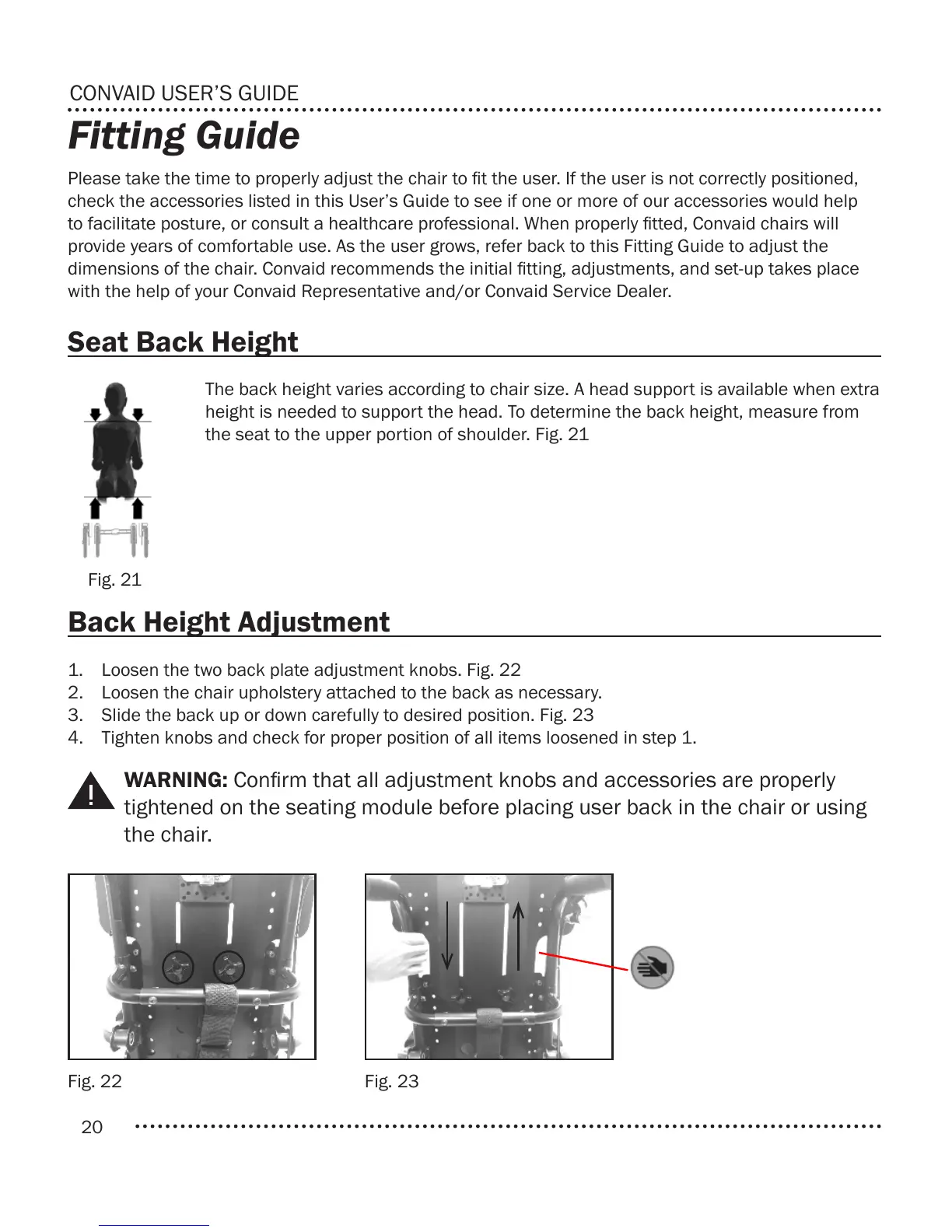
Fig. 21
Fitting Guide
Please take the time to properly adjust the chair to t the user. If the user is not correctly positioned,
check the accessories listed in this User’s Guide to see if one or more of our accessories would help
to facilitate posture, or consult a healthcare professional. When properly tted, Convaid chairs will
provide years of comfortable use. As the user grows, refer back to this Fitting Guide to adjust the
dimensions of the chair. Convaid recommends the initial tting, adjustments, and set-up takes place
with the help of your Convaid Representative and/or Convaid Service Dealer.
The back height varies according to chair size. A head support is available when extra
height is needed to support the head. To determine the back height, measure from
the seat to the upper portion of shoulder. Fig. 21
Seat Back Height
Back Height Adjustment
WARNING: Conrm that all adjustment knobs and accessories are properly
tightened on the seating module before placing user back in the chair or using
the chair.


 To Next Page