150 • Crestron Pyng OS 2 for CP4-R Product Manual – DOC. 8432A
MyCrestron Services
Tap MyCrestron Monitoring Service on the User Settings screen to display the
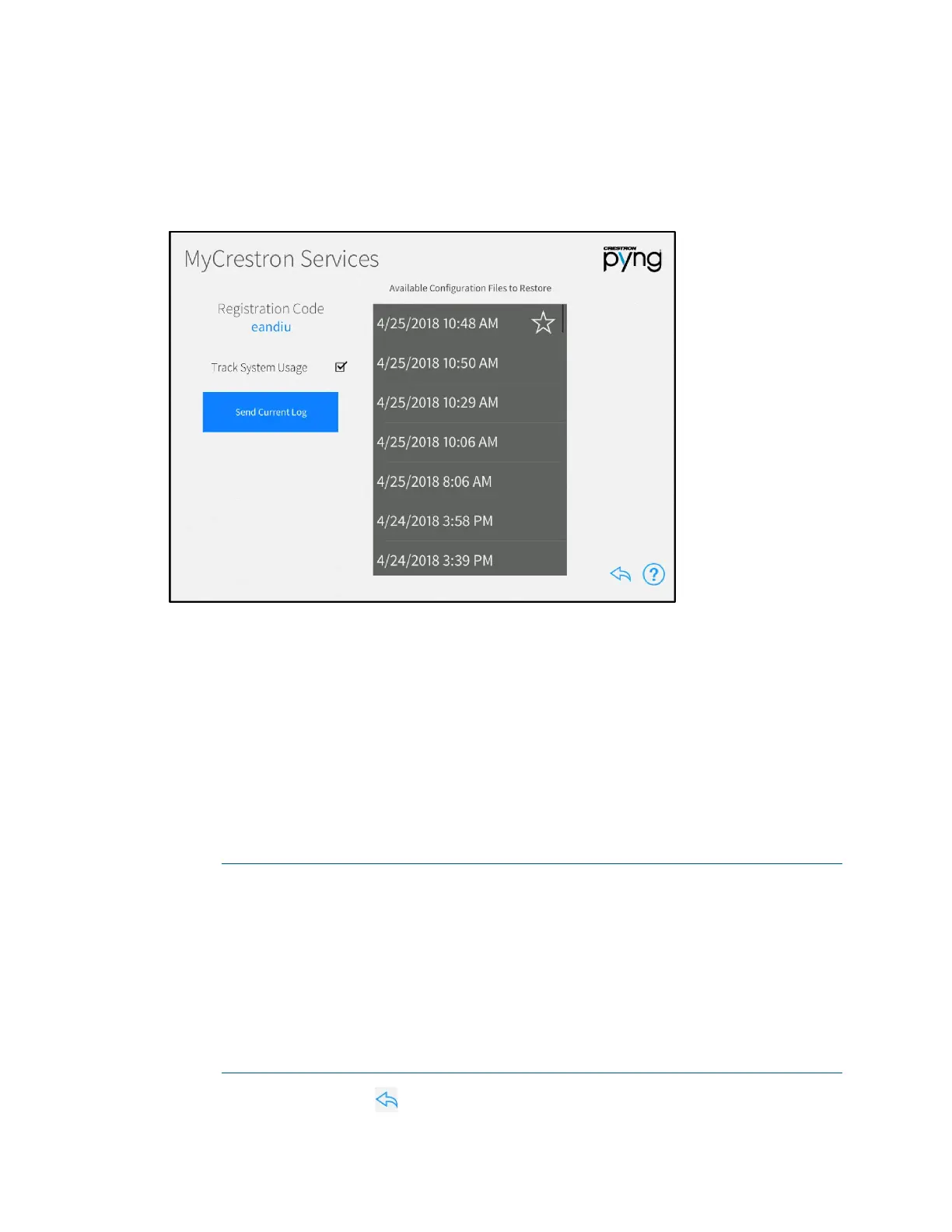
MyCrestron Services screen.
MyCrestron Services Screen
Use the MyCrestron Services screen to manage saved configuration files and to send
message logs to the cloud. A registration code is also provided for registering the
Crestron Pyng system with a MyCrestron account.
The following settings may be configured:
• Tap the check box next to Track System Usage to enable or disable tracking the
Crestron Pyng system usage through MyCrestron.
• Tap Send Current Log to send the current message log file to MyCrestron.
• Select a configuration file from the Available Configuration Files to Restore
menu to restore the system to the selected configuration.
NOTES:
∙ The Crestron Pyng system records the system configuration settings
periodically and saves them in configuration files, which are sorted by
time and date. If an issue arises with the system, the system may be
restored to an earlier working configuration.
∙ Golden configurations represent known, working system states that may
always be restored safely, and are indicated by a star icon in the
Available Configuration Files to Restore list. They always appear at the
top of the
Available Configuration Files to Restore list.
Tap the back arrow button to return to the User Settings screen.



 To Next Page
 Loading...






