54 • Crestron Pyng OS 2 for CP4-R Product Manual – DOC. 8432A
Light Scenes
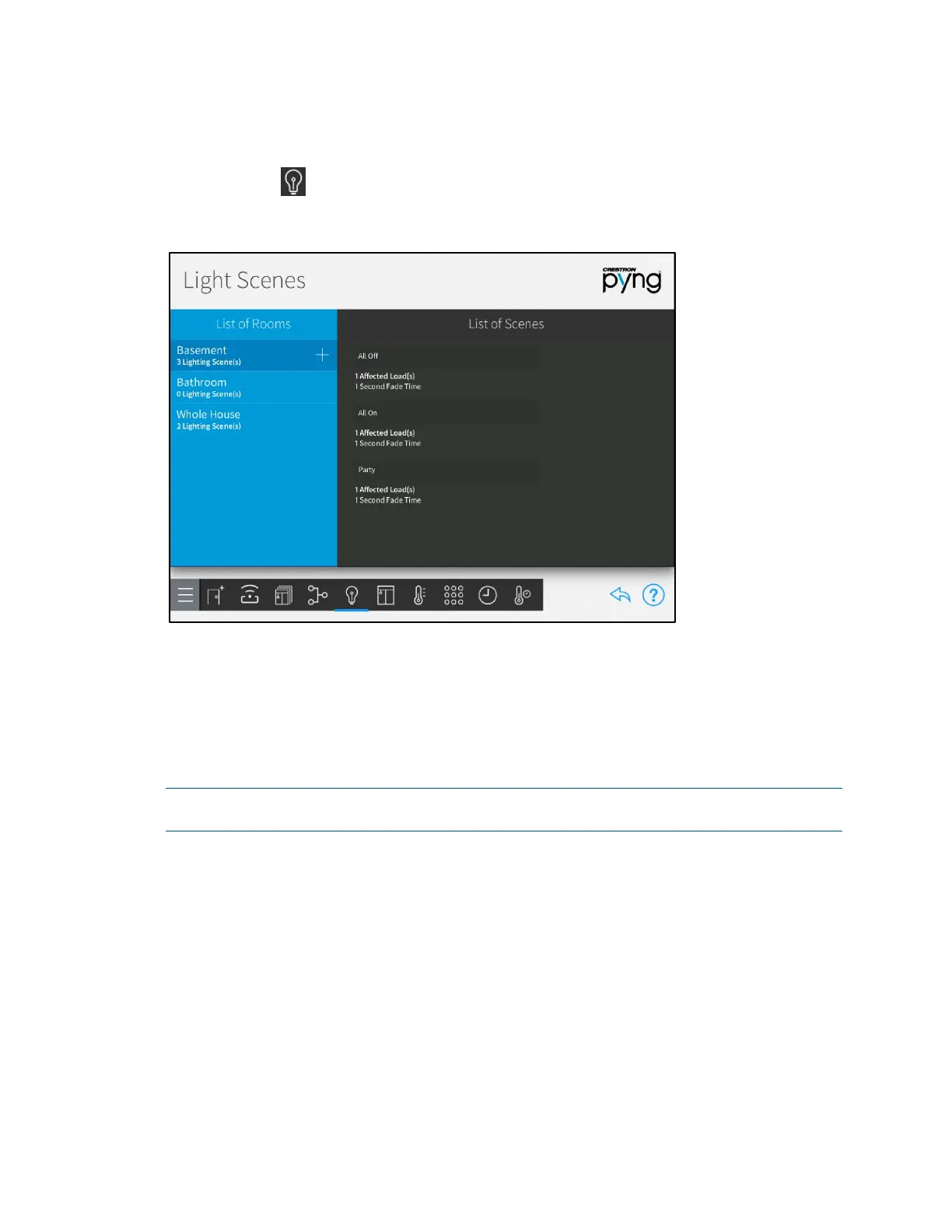
Tap the Configure Lighting Scenes button on the Setup Scenes screen or the Light
Scenes button on the setup menu to display the
Light Scenes screen.
Light Scenes Screen
Use the Light Scenes screen to create lighting scenes for one or more rooms or for the
entire house.
Lighting scenes are used to set predefined levels for multiple lighting loads. By default,
the Crestron Pyng system creates
All On and All Off scenes for every room with a
lighting load. Additionally,
All On and All Off scenes are created automatically for the
whole house after the first lighting load has been added to the system.
NOTE: Lighting scenes may also be created and configured by the homeowner in user
control mode. Refer to "Create a New User Lighting Scene" on page 153.
Create New Lighting Scenes
To create a new lighting scene:
1. Select a room from the List of Rooms menu. Refer to the image above.
2. Tap the plus button (+) next to the room name.
3. Enter a descriptive name for the lighting scene in the dialog box that is displayed.
4. Tap OK.



 To Next Page