68 • TSW-570, TSW-770, and TSW-1070 Product Manual — Doc. 8550C
Groups
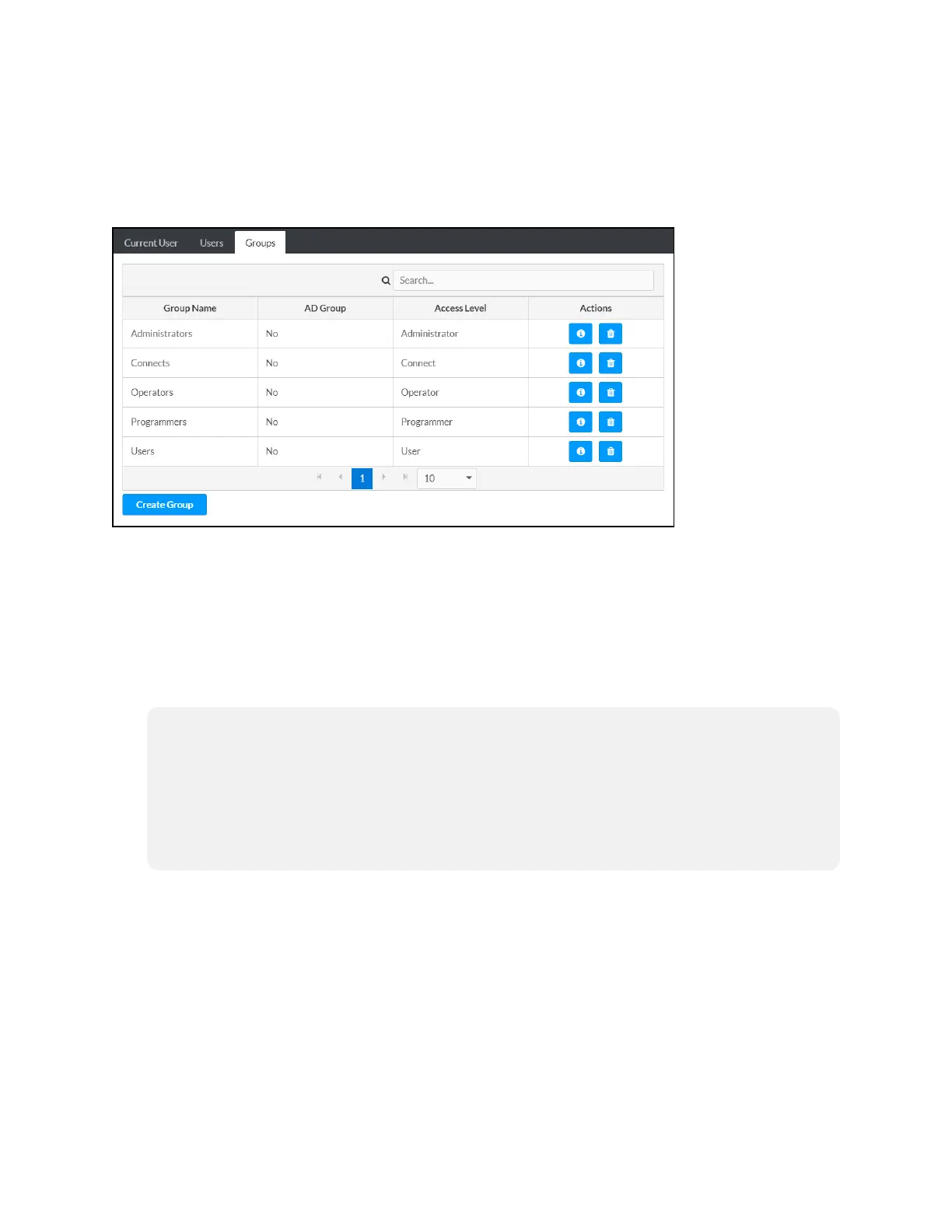
ClicktheGroups tabtoviewandeditsettings for touchscreengroups.Touchscreengroupsare
usedtogroupusers byaccess levelandActiveDirectoryauthenticationsettings.
AuthenticationManagement- Groups Tab
Enter textintotheSearchGroupsfieldtofindanddisplaygroupsthatmatchthesearch term(s).
Touchscreengroups arelistedintableformat.Thefollowinginformationis displayedfor each
touchscreengroup:
l GroupName:Thechosengroupname
l AD Group:Reports whether thegroupis (Yes)or isnot(No)authenticatedthroughActive
Directory
NOTE:ActiveDirectoryprovidesanadditionallayerofauthenticationfor touchscreen
groups andusers.Activedirectorygroupanduser names arestoredinthetouchscreen
consolealongwithauniqueSID (securityidentifier).WhenanActiveDirectoryuser
attemptstoauthenticateagainsttheconsole,theconsolefirstchecks theuser
credentials.IftheActiveDirectory authenticationis successful,ActiveDirectoryqueries
theconsolefor theuseror group's SID.Theuser is grantedaccess tothetouchscreen
onlyif atleastoneSID matchis found.
l Access Level:Theaccess levelfor theselectedgroup(Administrator,Programmer,
Operator,User,or Connect)
If thetouchscreengroupsspanmultiplepages,usethenavigationarrows onthebottomofthe
pagetomoveforwardor backwardthroughthepages,or selectapagenumber tonavigateto
thatpage.Additionally,thenumber of groupsdisplayedoneachpagemaybesetto5,10,or 20
users.
An Actions column isalsoprovidedfor eachgroupthatallows various actions tobeperformed.
Thefollowingselections maybeselectedfrom theActions column.



 To Next Page
 Loading...






