EasyManua.ls Logo

Datalogic Matrix 210N - User Manual

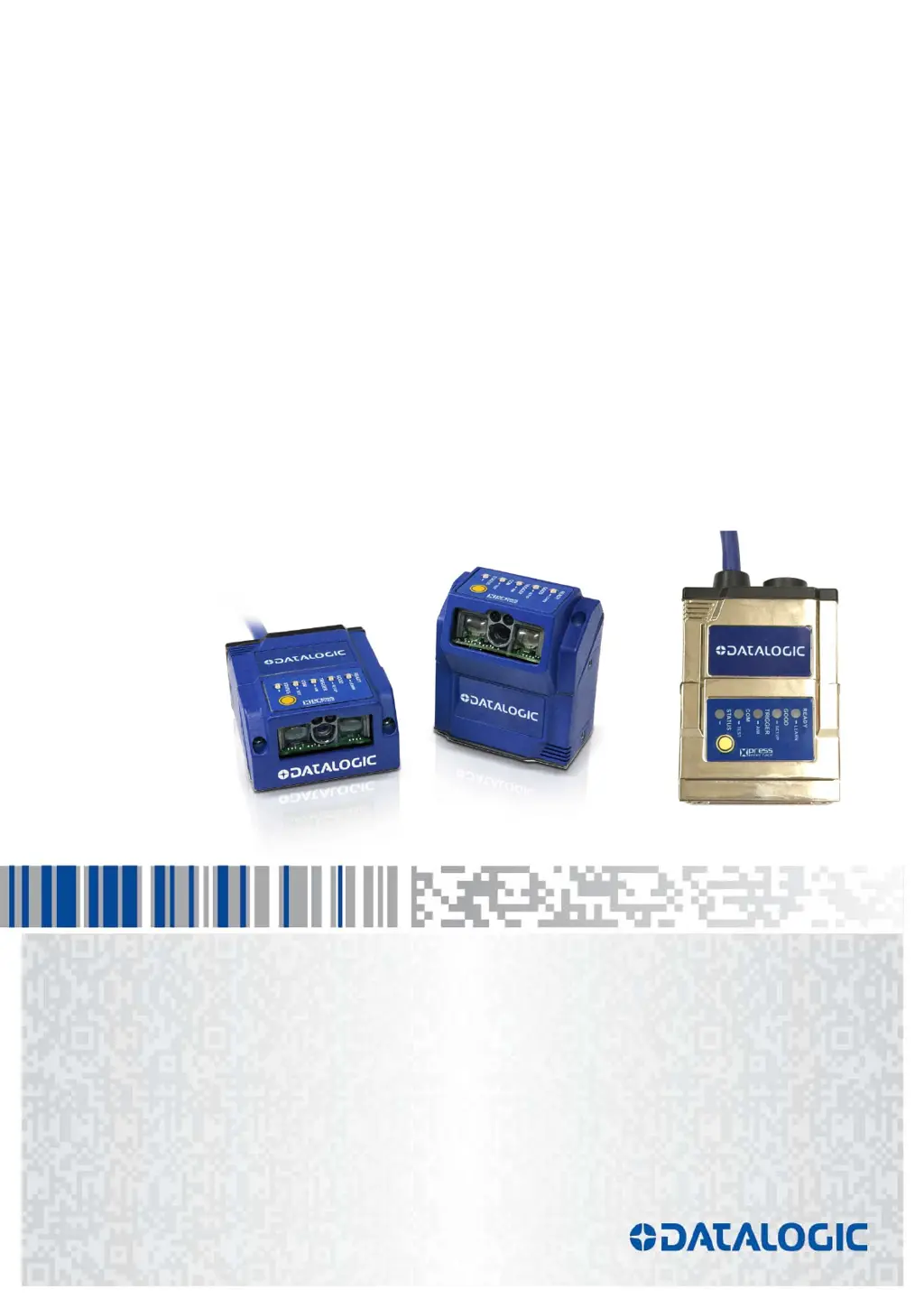
Datalogic Matrix 210N
167 pages
Print Icon
To Next Page IconTo Next Page
Loading...
REFERENCE MANUAL
> Matrix 210N™

Table of Contents

Questions and Answers

  • L
    Laura RiceAug 18, 2025
    Why is my Datalogic Matrix 210N Card Reader not transmitting data to the host?
    • E
      elizabethnguyenAug 18, 2025
      Ensure the serial cable is correctly wired. If you're using a CBX, verify that the RS422 termination switch is OFF. Confirm that the host serial port settings match the reader's. You can also configure the COM LED Function in DL.CODE under Device menu > Settings > Settings > LED Configuration to indicate Main Serial Port TX or Main Serial Port RX.
  • C
    Catherine ColemanAug 20, 2025
    What to do if Datalogic Card Reader transmits incorrect data to the host?
    • T
      Terry TaylorAug 20, 2025
      Check if the host serial port settings are the same as the reader serial port settings. In the DL.CODE?Data Formatting step, review the settings of the Header and Terminator String parameters, and also check the various Message Field parameter settings.
  • K
    Katherine ReillyAug 23, 2025
    What to do if my Datalogic Matrix 210N always transmits the No Read Message?
    • M
      Mark BoyleAug 23, 2025
      Run the Rapid Configuration procedure. Position the reader as described in par. 3.3 and through DL.CODE: Tune the Acquisition Delay on Trigger, if the moving code is out of the reader field of view; Set the Continuous Operating Mode if no external trigger source is available; Fine tune the Image Setup to improve the code image quality; Check the code parameter settings in the Code Setup step: 2D Codes, 1D Codes, and Postal Codes; View the full resolution code image to check the printing or marking quality.
  • K
    Kelly LoveAug 26, 2025
    Why is the TRIGGER LED not blinking in One Shot or Phase Mode on my Datalogic Matrix 210N Card Reader?
    • A
      Alexandra JimenezAug 26, 2025
      Check if you are referring to the 25-pin connector or to the CBX spring clamp connectors. Is the sensor connected to the Input 1 or Input 2? Is power supplied to the photo sensor? For NPN configuration, is power supplied to one of the two I1 or I2 signals (A or B)? For PNP configuration, is one of the two I1 or I2 signals grounded (A or B)? Are the photo sensor LEDS (if any) working correctly? Is the sensor/reflector system aligned (if present)? On the Reading Phase step check the Input 1 or Input 2 Debounce Filter parameter setting. On the Reading Phase step check the settings for Acquisition Trigger, Reading Phase-ON, and Reading Phase-OFF parameters.
  • G
    Gregory HarrisAug 28, 2025
    Why is the TRIGGER LED not blinking in One Shot or Phase Mode using serial trigger source on my Datalogic Card Reader?
    • S
      Stephen MorrisAug 28, 2025
      Check the settings for Acquisition Trigger, Reading Phase-ON, and Reading Phase-OFF parameters on the Reading Phase step. Ensure the COM port parameters (Baud Rate, Parity, Data Bits, Stop Bits) are correctly assigned. On the Reading Phase step, verify the settings of Acquisition Trigger String, Reading Phase-ON String, and Reading Phase-OFF String parameters. Also, confirm that the serial trigger source is correctly connected.
  • M
    Maria NguyenAug 30, 2025
    What to do if the image is not clear on my Datalogic Matrix 210N Card Reader?
    • J
      Julie GarciaAug 30, 2025
      Verify the Focus procedure.
  • B
    Brian OrtizSep 1, 2025
    What to do if the image is focused but not decoded on my Datalogic Matrix 210N?
    • J
      John SmithSep 2, 2025
      Verify the Image Auto-Setup procedure.
  • R
    Robert BryantSep 4, 2025
    What to do if I cannot access environment parameters in DL.CODE for my Datalogic Matrix 210N?
    • K
      Kimberly LeeSep 4, 2025
      Ensure you are using the Installer - Expert User level. If not, change it in the Options>Change User menu.
  • T
    Thomas RodriguezSep 6, 2025
    Why is the POWER LED not lit on my Datalogic Matrix 210N?
    • T
      timothy85Sep 6, 2025
      Is power connected? If using a power adapter (like PG6000), is it connected to wall outlet? If using rail power, does rail have power? If using CBX, does it have power (check switch and LED)? Check if you are referring to the 25-pin connector or to the CBX spring clamp connectors. Measure Voltage either at pin 13 and pin 25 (for 25-pin connector) or at spring clamp Vdc and GND (for CBX).
  • M
    michael04Sep 9, 2025
    Why is the TRIGGER LED correctly blinking but no image is displayed in DL.CODE window for Datalogic Card Reader in Phase Mode?
    • N
      Nicole JohnsonSep 9, 2025
      Is the Phase frequency lower than the maximum frame rate?

Summary

REFERENCES

CONVENTIONS

Describes typographic and formatting conventions used in the manual.

REFERENCE DOCUMENTATION

Lists other Datalogic documents for further details.

SUPPORT THROUGH THE WEBSITE

Explains how to access online support and resources.

PATENTS

Lists patents covering the product.

COMPLIANCE

EMC COMPLIANCE

Details Electromagnetic Compatibility requirements for the reader.

POWER SUPPLY

Information on power requirements and safety guidelines.

CE COMPLIANCE

States compliance with applicable European directives.

FCC COMPLIANCE

Details compliance with Federal Communications Commission rules.

EAC COMPLIANCE

LASER SAFETY

LED SAFETY

HANDLING

GENERAL VIEW

CBX100;CBX500 PINOUT

RAPID CONFIGURATION

STEP 1 - CONNECT THE SYSTEM

Describes methods for connecting the reader via Ethernet, USB, or Serial.

STEP 2 - MOUNT AND POSITION THE READER

Explains how to mount and position the reader for optimal reading.

STEP 3 - X-PRESS CONFIGURATION: SOFTWARE ADJUSTABLE FOCUS MODELS

Guides X-PRESS configuration for readers with liquid lens technology.

STEP 4 - X-PRESS CONFIGURATION: FIXED FOCUS MODELS

Guides X-PRESS configuration for readers with fixed focus optics.

STEP 5 - INSTALLING DL.CODE CONFIGURATION PROGRAM

Provides instructions for installing the DL.CODE software.

STEP 5 A - ETHERNET DEVICE DISCOVERY

Details how to discover devices connected via Ethernet.

STEP 5 B - USB DEVICE DISCOVERY

Details how to discover devices connected via USB.

STEP 5 C - SERIAL DEVICE DISCOVERY

Details how to discover devices connected via Serial port.

STEP 6 - DEVICE CONFIGURATION

Guides the process of configuring the reader's settings.

STEP 7 - TEST MODE

Guides how to enter and use the reader's test mode for performance checks.

ADVANCED READER CONFIGURATION

Host Mode Programming

Describes partial configuration of the reader via a host computer.

INTRODUCTION

PRODUCT DESCRIPTION

Describes the features and benefits of the Matrix 210N reader.

INDICATORS AND KEYPAD BUTTON

Explains the function of the reader's LEDs and keypad.

ID-NET

Describes the high-speed ID-NET communication interface.

X-PRESS HUMAN MACHINE INTERFACE

Details the reader's intuitive HMI interface and functions.

MODEL DESCRIPTION

Explains how to interpret the reader's model numbers and characteristics.

ACCESSORIES

Lists available accessories that can be used with the reader.

APPLICATION EXAMPLES

Shows practical use cases and applications of the reader.

EXTERNAL LIGHTING SYSTEMS

Discusses external lighting options and their connection.

INSTALLATION

PACKAGE CONTENTS

Lists all items included in the product package.

MECHANICAL DIMENSIONS

Provides the physical dimensions of the reader models.

MOUNTING AND POSITIONING MATRIX 210 N

Explains how to mount and position the reader using brackets.

CBX ELECTRICAL CONNECTIONS

POWER SUPPLY

Explains power supply connections and requirements for the reader.

MAIN SERIAL INTERFACE

Describes the main serial interface connections and parameters.

ID-NET INTERFACE

Details the ID-NET interface, cables, and termination requirements.

AUXILIARY RS232 INTERFACE

Describes the auxiliary RS232 interface connections.

INPUTS

Explains the reader's input connections and their functions.

OUTPUTS

Explains the reader's output connections and their functions.

EXTERNAL LIGHTING SYSTEMS

Details how to connect and control external lighting systems.

ON-BOARD ETHERNET INTERFACE

Describes the onboard Ethernet interface and protocols.

USER INTERFACE - SERIAL HOST

Details RS232 PC host interface pinouts and test cable creation.

TYPICAL LAYOUTS

ETHERNET CONNECTION

Illustrates typical reader connection setups via Ethernet.

SERIAL CONNECTION

Illustrates typical reader connection setups via Serial interface.

FIELDBUS CONNECTION

Illustrates typical reader connection setups via Fieldbus.

PASS-THROUGH

Describes pass-through layout configurations for multi-device networks.

ID-NET MULTIDATA NETWORK CONFIGURATION

Details ID-NET Multidata network layouts.

ID-NET SYNCHRONIZED NETWORK CONFIGURATION

Details ID-NET Synchronized network layouts.

USB CONNECTION

Illustrates typical reader connection setups via USB.

READING FEATURES

MATRIX FIXED FOCUS MODELS

Details reading features for fixed focus models.

FOV CALCULATION

Explains how to calculate the reader's Field of View.

GLOBAL FOV DIAGRAMS

Provides diagrams for typical Field of View performance.

MAXIMUM LINE SPEED CALCULATION

Explains how to calculate the maximum line speed.

SOFTWARE CONFIGURATION

DL.CODE SYSTEM REQUIREMENTS

Lists system requirements for the DL.CODE software.

READER CONFIGURATION

Guides the reader configuration process using DL.CODE.

PASS-THROUGH CONFIGURATIONS

Configures pass-through settings for multi-device setups.

INTERNAL NETWORK CONFIGURATIONS

Guides setting up ID-NET Master/Slave networks.

MULTIDATA ID-NET NETWORK CONFIGURATIONS

Configures Multidata ID-NET networks.

SYNCHRONIZED ID-NET NETWORK CONFIGURATION

Configures Synchronized ID-NET networks.

VERIFY MASTER;SLAVE SYNCHRONIZED CONFIGURATION

Guides verification of synchronized network setup.

BACKUP AND RESTORE VIA DL.CODE

Explains backup and restore procedures using DL.CODE.

DIAGNOSTIC ALARMS

Explains how to interpret diagnostic alarms from the ID-NET network.

STATISTICS

Details how to view reading performance statistics.

BM150 DISPLAY MODULE CONFIGURATION

Configures and interprets messages from the BM150 display module.

GLOSSARY

TROUBLESHOOTING

GENERAL GUIDELINES

Offers general advice for troubleshooting common issues.

TECHNICAL FEATURES

ALTERNATIVE CONNECTIONS

POWER COM AND I;O CONNECTOR

Explains the 25-pin D-sub connector pinout for connections.

ON-BOARD ETHERNET CONNECTOR

Details the M12 Ethernet connector pinout and specifications.

ID-NET NETWORK TERMINATION

Explains ID-NET network termination requirements.

INPUTS

Explains the reader's input connections on the 25-pin connector.

OUTPUTS

Explains the reader's output connections on the 25-pin connector.

USER INTERFACE - SERIAL HOST

Shows how to build a simple interface test cable.

Datalogic Matrix 210N Specifications

General IconGeneral
Storage temperature (T-T)-20 - 70 °C
Operating temperature (T-T)0 - 50 °C
Input voltage10 - 30 V
Power source typeDC
Power consumption (typical)4.5 W
CertificationAIM DPM, ISO/IEC 15416
Product colorBlue
Housing materialAluminium, Plastic
International Protection (IP) codeIP65
TypeBarcode module bar barcode readers
Sensor typeCMOS
Scanner type1D/2D
Maximum scan area80 x 50 mm
Linear (1D) barcodes supported-
Optical sensor resolution (W x H)780 x 480 pixels
2D (matrix & stacked) barcodes supportedAztec Code, Data Matrix, MaxiCode, Micro QR Code, QR Code
Ethernet LANYes
PC connectionRJ-45
Connectivity technologyWired
Weight and Dimensions IconWeight and Dimensions
Depth25 mm
Width50 mm
Height45 mm
Weight204 g

Related product manuals