1
2
1
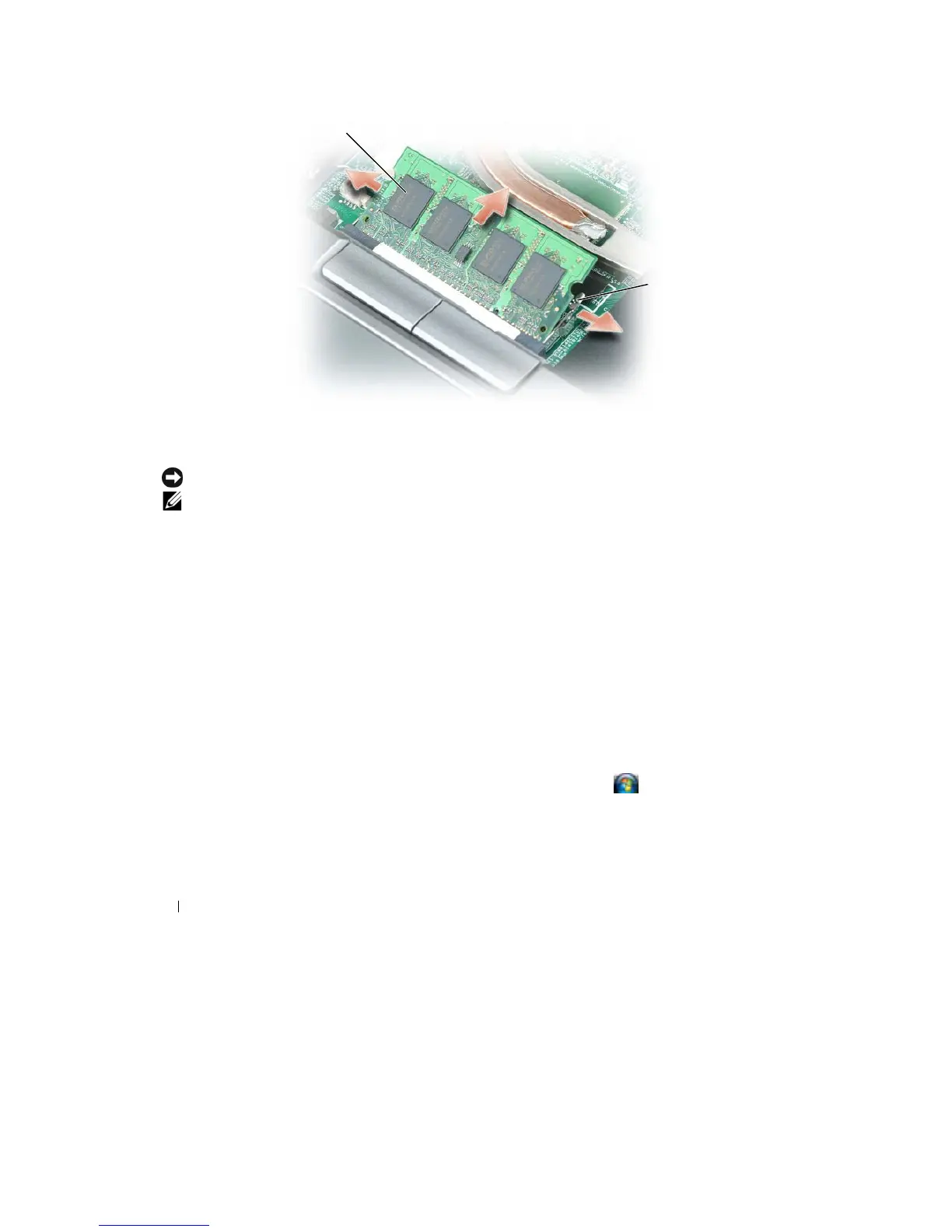
memory
module
2
securing clips
(2)
NOTICE:
Insert memory modules at
a
45-degree angle to avoid damaging the
connector
.
NOTE:
If
the memory module is not installed properly, the computer may not boot properly. No error
message
indicates this
failure.
6 Ground yourself and install
the
new memory
module:
a
Align
the
notch
in the
module edge connector
with the
tab
in the
connector slot.
b
Slide
the
module
firmly into the
slot
at
a 45-degree angle, and rotate
the
module down
until
it
clicks
into
place.
If
you do
not
feel
the
click, remove
the
module and reinstall
it.
7 Replace
the
keyboard (see "Keyboard" on page
113).
8 Replace
the
hinge cover (see "Hinge Cover" on page
112).
9 Insert
the
battery
into the
battery bay,
or
connect the
AC
adapter
to
your computer and an
electrical
outlet.
10
Turn
on
the computer.
As
the
computer boots,
it
detects
the additional
memory and automatically updates
the system
configuration
information.
To confirm the
amount
of
memory installed
in the
computer,
click Start or
→Help
and
Support→
Computer
Information
.
To install
a memory module
in the DIMM B connector:
1 Follow
the
procedures
in
"Before You Begin" on page
107.
116
Adding and Replacing
Parts










 To Next Page