Cutting (Double Sided)
116
STEP 5 : Perform the Roughing
The points to be checked before cutting
Check the following things before starting cutting. If there are problems
with any of these, the cutting material may be wasted or the machine may
be damaged.
□ Is an output le right?
□ Have you made a mistake with the origin point position?
□ Do the cutting conditions match the type of cutting material?
To change the cutting tool for each process, replace the
cutting tool before outputting data.
"“STEP 5 : Attach the Cutting Tool” (p. 11)
Procedure
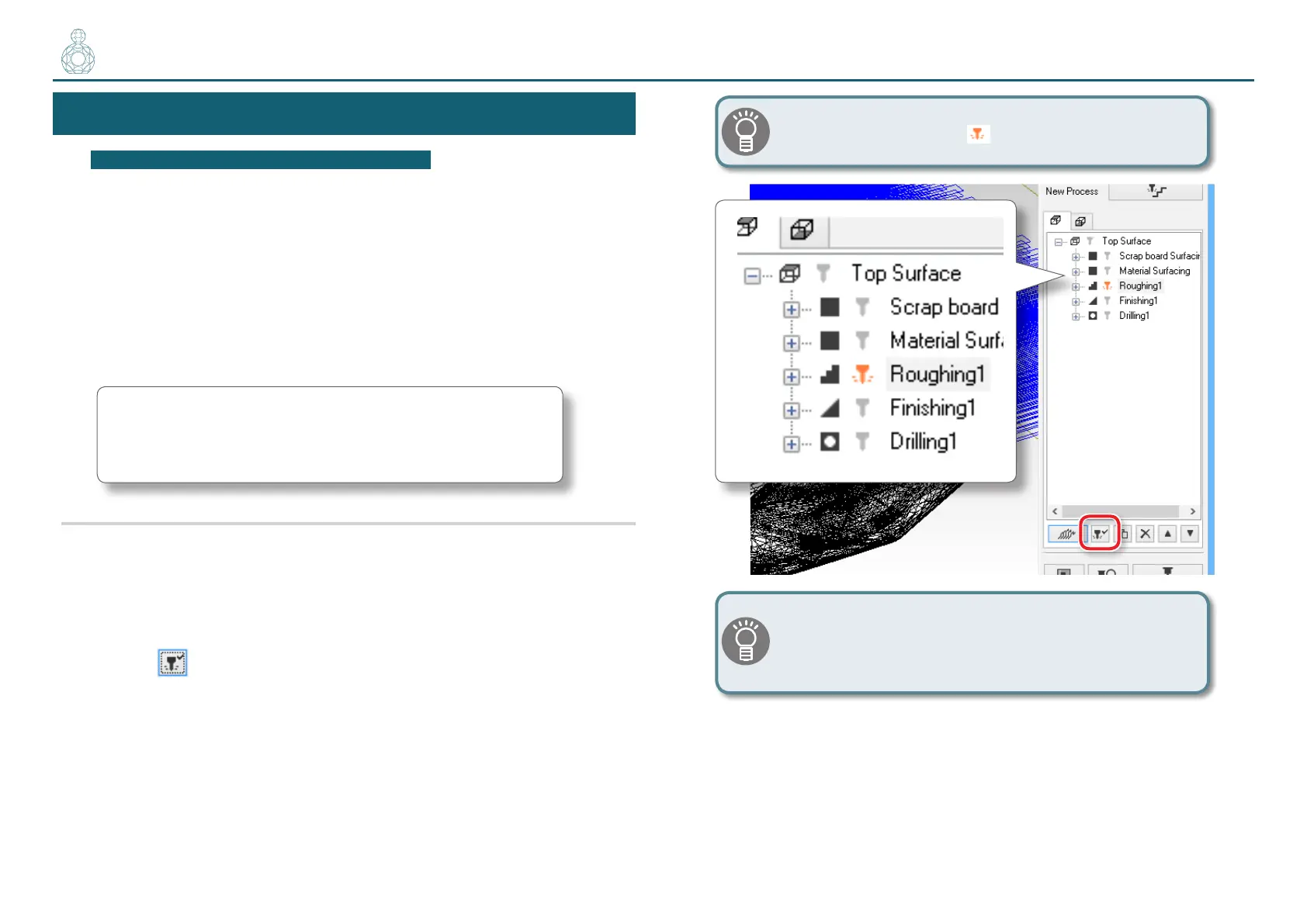
1. Enable the [Rounding 1] process only on the MODELA Player 4.
(Figure at right)
1-1.
Click the unnecessary process of the cutting process list.
1-2.
Click [Enable/Disable Cutting].
1-3.
Repeat procedures 1-1 and 1-2, and disable the processes that are not
required.
Only the orange processes will be output.
If there is no need to switch the cutting tool, it is possible
to select processes “Material surfacing ” to “Drilling”
and perform them all in a single operation.
〇〇〇〇●〇〇〇〇〇〇〇



 To Next Page