Entrematic Canada Inc.
Toll Free: 1-877-348-6837
info.ditec.ca@entrematic.com
www.ditecentrematic.ca
Entrematic USA Inc.
Toll Free: 1-866-901-4284
info.ditec.us@entrematic.com
www.ditecentrematic.us
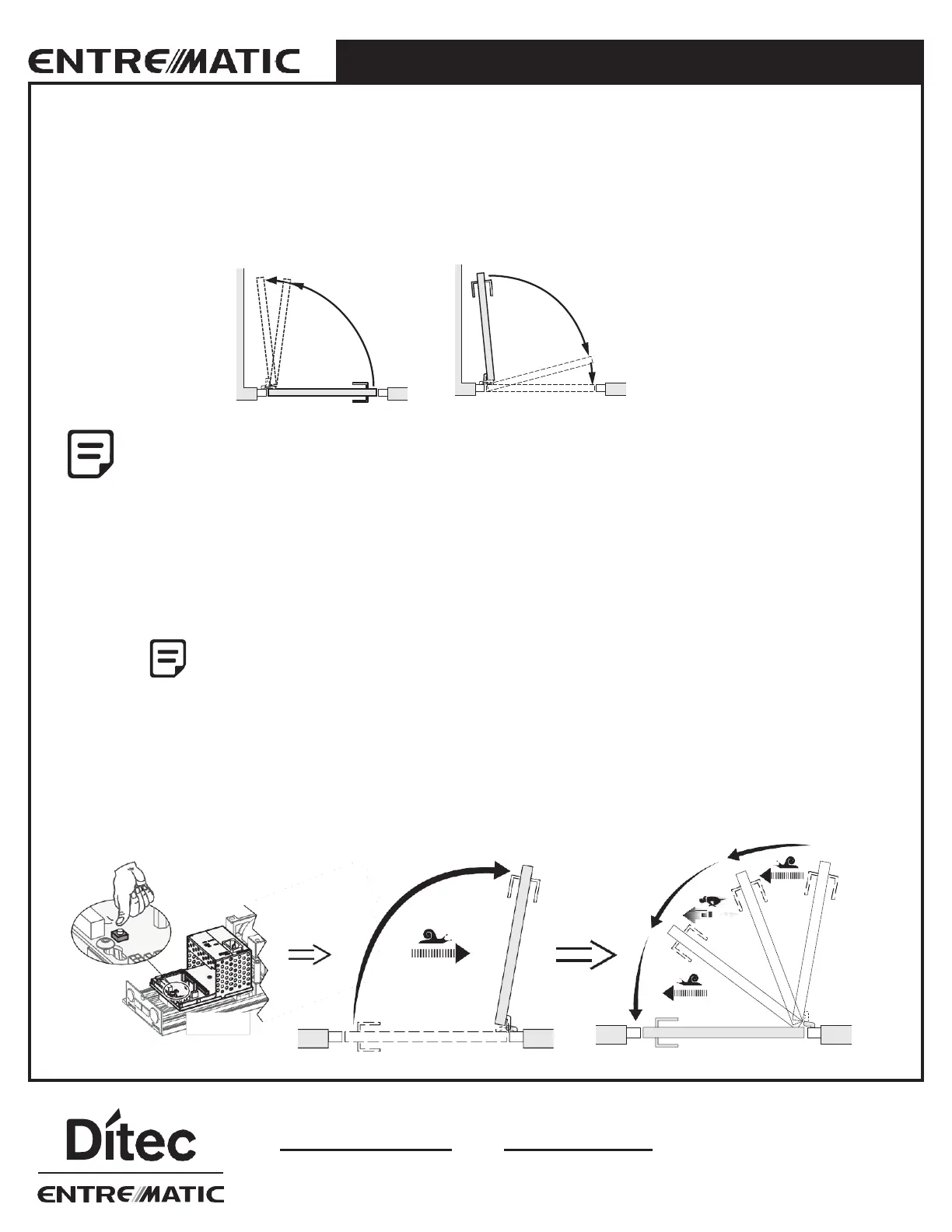
5.4 Auto-learn – automatically sets back and latch check
(recommended)
This learning is performed by pushing the Learn button (LRN).
Back-check
10°/1 s
Latch-check
10°
1.5 s
• Before the learning procedure starts, make sure that the door has been properly closed i.e., not by force.
• If any of the parameters "Spring pre-tension", "Closing torque" (CLTQ) and "Lock release"
DIP-switch No. 3 on EXU-SI) are changed after performing a learn, a new learn
must be carried out.
• Learn can be carried out with activation units and locks connected.
• The back-check will be automatically adjusted to 10° and 1 second before open position. The latch-check
will be automatically adjusted to 10° and 1.5 seconds before closed position.
5.5 One push / two pushes on the Learn button (LRN)
Remain clear of swing path of door, as door may close rapidly.
The door has no safety during auto-learn cycle.
One push (delayed opening)
Push the button once. The door will open after 2 seconds and adjust the back-check and latch-check automatically.
Two pushes (direct opening)
Push the button twice. As above, but the door starts to move directly.
LRN
HA9




 To Next Page