________________________________________________________________________________________________________
1592025400 – Vers. 1.0 - 126
-
• Jump to stage and back: allow to come back to the previous stage.
13.7.2 Disabled property unchecked (active element)
As already seen in the previous example, if the flag “Disabled” is unchecked:
• for a VARIABLES: the value is modifiable.
In the stage are necessary three buttons: Active Input, UP Value and DOWN value.
• for a LABEL and IMAGE: allow to do a conditional jump stage.
In the stage are necessary three buttons: Active Input, Next Element and Prev
Element.
• for a SWITCH VAR and LABEL: enable only if switch mode is different from variable.
In this case the value of the variable is showed as images or vocabulary.
In the stage are necessary three buttons: Active Input, UP Value and DOWN Value.
13.7.3 Controls visibility
VISOGRAPH has the possibility to display the information depending on the variable values.
Each elements of the VISOGRAPH human interface has the property of visibility; this
property can be filled with a mathematical (logical) condition in order to create a
dependency on a variable.
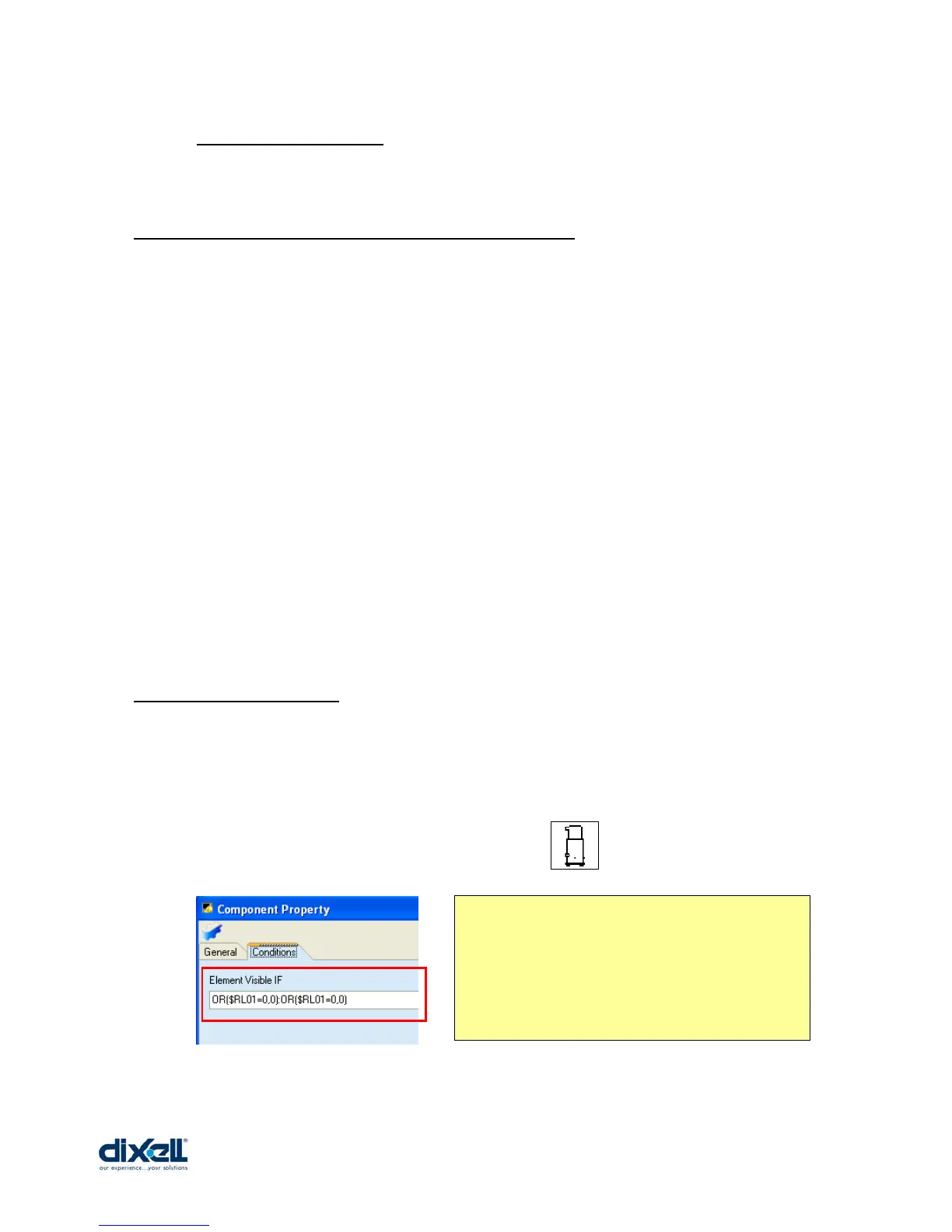
For example if the compressor is “OFF”, the control is blinking:
Inthe Component Property of the control, in the
Conditions tab, the condition to write is:
OR($RL01=0,0):0R($RL01=0,0)
If the condition befor colon is true, the component
will be visible; if the condition after the colon is true,
the com















 To Next Page