________________________________________________________________________________________________________
1592025400 – Vers. 1.0 - 83 -
10. HOW TO USE THE USB KEY
Through the USB key it is possible download and upload files from iPRO.
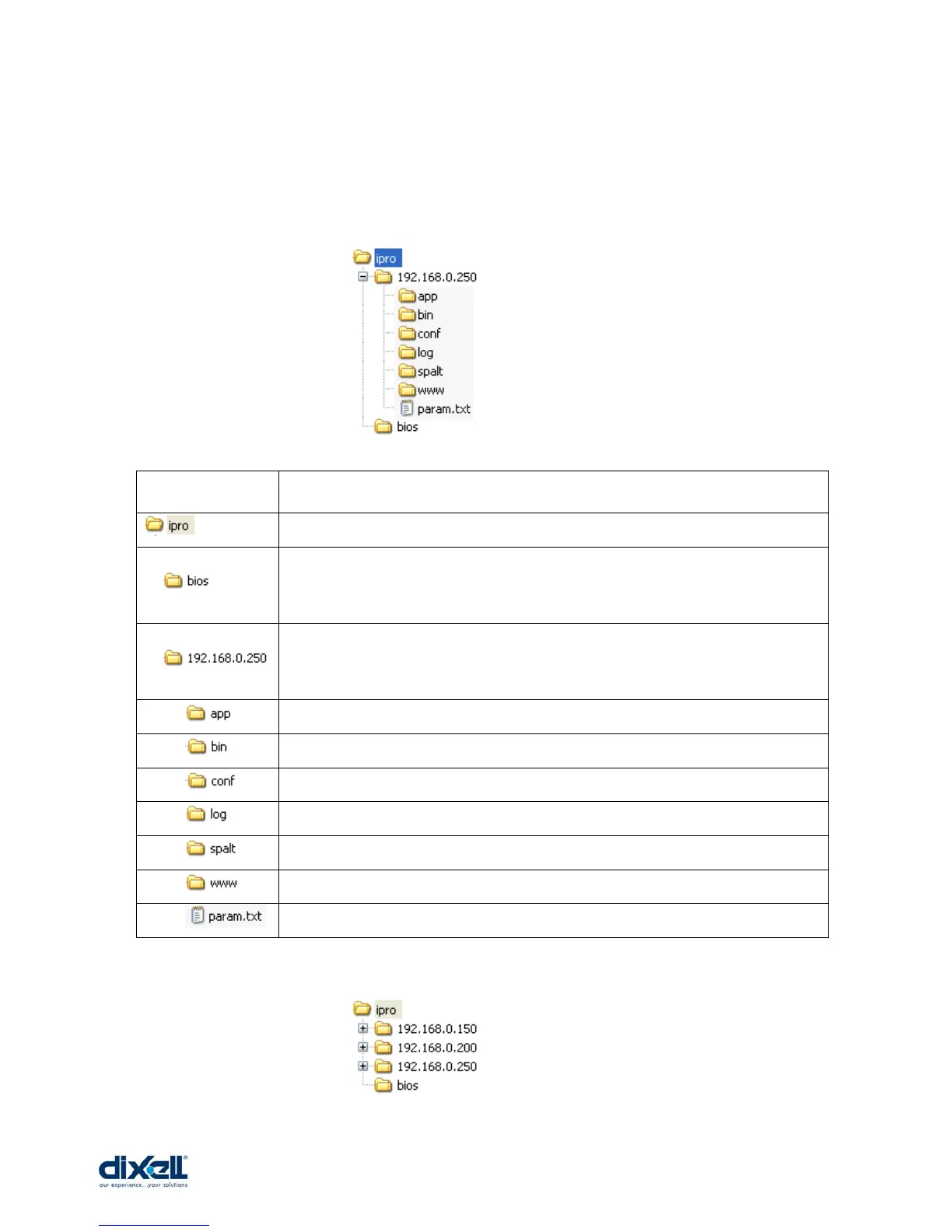
First off all it is necessary to set-up the USB key creating the following structure:
If you have more iPRO the structure of your USB key have to be:
FOLDER DESCRIPTION
This is the main folder common for all the iPROs.
This folder, common for all the iPROs, contains the file to update the
microprocessor; it is possible to download the latest version from Dixell website
and the syntax of this file is: “updater-2008090300”.
This is iPRO’s IP folder with inside the files only for the single iPRO. If there are
more iPRO is enough to create more folders with different IP; inside the IP folders
the structure have to be the same.
Folder to download the ISaGRAF application (isadix file – crypted)
Folder to download the Visograph application (up to 5 files)
Folder to download the maps of the application (up to 10 files)
Folder to upload the log file from iPRO
Folder to download the spalt files with parameters for e-mail, sms and dial-in
Folder to download the personal website
File with the parameters of iPRO (IP, Hostname, DNS)















 To Next Page