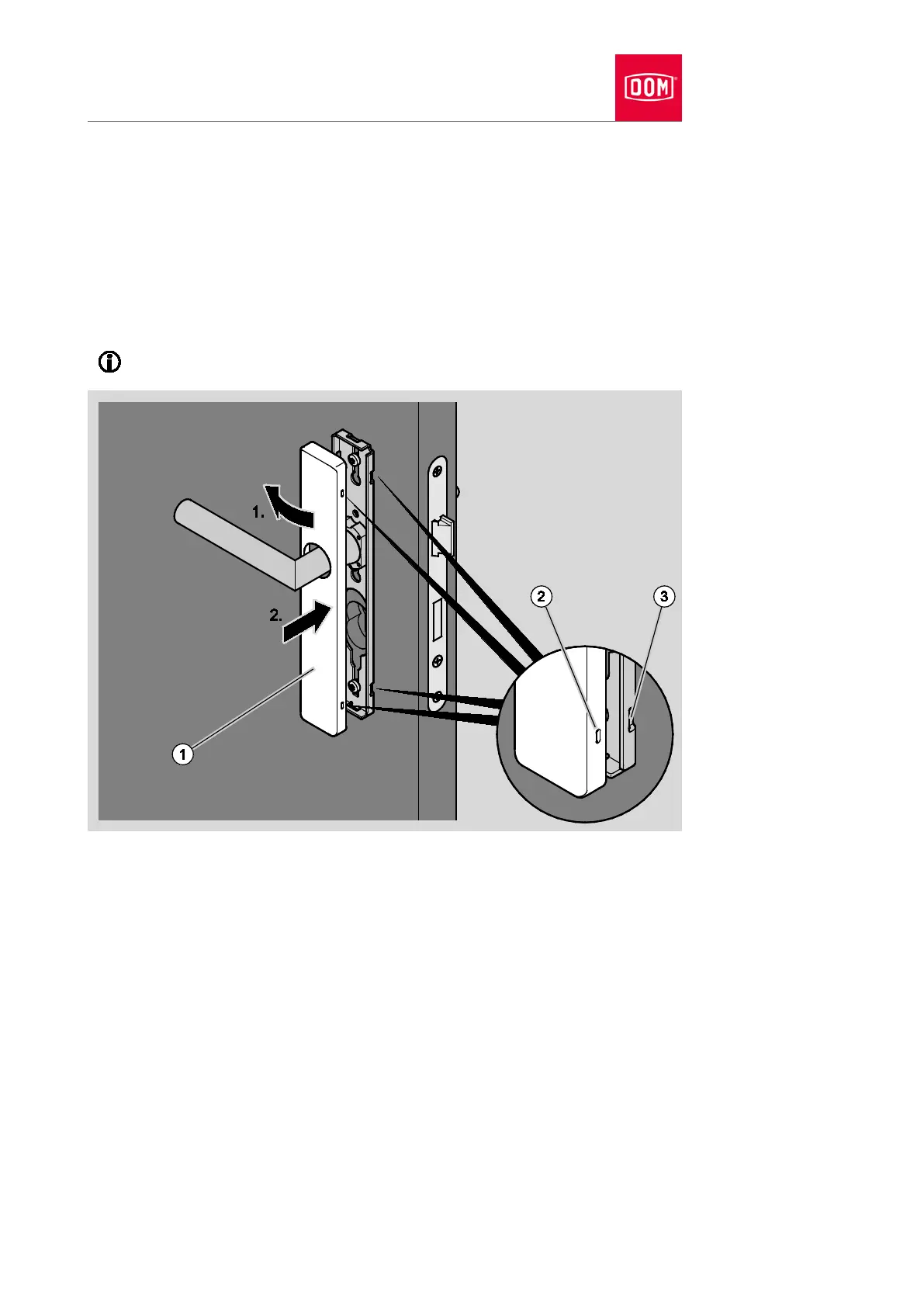
Place the cover (1) over the lever handle as shown.
You must twist the cover when putting it in position if this is necessary.
Press the cover laterally onto the assembly profile (1.) until the locking
points of the cover (2) are in contact with the locking points of the assembly
profile (3) (1.).
Press the other side of the cover onto the assembly profile in such a way
that the locking points audibly click into place (2.).
The diagram which follows shows an example of the attachment.
Check the outer lever handle for flawless functioning (coupling).
If the outer lever handle does not couple flawlessly, align it as follows:
Remove the cover of the outer handle as described in section “Removing
handle” from page 234 onwards.
Align the outer lever handle horizontally as described from page 60
onwards.
The horizontal positions of the outer lever handle and inner lever handle must
match.
Reattach the cover to the assembly profile.


 To Next Page