21
ED100LE 02-2021DL4616-001
dormakaba ED100LE operator – Fine cover
Installation Instructions
Chapter 8
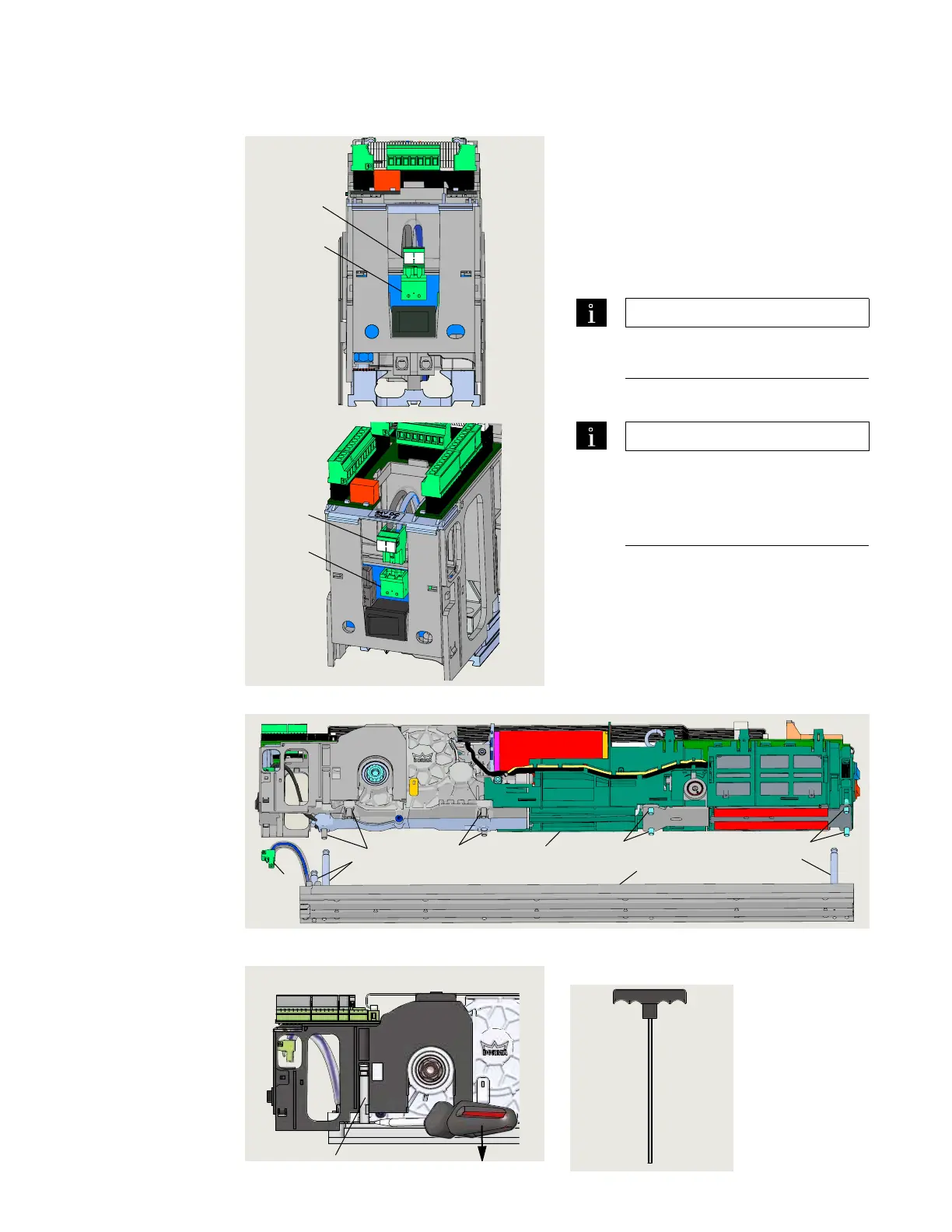
. Remove mounting plate from EDLE operator
Fig. 8.2.2 Mounting plate removed from ED100LE operator
.. Remove Vac plug from
receptacle.
. Remove Vac plug () from its
receptacle ().
.. Remove mounting plate from
operator.
. Loosen all eight captive M socket head
cap screws (SHCS) using a mm hex
T-handle.
TIPS AND RECOMMENDATIONS
Insure all eight fasteners are free
of the mounting plate.
. Remove operator from mounting plate.
TIPS AND RECOMMENDATIONS
Guide pin resistance may require
screwdriver to start operator
removal from end of mounting
plate (Fig. ..).
Fig. 8.2.1 115 Vac plug removal
Fig. 8.2.3 Mounting plate removal Fig. 8.2.4 5 mm T-handle
hex key
5 Guide pin
1 ED100 operator
2 Mounting plate
5 115 Vac plug
3 M6 X 20 SHCS
4 M6 X 10 SHCS
5 Guide pin
6 115 Vac plug
5 115 Vac plug
6 115 Vac socket
5
6
5
3
3
4
4
5
2
1
6
5
6
EDLE operator installation












 To Next Page