23
ED100LE 02-2021DL4616-001
dormakaba ED100LE operator – Fine cover
Installation Instructions
Chapter 8
.. Install conduit box (option).
TIPS AND RECOMMENDATIONS
Vac terminal block is secured
to mounting plate by M x
Phillips head screw.
• Screw must be loosened to
allow conduit box tabs to slide
into mounting plate slots.
• Screw is then threaded into
conduit box mounting hole and
tightened.
. Loosen M x Phillips head screw.
. Slide conduit box tabs into slots in
bottom of mounting plate until hole in
conduit box lines up with hole in
mounting plate.
. Thread M Phillips head screw into
conduit box mounting hole and tighten
screw.
CAUTION
Terminal block M screw torque.
Tighten M screw to a torque of
- in-lb.
• Insure screw is threaded into
conduit box mounting hole.
. Mounting plate assembly is ready for
installation.
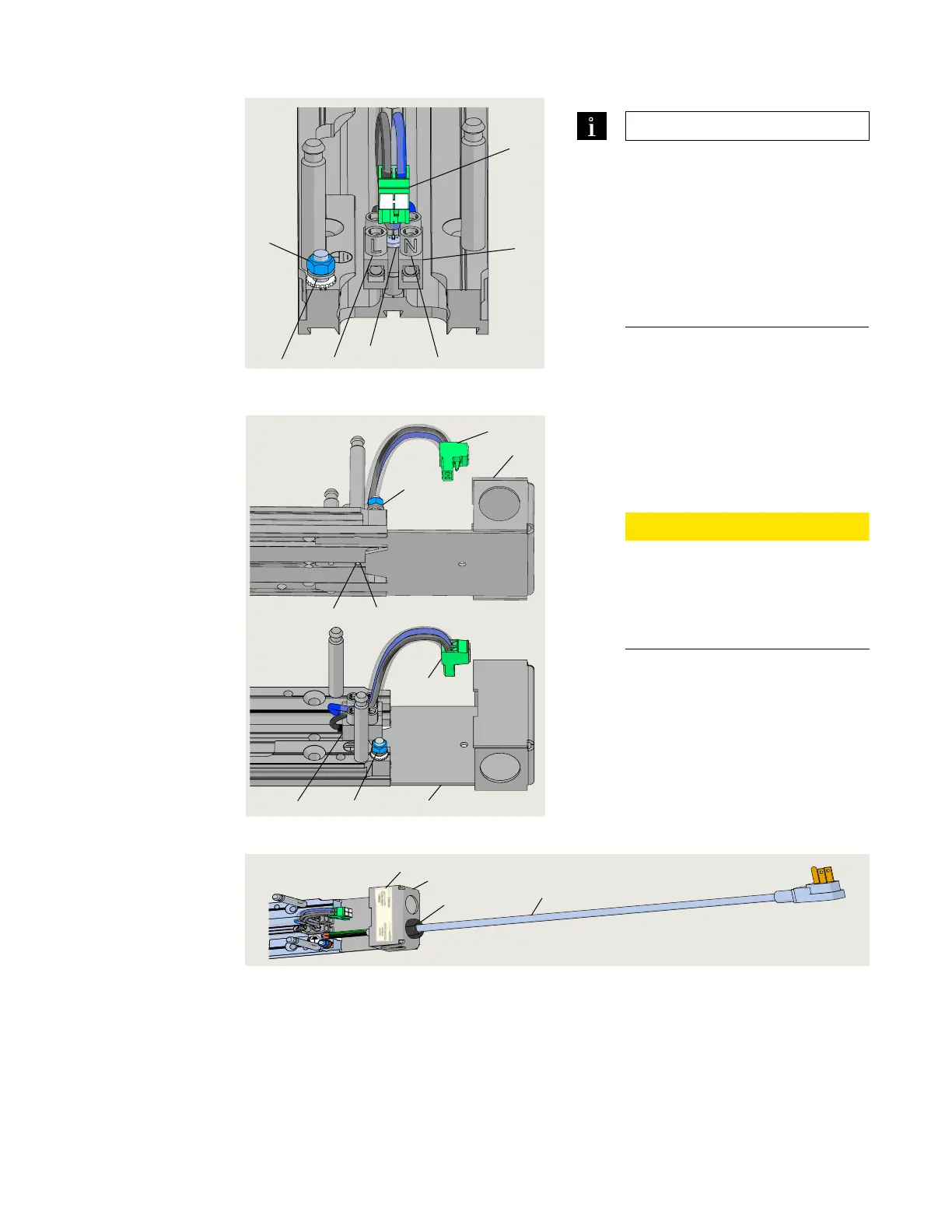
Fig. 8.3.5 115 Vac terminal block mounting
Fig. 8.3.6 Conduit box installed on
mounting plate
1 115 VAC terminal
block
2 Ground terminal
5 M3.5 screw
6 115 Vac plug to
operator
L 115 Vac
N Neutral
G Ground
1 115 VAC terminal
block
2 Ground terminal
5 M3.5 screw
6 115 Vac plug to
operator
7 Conduit box DX3501
7.1 Conduit box
mounting hole
1
2
5
6
L
N
G
5
6
2
7
7.1
1
2
6
7
1
3
4
5
Fig. 8.3.7 PC power cord wiring kit assembly (option)
1 Power cord
3 Cord grip
4 Conduit box
5 120 Vac label












 To Next Page