Daily cleaning operation
© Elma Schmidbauer GmbH BA_Elmasolvex_VA_EN_Vers.05.2018
6.3 Selecting and starting cleaning program
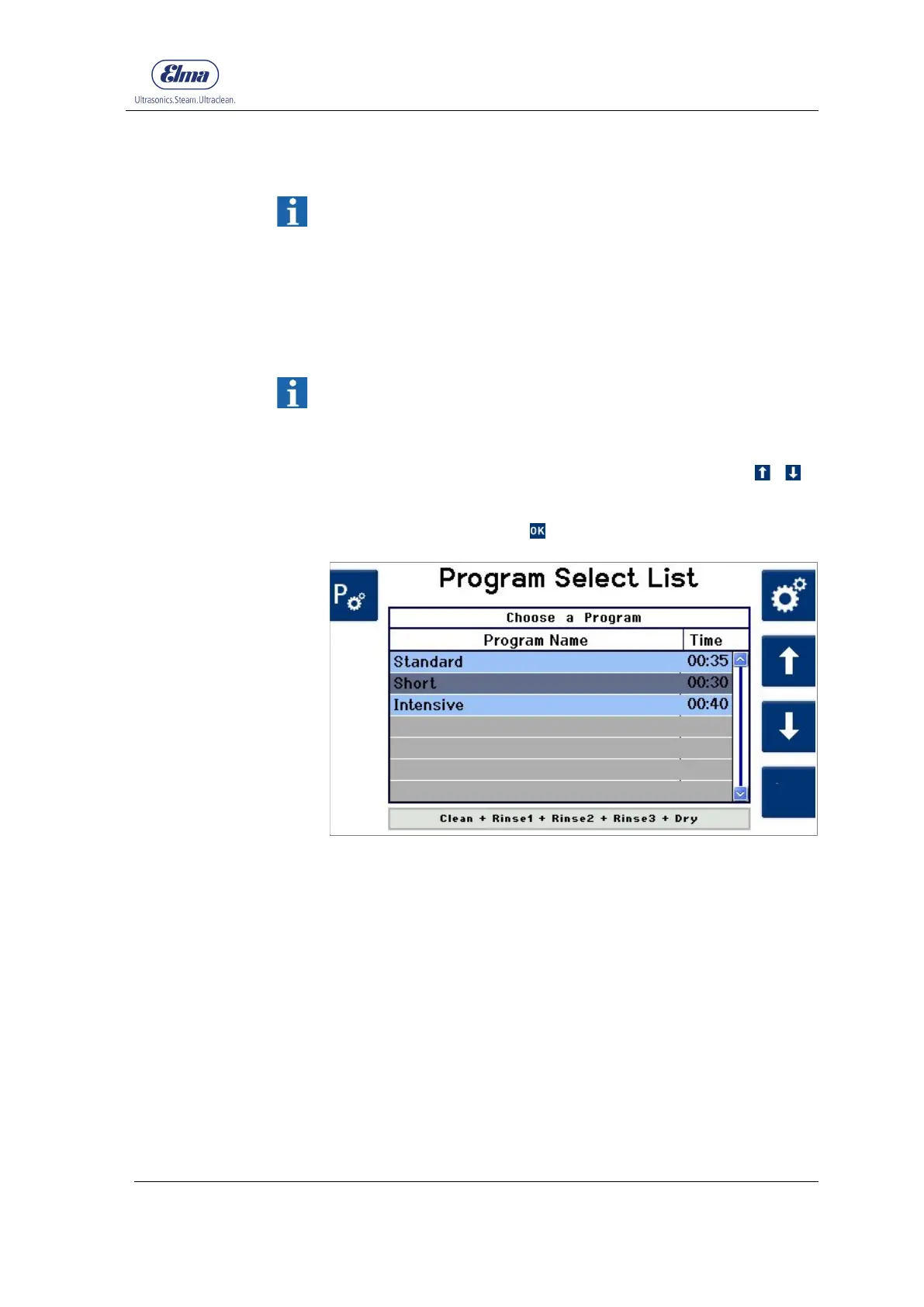
Three predefined cleaning programs are stored at the factory
and are displayed in the program selection (Fig.6.3.1).
These are differentiated by the duration of individual cleaning
and rinsing times and by different ultrasound modes:
Cleaning program for normal soiling of the parts to be cleaned.
Cleaning program for normal soiling of the parts to be cleaned.
Cleaning program for normal soiling of the parts to be cleaned.
Four special programs for particular applications are also stored
(description Chap. 6.3.1). These are displayed in the Visible
Cleaning Programs display setting and can be displayed in the
program selection if required (see Chap. 7.1.5).
Select the required cleaning program by navigating with / .
Confirm the selection with .
Fig. 6.3.1 Display Program Select List (home screen
The instruction to insert the basket holder and close the cover is
shown on the display (Fig. 6.3.2).
If the basket holder has not yet been inserted, now load and
insert the basket holder in the cleaning chamber
(for procedure, see Chapter 6.2).
Close the cover of the cleaning chamber.
Selecting cleaning
program
Insert basket holder,
close cover




 To Next Page